7.2 MEASURE M E N T
No device calibration is needed before chlorophyll fluorescence measurements are made. Results of fluorescence
measurement depend on device settings and the samples.
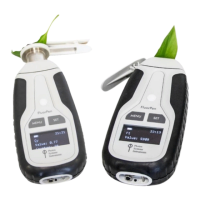
How to perform Chlorophyll Fluorescence measurement with FluorPen:
• Prepare dark adapted sample first (prior to F
0
, QY, NPQ, LC measurements) by placing the sample for at least 10-15
min in the dark. Alternatively, dark adaptation can be easily achieved by placing the detached leaf clips in closed
position on the leaf ahead of the measurements. Only the FP110/D or PAR-FP110/D is designed for use with the
detachable leaf clips. The duration of dark-adaptation period depends on plant species and growth conditions.
• For light adapted measurements no dark adaptation of the sample is required.
• Turn ON the device by holding the SET button for 1 sec.
• Place the dark-adapted leaf in the leaf-clip (FP110/S or PAR-FP110/S) or in case of detachable leaf clips place the leaf
clip on the optical probe of the FluorPen and slide open the screen of the leaf clip to expose the leaf to the optical
probe.
• Select Measure > from the menu and select required parameter for example – QY (press SET as Enter button when
making selections).
• Press SET to start the measurements.
• When OJIP, LC or NPQ are being measured the display on the device shows the progress of the measurement as
percentage.
• When Ft or QY are measured the values appear on the device display. The result of OJIP, NPQ or LC protocol are not
visible on the display of the device and need to be download to PC computer (via USB cable or BT connection, see
instructions on pg. 35, Chapter 8 and 9) using FluorPen Software (downloaded to PC earlier).
• All measured data are stored in the device memory and can be downloaded to PC computer after completion of the
experiment.
7.3 PROTOC O LS EXPLANA T I O N
7.3.1 OJIP PROTOCOL
The FluorPen device offers the protocol to capture rapid fluorescence transient – OJIP, which occurs during exposure of
photosynthetic organisms to high irradiance. The FluorPen software enables data downloading to a PC and subsequent
OJIP curve and calculated data visualization.


 To Next Page