DT2010247-07
6.8 PROGRAMMING
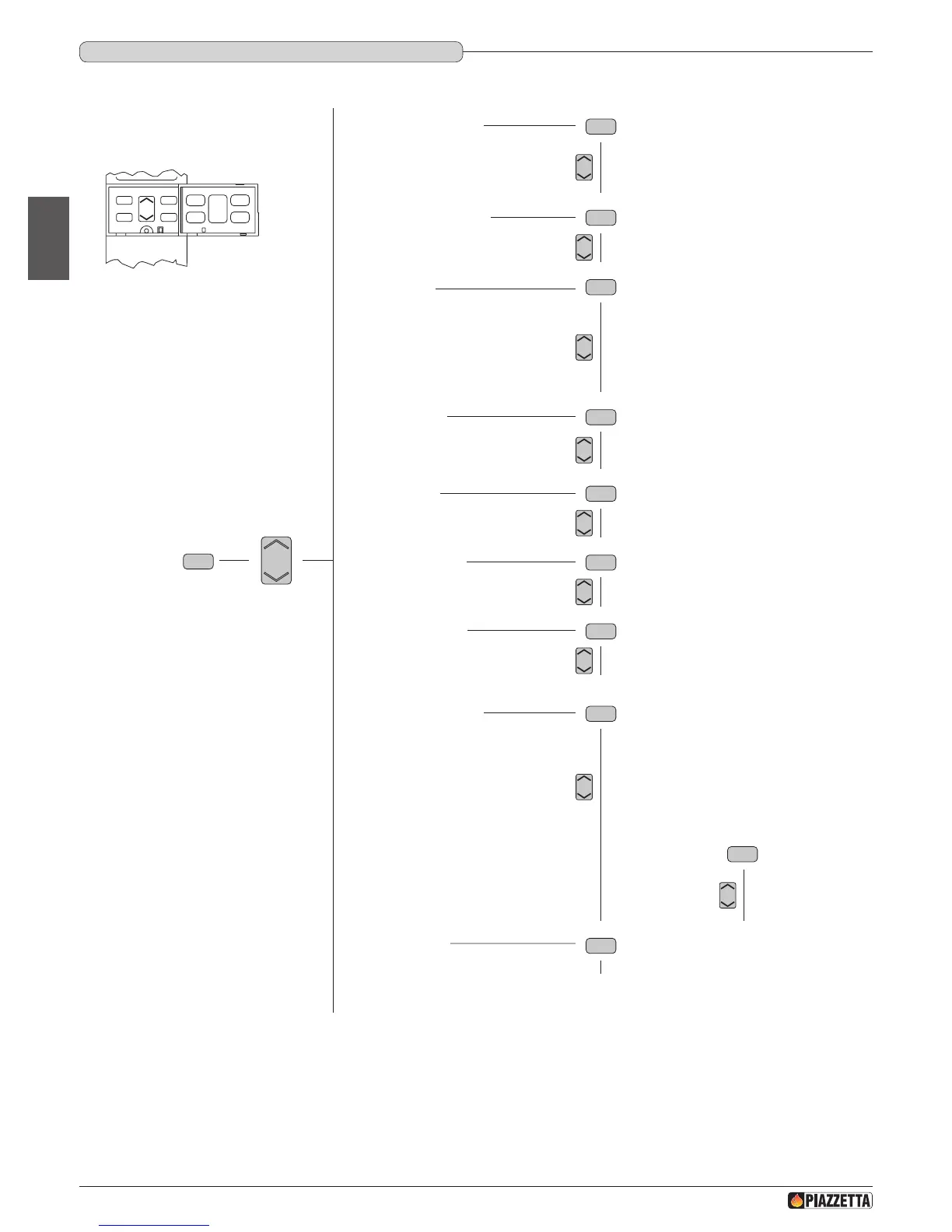
The remote control can be used to select the following functions from the main menu:
These functions are activated by opening the front ap and pressing the following keys:
- the MENU key is used to access the main menu and return to the initial display at any time during programming to alter data that has been input
incorrectly;
- the MENU SELECT key is used to scroll through the main menu and the submenus;
- the SET key is used to conrm a MENU or a selection;
- the ESC is used to return to the previous menu display at any time during programming to alter data that has been input incorrectly.
•Whenever the keyboard is not used for about 3 ½ minutes, the display goes dark to reduce consumption.
•In a blackout and therefore with no reception by the stove, the display goes dark after about 20 seconds.
SET
OPT
ESC
MENU
Remote control
MENU
• SELECT LANGUAGE
LANGUAGE ENGLISH
LANGUAGE ITALIANO
LANGUAGE DEUTSCH
LANGUAGE FRANCAIS
• SET CHRONO
• SET CLOCK
DAY MONDAY
DAY TUESDAY
DAY WEDNESDAY
DAY THURSDAY
DAY FRIDAY
DAY SATURDAY
DAY SUNDAY
PROGRAM DAY
PROGRAM WEEK
PROGRAM WEEK-END
• MENU PARAMETER
SETTINGS FACTORY > key access
DATA BANK > key access
SETTINGS LOAD > key access
SETTINGS SMOKE EXT > key access
MULTIFUOCO V1 > key access
MULTIFUOCO V2 > key access
RESET PARTHOUR > key access
RESET ALARM > key access
MEMORY COUNTERS
• ENABLE BEEP
• STATE STOVE



 To Next Page