PicoQuantGmbH MultiHarpSoftwareV.3.1.0.0
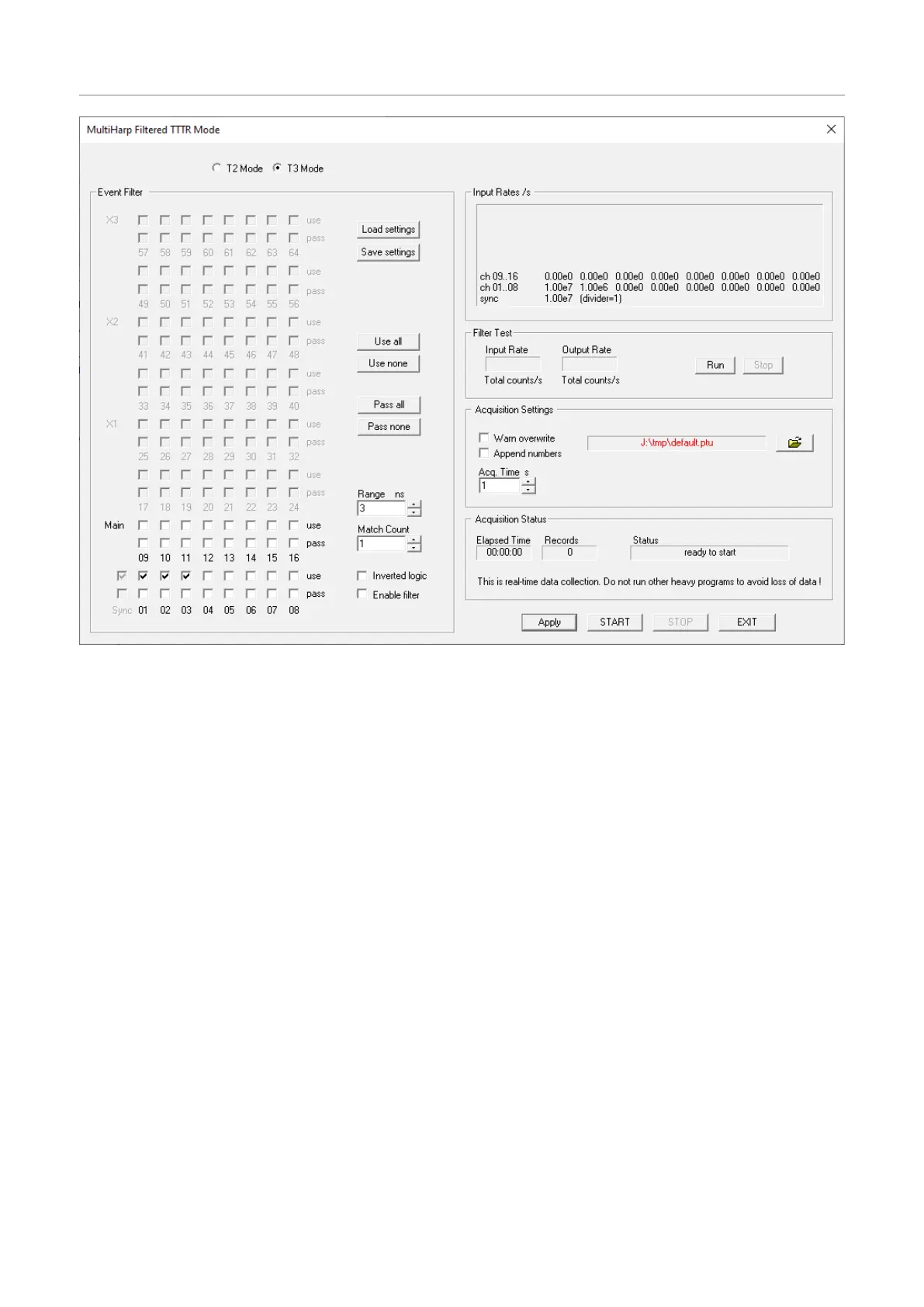
MostprominentonthetopleftthereisapairofradiobuttonsforT2versusT3mode.Itisimportanttomakethis
selectionfirst,asitwilldeterminethepermittedfiltersettingsforthesyncchannel.
Belowontheleftinthegroupbox‘EventFilter’thereisalargematrixoftickboxesfortheselectionofwhether
andhowindividualchannelsaregoingtobeusedinthefilter.Notethatthismatrixcatersforthelargestpossible
MultiHarpdevicewiththreeextensionunitsX1..X3andatotalof64channels,laidouttoroughlyresemblethe
frontpanelofthedevice.Ifyourparticulardevicehasfewerchannels,theextraneouselementswillbedisabled
andgreyedout.Foreachchannelthereisonetickbox‘use’toindicateifthechannelisgoingtoparticipatein
thedatacollectionandinthefilteringscheme.Inaddition,foreachchannelthereisanothertickbox‘pass’toin-
dicateifthechannelistobepassedthroughthefilterunconditionally,whetheritismarkedas‘use’ornot.The
eventsonachannelthatismarkedneitheras‘use’noras‘pass’willnotpassthefilter,providedthefilterisactu-
allyenabled,asmarkedbythetickbox‘Enablefilter’furtherrightonthebottom.
Alsowithinthegroupbox‘EventFilter’thereisasetofbuttonsforloadingandsavingthefiltersettings.Thisisa
conveniencefeatureforquickretrievalofstandardsettingsyoumaywishtokeep.Thefiltersettingsarealso
memorizedintheWindowsregistryaswellasineachdatafile.Yetanotherconveniencefeaturearethebuttons
‘Useall’,‘Usenone’,‘Passall’,and‘Passnone’.Themakeiteasiertofillentirerowswiththedesiredsetting.
Theothercontrols‘Range’,‘MatchCount’,and‘Invertedlogic’determinehowthefilterwillact.‘Range’deter-
minesthetimewindowthefilterisactingon.Itcanbeenteredinwholenanosecondsorasfloatingpointnum-
bers.Ifyouenterfractionssmallerthanthedevice’sresolutiontheeffectiverangewillberoundeddown.The
parameter‘MatchCount’specifieshowmanyothereventsmustfallintothechosentimewindowforthefilter
conditiontoactontheeventathand.Thetickbox‘Invertedlogic’invertsthefilteraction,asyouwillseemore
clearlyfurtherinthissection.Fornow,letitbenotinverted.Then,forinstance,if‘Matchcount’is1wewillobtain
asimple‘singlesfilter’.Thisisthemoststraightforwardandmostusefulfilterintypicalquantumopticsexperi-
ments.Itwillsuppressalleventsthatdonothaveatleastonecoincidenteventwithinthechosentimerange,be
thisinthesameoranyotherchannelmarkedas‘use’.
Beforeshowingtheactualfilteroperation,letusfirstcompletetheintroductionoftheremainingdialogelements.
Thegroupbox‘Inputrates’atthetoprightisselfexplanatoryandidenticaltowhatyoufindintheregularTTTR
modedialog.Itgetsupdatedevery500ms.Asofsoftwareversion3.1.0.0theinputrowsareorderedbottomto
top,soastomatchthephysicalMultiHarpfrontpanellayout.
Page46



 To Next Page