27
Changing Station Order
You may want to display the stations in different order.
1. Press MENU button, turn SCROLL knob to select “Station order”, and then press SCROLL
knob to confirm.
2. Turn SCROLL knob to select “Alphanumeric”, “Ensemble” or “Valid”, and then press
SCROLL knob to confirm your selecting option.
Alphanumeric Display all stations in alphanumeric order.
Ensemble List currently broadcasting active stations before inactive ones.
Valid
Remove inactive stations from the station list.
Viewing Station Information
DAB/DAB+ stations broadcast additional information. Press INFO button repeatedly while a
program is playing to view information through DLS (Dynamic Label Segment), Ensemble,
Program Frequency, Signal Quality, Signal Strength, Bitrate, Codec, Channel and Date.
Note: to view station information while the display is playing slide show in full screen, press
SCROLL knob to play slide show in small image, and then you can press INFO button
repeatedly to view information. Press SCROLL knob a second time to play slide show in full
screen again.
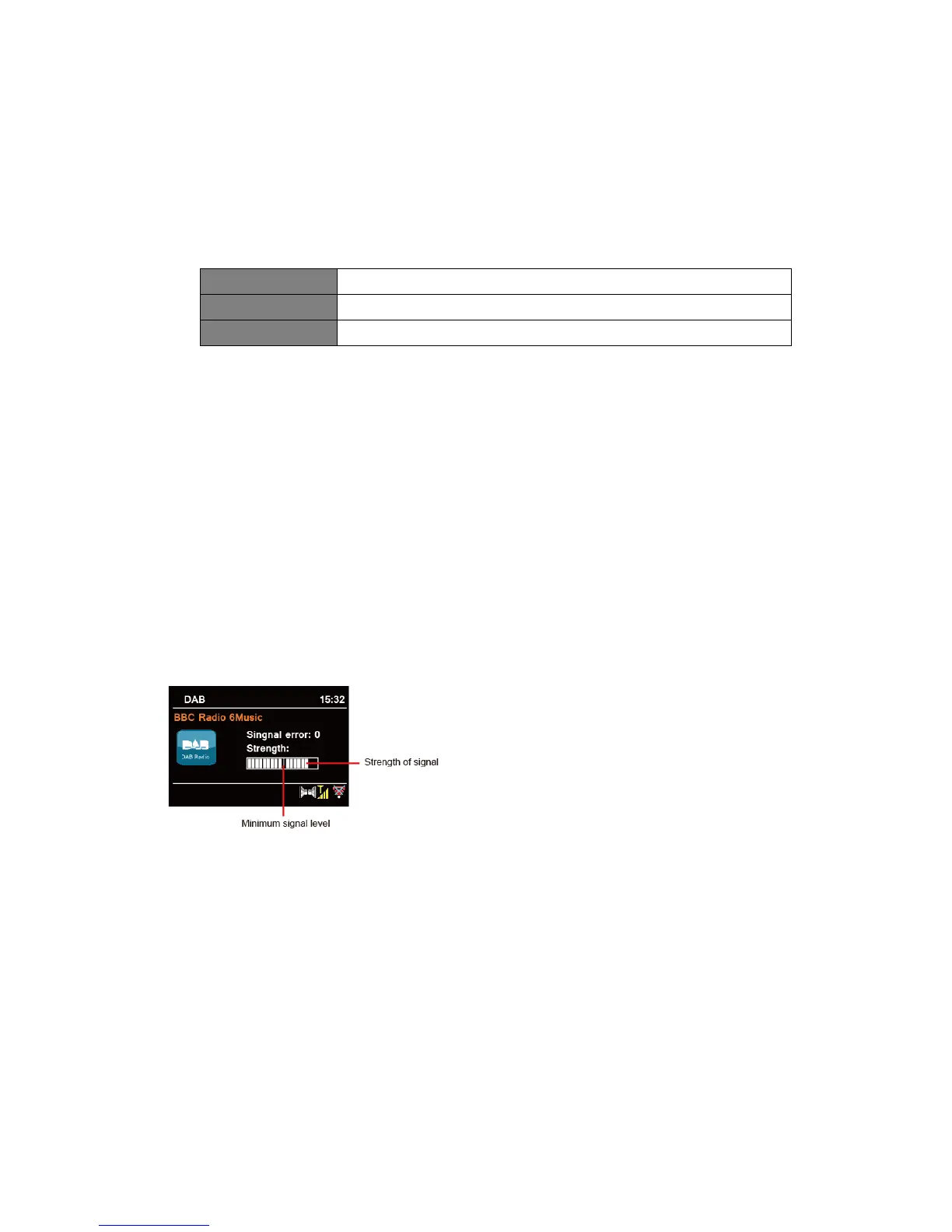
Showing Signal Strength
While you selected signal strength, a signal bar with the strength of the current station will show
on the display.
The indicator on the signal bar shows the
minimum acceptable signal level.
Note: Stations with signal strength below
the minimum signal level may not provide
a steady stream of audio.



 To Next Page