7
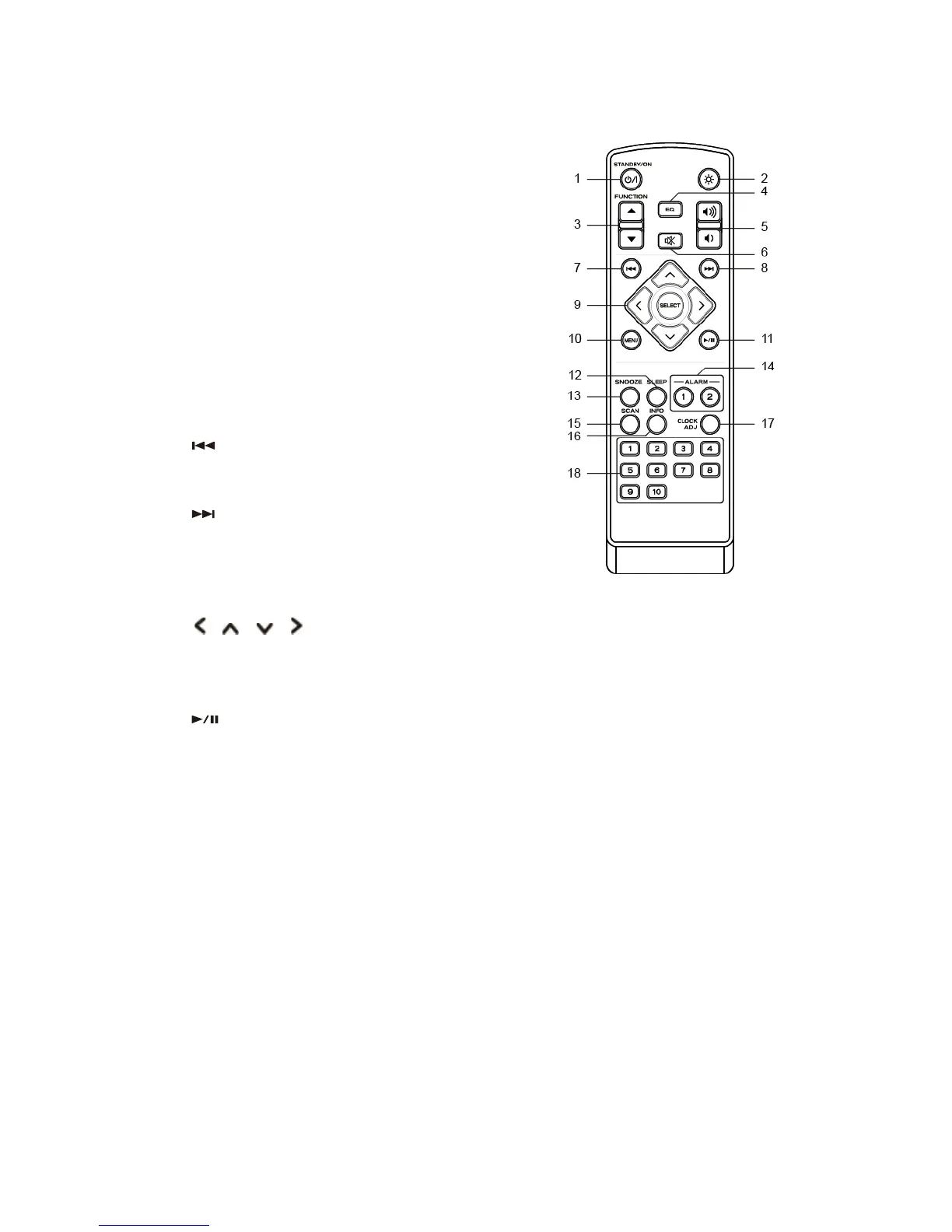
Remote Control View
1. STANDBY/ON button
Press to switch radio on or standby.
2. BACKLIGHT button
Press to set backlight.
3. MODE buttons
Press to switch among Internet, Spotify, Music
player, DAB, FM, Aux in and Bluetooth modes.
4. EQ button
Press to set EQ.
5. VOL +/- buttons
Press to adjust volume level.
6. MUTE button
Press to mute radio or resume sound.
7. button (Music player and Bluetooth mode)
Press to skip to previous track; press and hold to
fast reverse current track.
8. button (Music player and Bluetooth mode)
Press to skip to next track; press and hold to fast
forwards current track.
9. SELECT button
Press to confirm selection.
buttons
Press to browse options.
10. MENU button
Press to display or exit menu screen.
11. button (Music player and Bluetooth mode)
Press to pause or play current track.
12. SLEEP button
Press to set up sleep time.
13. SNOOZE button
Press to activate snooze function when alarm
sounds.
14. ALARM buttons
Press to set alarm 1 or alarm 2.
15. SCAN button
Press to automatically scan for available stations in
DAB and FM mode.
16. INFO button
Press to view station information.
17. CLOCK ADJ button
Press to set clock.
18. 1-10 buttons
Press and hold to save preset stations.
Press to recall a saved preset station.



 To Next Page