14
7.8 Memory Card (optional)
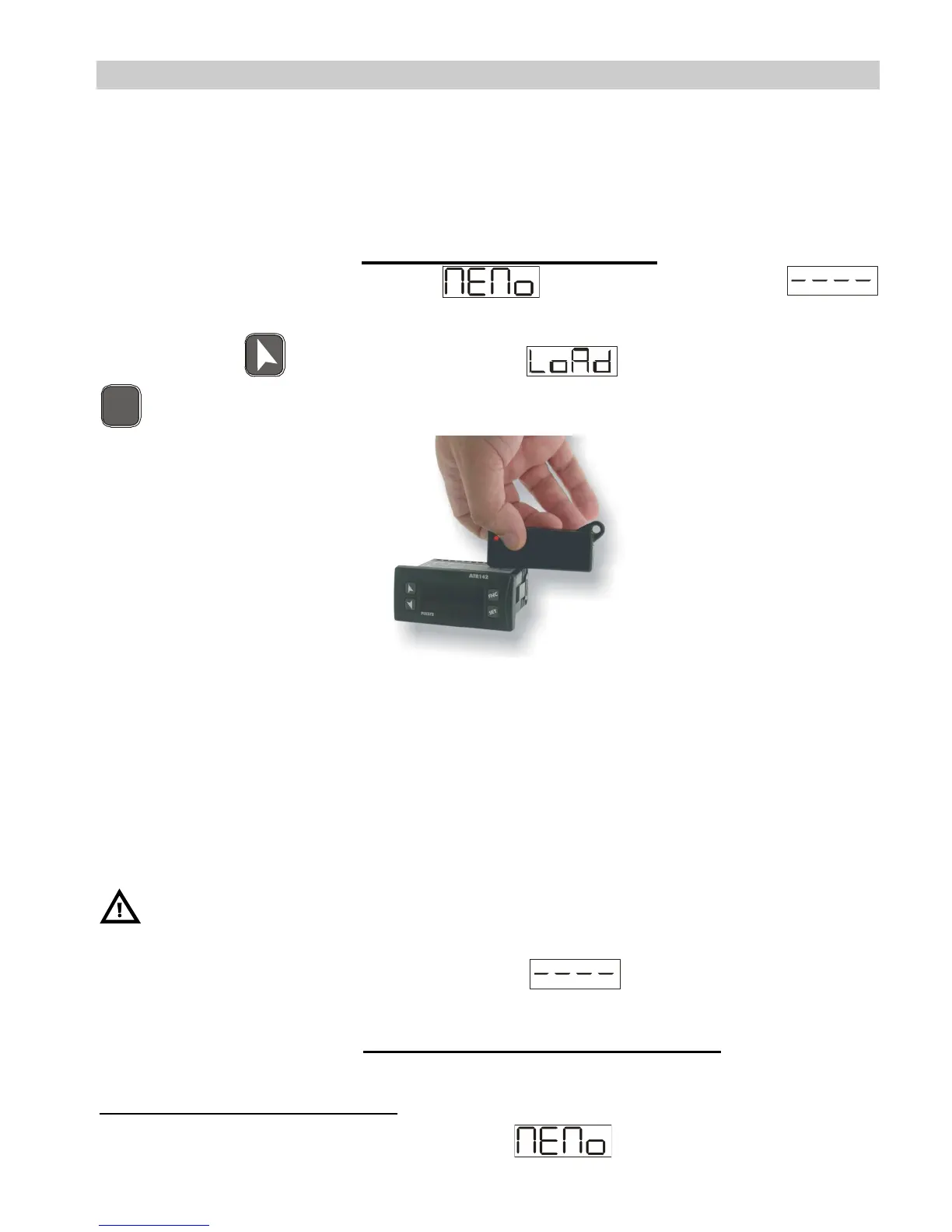
Parameters and setpoint values can be duplicated from one controller
to another using the Memory card.
There are two methods:
• With the controller connected to the power supply
Insert the memory card when the controller is off.
On activation display 1 shows and display 2 shows
(Only if the correct values are saved in the memory card). By
pressing the key display 2 shows , then confirm using the
F
N
C
key. The controller loads the new data and starts again.
• With the controller not connected to power supply.
The memory card is equipped with an internal battery with an
autonomy of about 1000 uses.
Insert the memory card and press the programming buttons.
When writing the parameters, the led turns red and on completing the
procedure it changes to green. It is possible to repeat the procedure
without any particular attention.
Updating Memory Card
To update the memory card values, follow the procedure described in
the first method, setting display 2 to so as not to load the
parameters on controller
2
.
Enter configuration and change at least one parameter
.
Exit configuration. Changes are saved automatically.
2
If on activation the controller does not display it means no data have been
saved on the memory card, but it is possible to update values.



 To Next Page