EasyManua.ls Logo

Pixsys ATR142 - 10 Configuration; Modify Configuration Parameter

Pixsys ATR142
52 pages
Print Icon
To Next Page IconTo Next Page
To Previous Page IconTo Previous Page
Loading...
26
10
Configuration
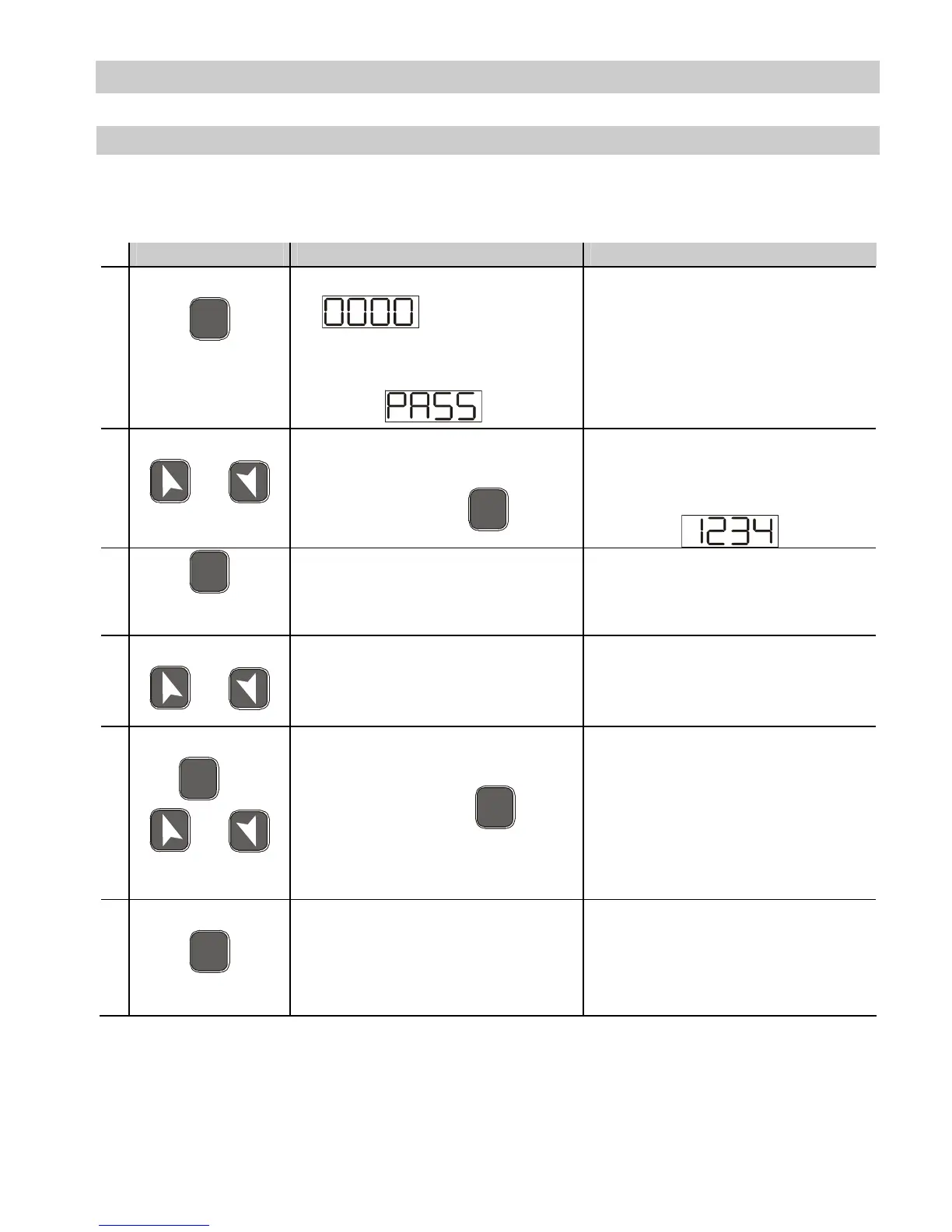
10.1 Modify Configuration Parameter
For configuration parameters see paragraph 11.
Press Effect Operation
1
F
N
C
for 3
seconds.
Display 1 shows
with the 1st
digit flashing, while
display 2 shows
.
2
or
Change the flashing digit
and move to the next
one using the
S
E
T
key.
Enter password
3
S
E
T
to confirm
Display 1 shows the first
parameter and display 2
shows the value.
4
or
Slide up/down through
parameters
5
S
E
T
+
or
Increase or decrease the
value displayed by
pressing firstly
S
E
T
and
then an arrow key.
Enter the new data which
will be saved on
releasing the keys.
To change another
parameter return to point
4.
6
F
N
C
End of configuration
parameter change.
The controller exits from
programming.

Related product manuals