16
To use the LATCH ON function configure as you wish the parameter
.
3
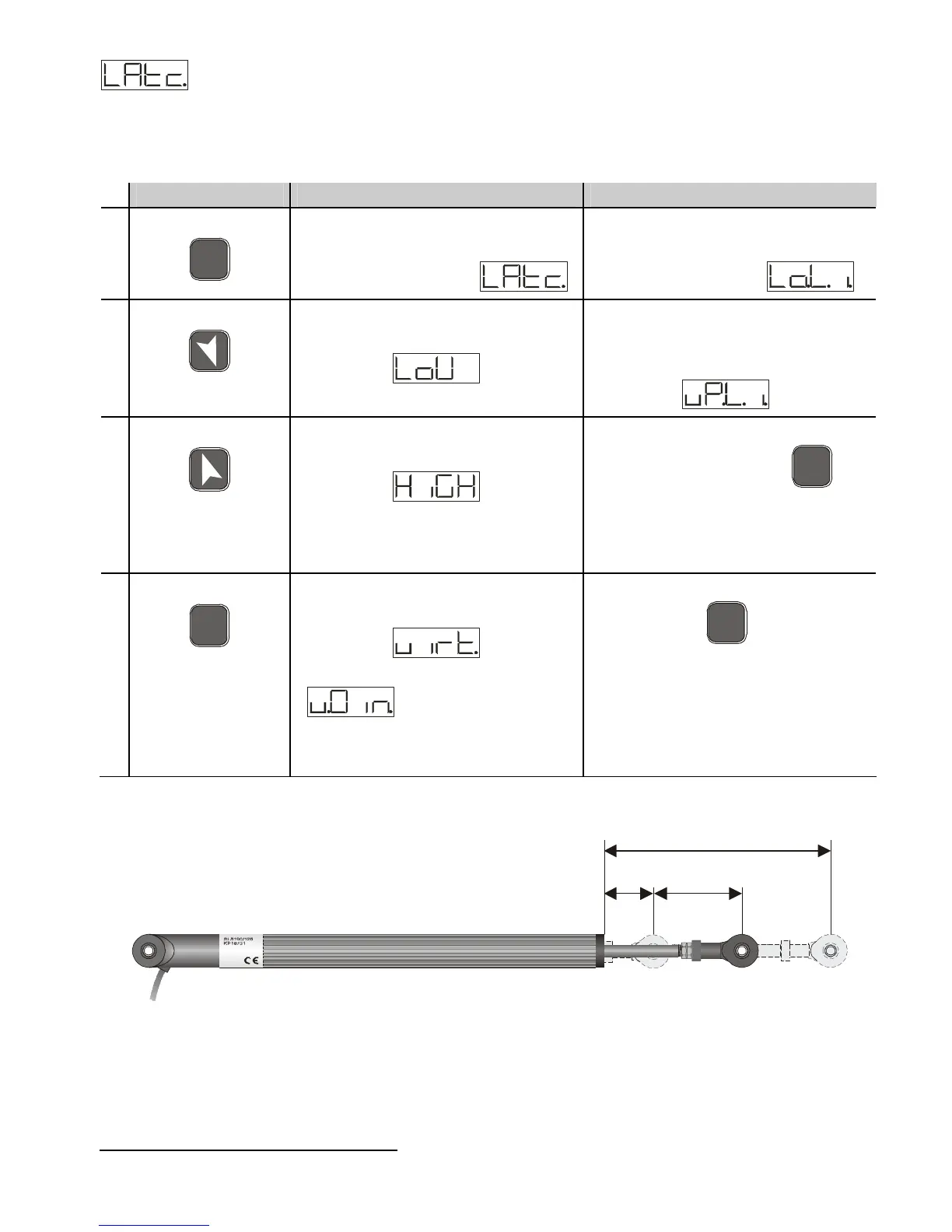
For the calibration procedure refer to the following table:
Press Effect Operation
1
F
N
C
Exit parameters
configuration. Display 2
shows the writing .
Position the sensor on the
minimum functioning value
(associated with )
2
Set the value to minimum.
The display shows
Position the sensor on the
maximum functioning
position (associated with
)
3
Set the value to maximum.
The display shows
To exit the standard
procedure press
F
N
C
.
For “virtual zero” settings
position the sensor on the
zero point.
4
S
E
T
Set the virtual zero value.
The display shows
N.B.: for selection of
the procedure in
point 4 should be followed
on each re-activation.
To exit the procedure press
F
N
C
.
ZERO
3
The tuning procedure starts by exiting the configuration after changing the parameter.



 To Next Page