User Manual of WDAP-C3000AX, WDAP-3000AX, WDAP-W3000AX
- 78 -
4.3.3 IP Filtering
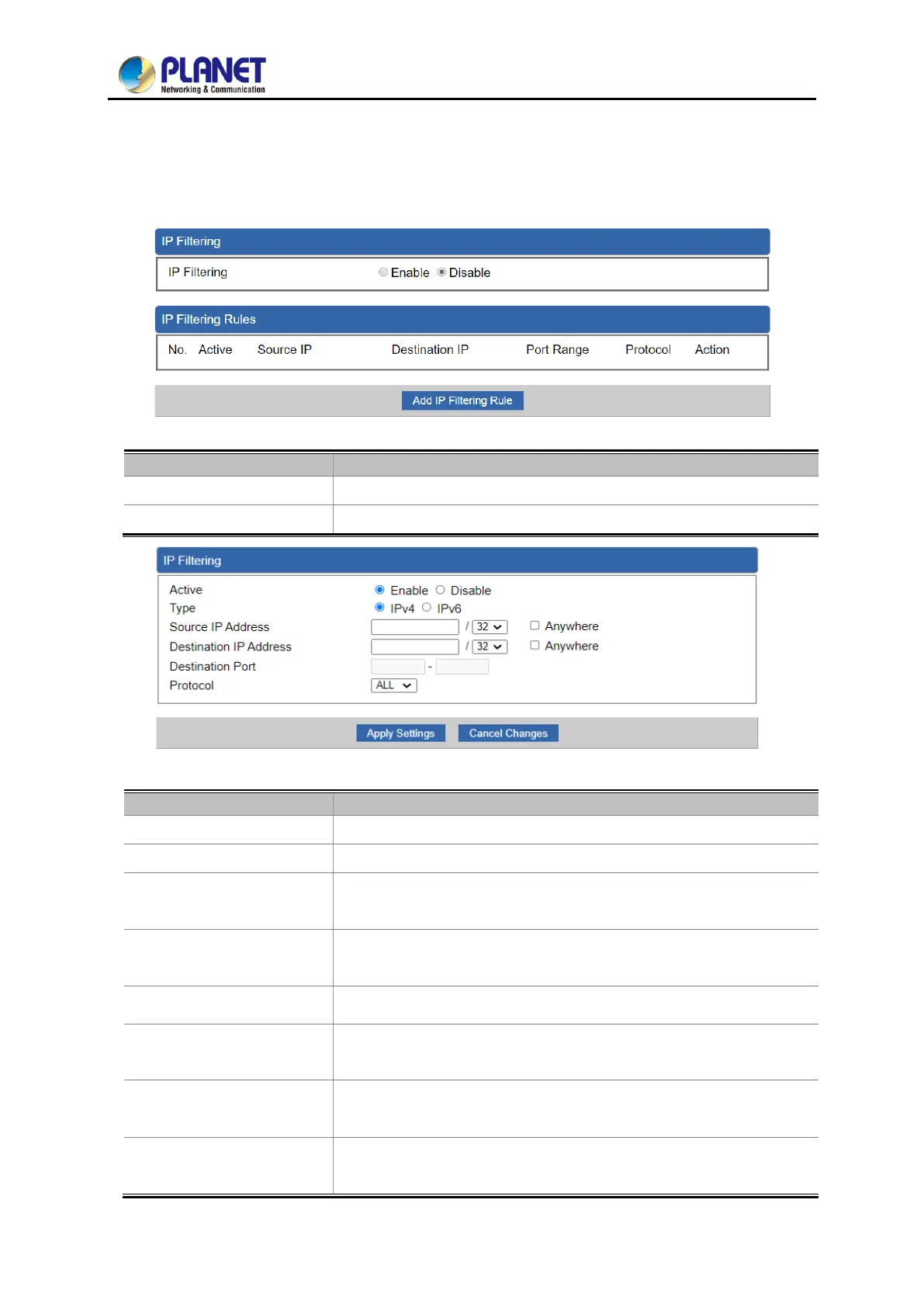
IP Filtering is used to deny LAN users from accessing the public IP address on internet as shown in
Figure 4-44. To begin blocking access to an IP address, enable IP Filtering and enter the IP address of
the web site you wish to block.
Figure 4-44: IP Filtering
Set the function as enable or disable.
Go to the Add Filtering Rule page to add a new rule.
Figure 4-45: IP Filter Rule Setting
Set the rule as enable or disable.
Set the type as IPv4 or IPv6
Input the IP address of LAN user (such as PC or laptop) which you
want to control.
Anywhere (of source IP
Address)
Check the box if you want to control all LAN users.
Input the IP address of web site which you want to block.
Anywhere (of destination
IP Address)
Check the box if you want to control all web sites, meaning the LAN
user can’t visit any web site.
Input the port of destination IP Address which you want to block.
Leave it as blank if you want to block all ports of the web site.
Select the protocol type (TCP, UDP or all).
If you are unsure, please leave it to the default all protocol.



 To Next Page
 Loading...











