User’s Manual of WNRT-617
-34-
If you get “Address not found” error when you access a Website, it is likely that your
DNS servers are set up improperly. You should contact your ISP to get the correct DNS
server address.
Static IP
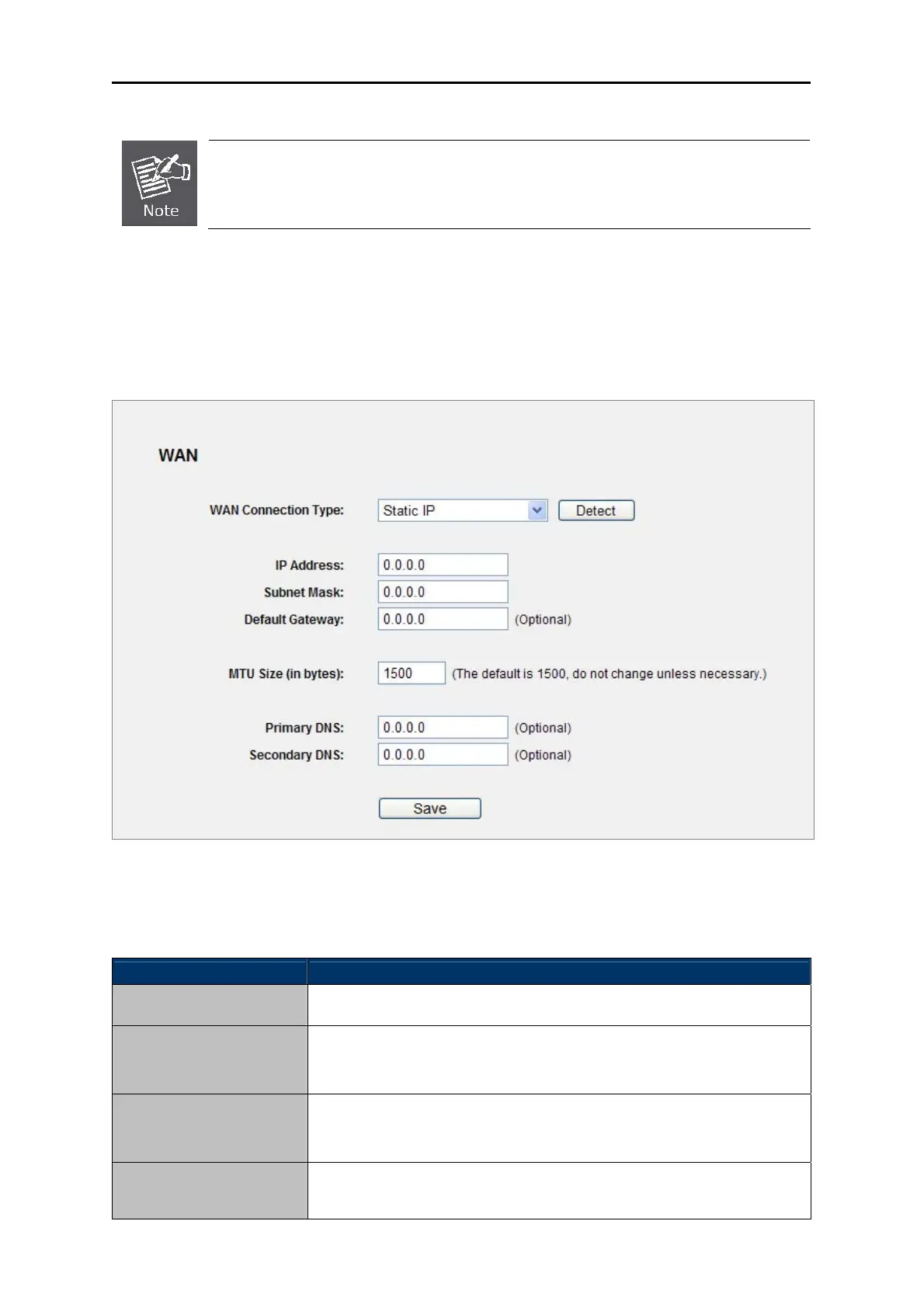
2. If your ISP provides a static or fixed IP Address, Subnet Mask, Gateway and DNS setting,
select Static IP. The Static IP settings page will appear, shown in Figure 5-10.
Figure 5-10 WAN - Static IP
The page includes the following fields:
Object Description
IP Address
Enter the IP address in dotted-decimal notation provided by your ISP.
Subnet Mask
Enter the subnet Mask in dotted-decimal notation provided by your ISP,
usually is 255.255.255.0
Default Gateway
(Optional) Enter the gateway IP address in dotted-decimal notation
provided by your ISP.
MTU Size
The normal MTU (Maximum Transmission Unit) value for most Ethernet
networks is 1500 Bytes. It is not recommended that you change the



 To Next Page