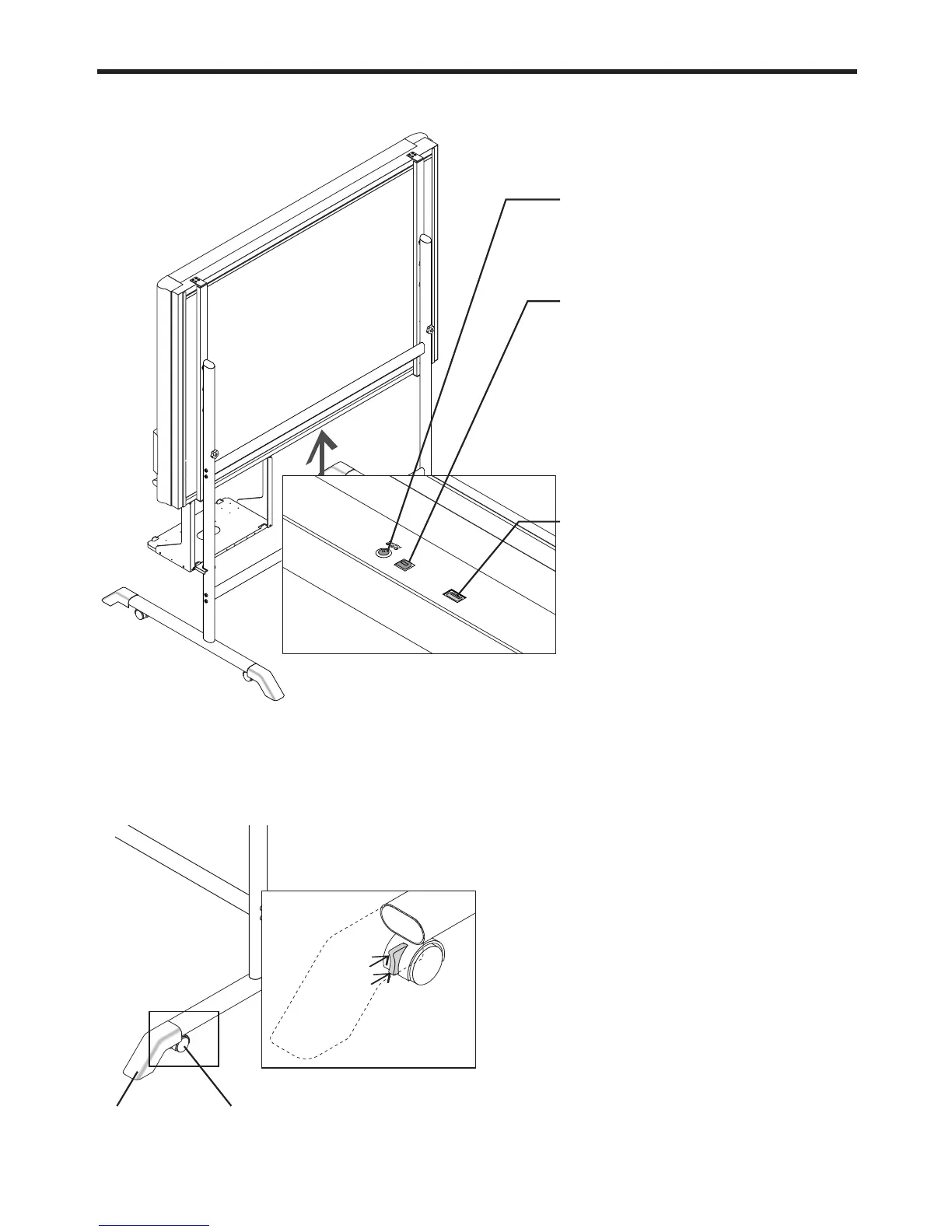
DC input connector
Connect this with the DC plug end of the AC
power adapter. (See Page E-13.) (Only connect
the supplied AC power adapter; nothing else.)
Personal computer (PC) dedicated USB port
(Type B)
Connect this with the USB port (type A) of the
PC. (See Page E-25.)
Use this when reading is started from the PC
side and image data is transferred directly to
the PC, or when setting the operating environ-
ment of the copyboard from the PC side. First,
install the drivers and software contained on
the supplied CD-ROM. (See Page E-24 of the
Supplied Software Setup Guide.)
Printer connector
Connect this with the USB connector of the
printer (See Page E-33).
(The printer connector is dedicated for use with
a printer; use it only with a printer.)
The connector is located on the bottom
surface of the main unit. The diagram view
is seen from the bottom.
Locking and unlocking the casters of the stand*
Lock the casters with the stopper after setup. To move the unit, remove the stabilizers and release the caster stopper.
Press the bottom of the stopper to lock it. Press the top to release it.
Unlock
Lock
* May be sold separately.
Stabilizer Caster



 To Next Page