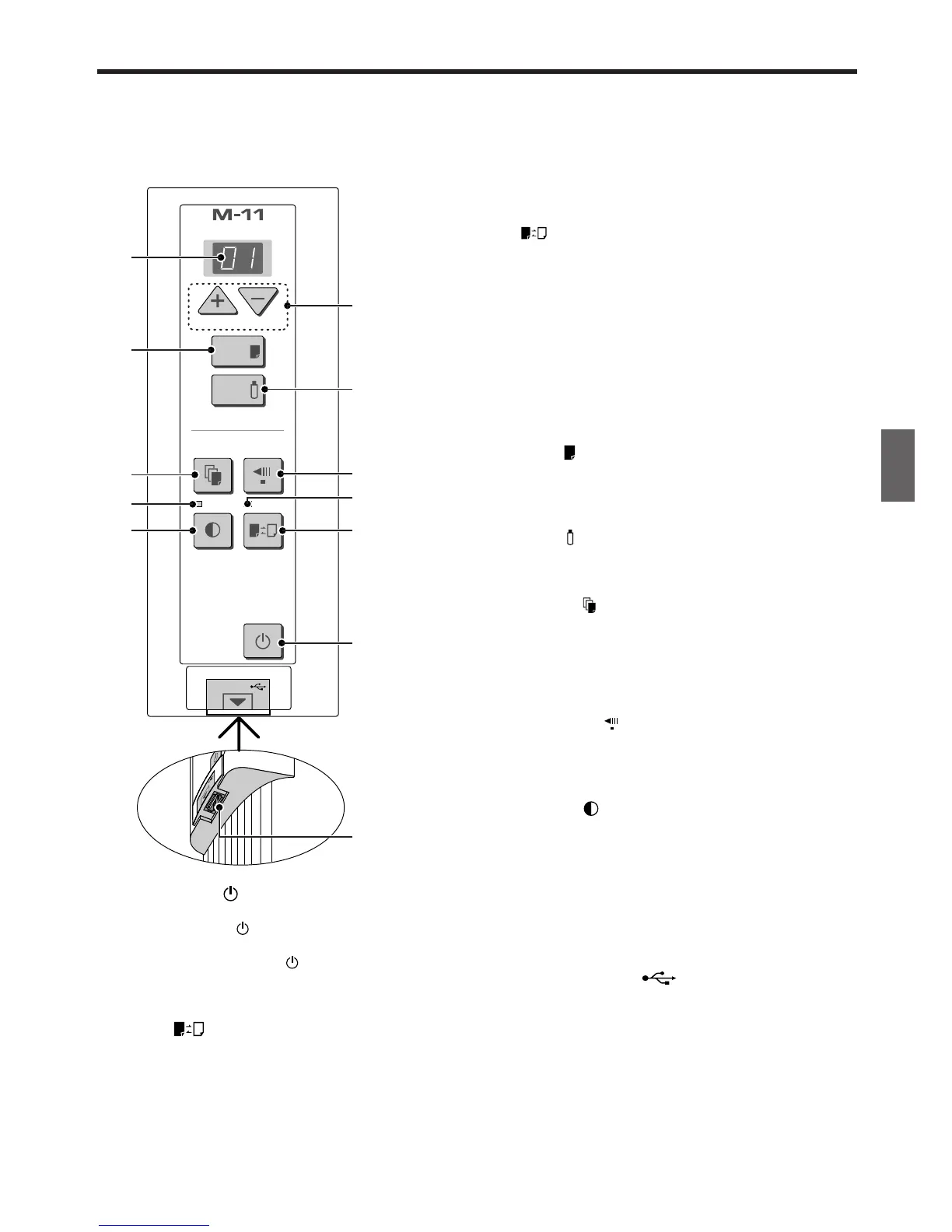
E-11
3 Color mode lamp
Lights in green when “color” is selected with the Color
button.
4 + / − buttons (Number of copies)
Pressing the + button or the − button sets the number of
copies to be printed (to a maximum of 20 sheets). The
number of copies appears in the display window.
5 Display window
This 7-segment LED displays the number of copies to
be printed, the USB memory storage operating condi-
tion, and error information. Please see Page 30 for
details about error information.
6 Print button
Moves a one-screen portion of sheet and reads it, then
prints the number of copies displayed in the display
window.
7 Save button (USB memory storage)
Moves a one-screen portion of sheet and reads it, then
stores the data on a USB memory.
8 Reprint button
Prints the previously printed sheet surface one more
time. (The sheet does not move.)
The number of copies can be changed, but the den-
sity and the color/monochrome selection cannot be
changed.
9 Feed/Stop button
Scrolls the sheet one screen portion left, then stops
automatically. A press of this button while scrolling will
stop the scrolling.
10 Density button
Selects the copying density, either “standard” or “dark”.
The Density mode lamp lights when “dark” is selected.
This function will be effective at time of printing, USB
memory storage, and personal computer storage.
11 Density mode lamp
Lights in green when “dark” is selected with the Density
button.
12 Memory button (USB port Type A)
Saves in commercially-available USB memory images
that have been read by the copyboard.
1 ON/Standby button
Switches the power of the copyboard on and off.
The ON/Standby button does not synchronize with
the main power control of the Copyboard.
Pressing the ON/Standby button in combination with
another button permits setting of the current time and
the print compression. See pages 14 and 19 for details.
2 Color button
Selects whether to print (or store in memory) in “color”
or “black & white”.
The COLOR lamp lights when “color” is selected.
*When a black & white printer is connected, the printout
will be in black & white even when “Color” is selected.



 To Next Page