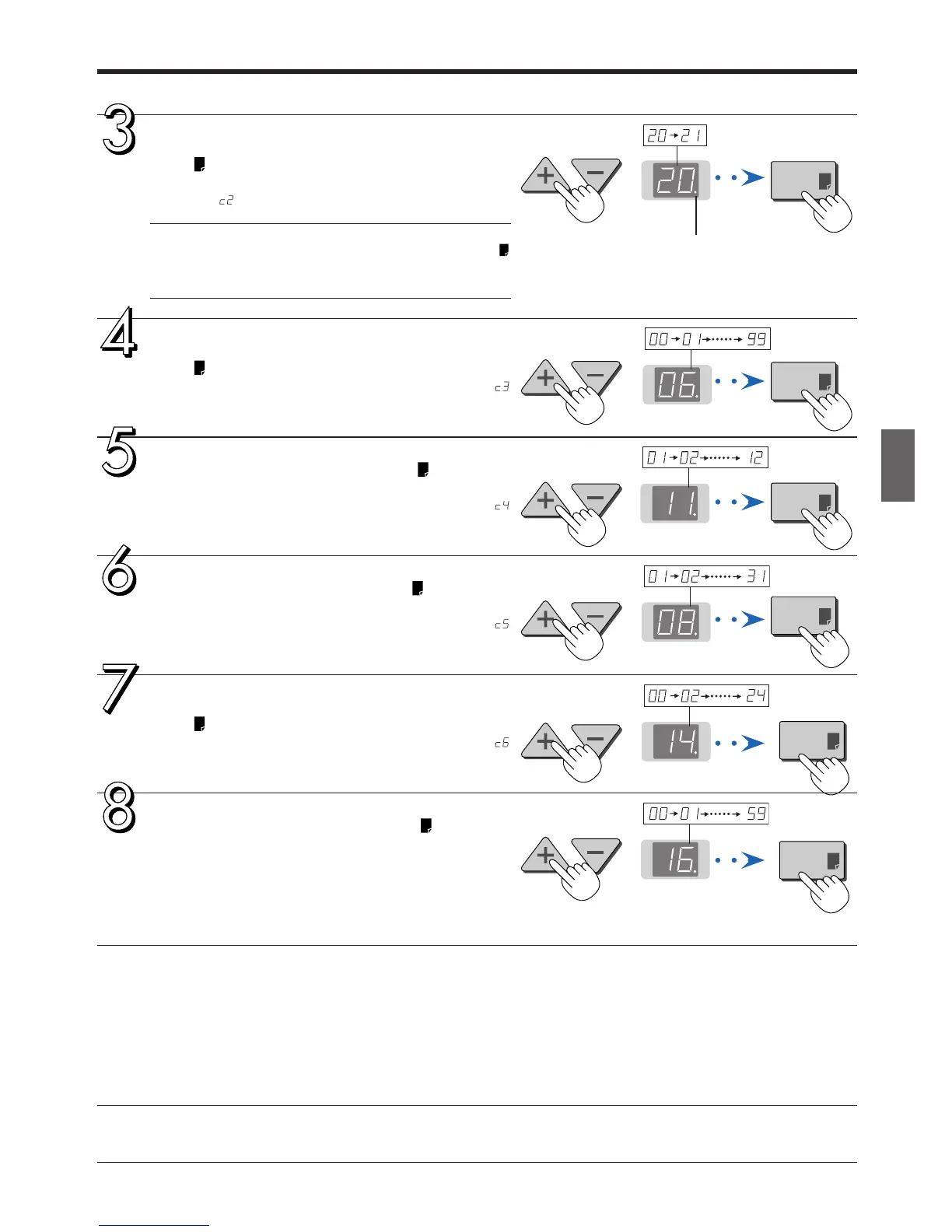
Press the + button or the − button, select 20
(the first 2 digits of the year), and press the
Print button to finalize.
There will be a change to the “last 2 digits of the year” set-
ting mode ( display).
Note
• The factory default setting is 20. Pressing the Print
button in this condition will result in a change to the “last
2 digits of the year” setting mode.
Press the + button or the − button, select 06
(the last 2 digits of the year), and press the
Print button to finalize.
There will be a change to the “month” setting mode (
display).
Press the + button or the − button, select 11
(the month), and press the Print button to
finalize.
There will be a change to the “day” setting mode (
display).
Press the + button or the − button, select 08
(the day), and press the Print button to
finalize.
There will be a change to the “hour” setting mode (
display).
Press the + button or the − button, select 14
(the hour of the 24-hour display), and press the
Print button to finalize.
There will be a change to the “minute” setting mode (
display).
Press the + button or the − button, select 16
(the minutes), and press the Print button to
finalize.
The display will change to being lit steadily, and there will
be a return to the display indicating the number of sheets
to copy.
This completes the time setting.
The dot will flash while making settings.
Setting the Time



 To Next Page