SOFTWARE
27
CAMERA
Photo and Video Modes
BROWSER
Using Application menu you can perform the following operations:
•Stop/Update;
•New tab;
•New incognito tab
•Share page;
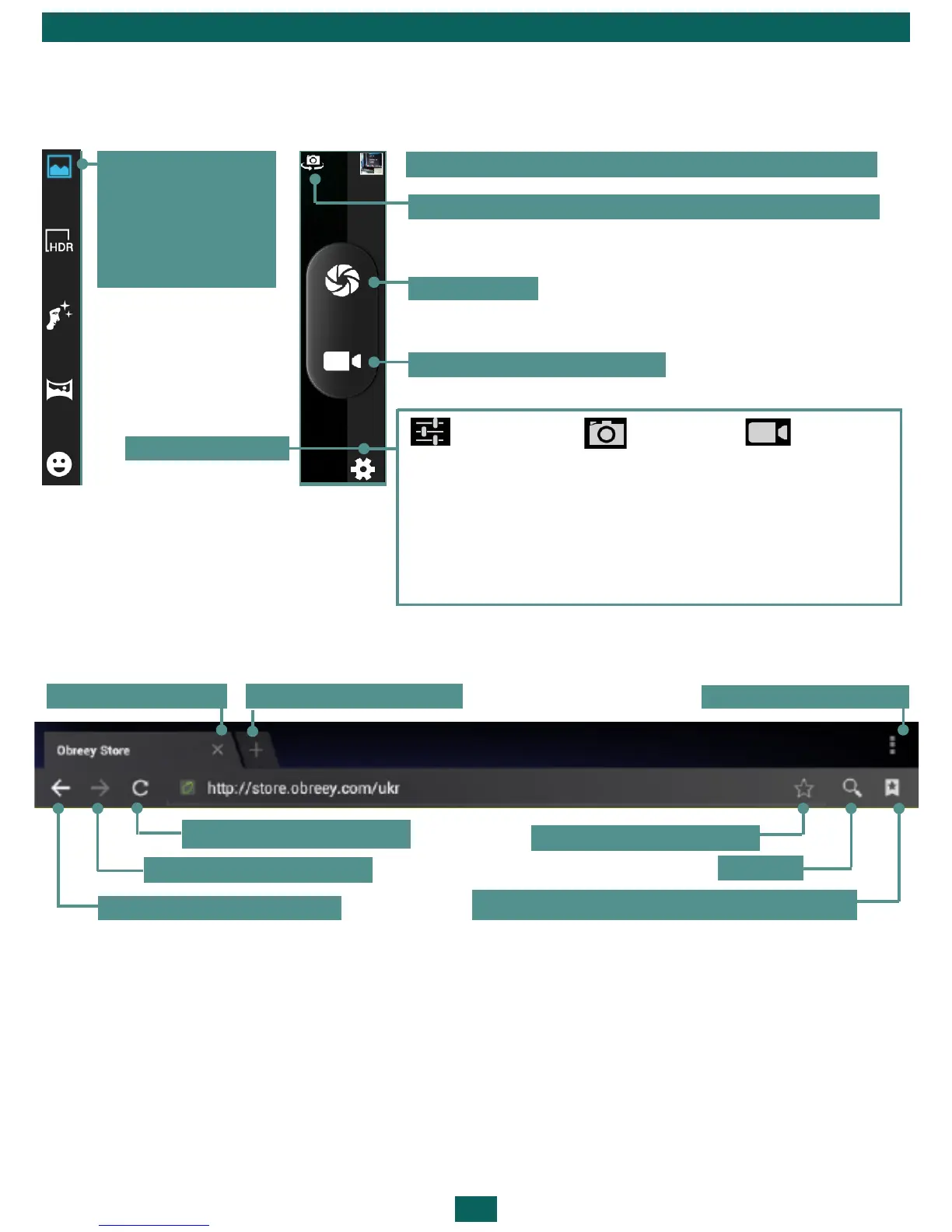
New tab
Add to Bookmarks
Application menu
Search
View bookmarks, history, saved pages
Update page
Next page
Previous page
Close tab
Last made photo or video. Touch to open Gallery
Take a photo
Camera settings
Start/stop video recording
A panel of re-
cord and photo
modes. Press to
choose one of
them.
GPS location info
Exposure
Color effect
Scene mode
White balance
Image Properties
Face Detection
Self timer
Continuous shot
Picture size
ISO
EIS
Microphone
Audio mode
Time lapse interval
Video quality
Toggle between front and rear cameras



 To Next Page