91
high fitness level. If you choose Default, you can't change the limits. If you choose Free, all limits can be
changed.)
Training views
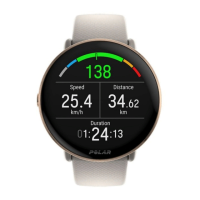
Choose what information you see on your training views during your sessions. You can have a total of eight different
training views for each sport profile. Each training view can have a maximum of four different data fields.
Click the pencil icon on an existing view to edit it, or click Add new view.
Gestures and feedback
l Vibration feedback (You can choose to have vibration on or off)
GPSand altitude
l Automatic pause: To use Automatic pause during training, you need to have GPS set to High Accuracy or a
Polar stride sensor in use. Your sessions pause automatically when you stop, and continue automatically when
you start.
l Choose the GPS recording rate (Can be set off or to High accuracy, meaning that the GPS recording is on)
When you're done with the sport profile settings, click Save. Remember to sync the settings to your watch.
PLANNING YOUR TRAINING
You can plan your training and create personal training targets for yourself in the Polar Flow web service or in the Polar
Flow app.
CREATE A TRAINING PLAN WITH THE SEASON PLANNER
The Season Planner in the Flow web service is a great tool for creating a tailored annual training plan. No matter what
your training goal is, Polar Flow helps you create a comprehensive plan to reach it. You can find the Season Planner
tool from the Programs tab in the Polar Flow web service.



 To Next Page