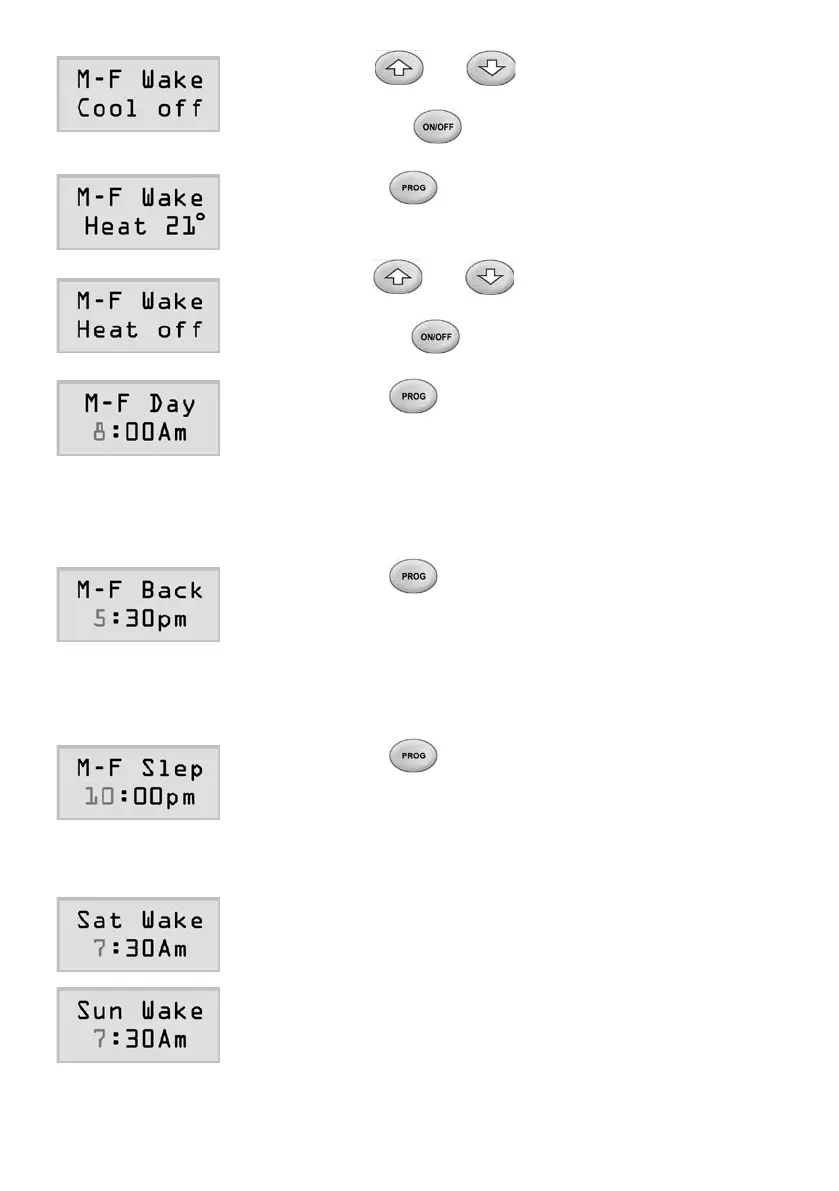
7) Useorbuttontochangethe
setpointincoolingmodetothedesiredvalue
orpressbuttontoturnoffthecooling
control at the start time.
8) Pressbuttonagain,theLCDwillshow
thetemperaturesetpointforheatingmodeof
the event.
9) Useorbuttontochangethe
setpointinheatingmodetothedesiredvalue
orpressbuttontoturnofftheheating
control at the start time.
10) Pressbuttonagain,theLCDwillshow
thestarttimeoftheDayeventoftheprogram1
forMondaytoFriday.
11) Follow steps 2) to 10) to set the start time and
cooling/heatingsetpointoftheDayeventor
disable the event.
12) Pressbuttonagain,theLCDwillshow
thestarttimeoftheBackeventoftheprogram
1forMondaytoFriday.
13) Follow steps 2) to 10) to set the start time and
cooling/heatingsetpointofBackeventor
disable the event.
14) Pressbuttonagain,theLCDwillshow
thestarttimeoftheSleepeventoftheprogram
1forMondaytoFriday.
15) Follow steps 2) to 10) to set the start time and
cooling/heatingsetpointofSleepeventor
disable the event.
16) Followsteps2)to15)toadjusttheprogram1
ofSaturday.
17) Followsteps2)to15)toadjusttheprogram1
ofSunday.
Page 21



 To Next Page