ZONEMASTER ZONETOUCH V2 ZONE CONTROL SYSTEM - Installation Manual
10
7) Recommended Commissioning Procedure
7.1 Setting Parameters
System parameters canbesetupfrom‘InstallerSettings’screen.
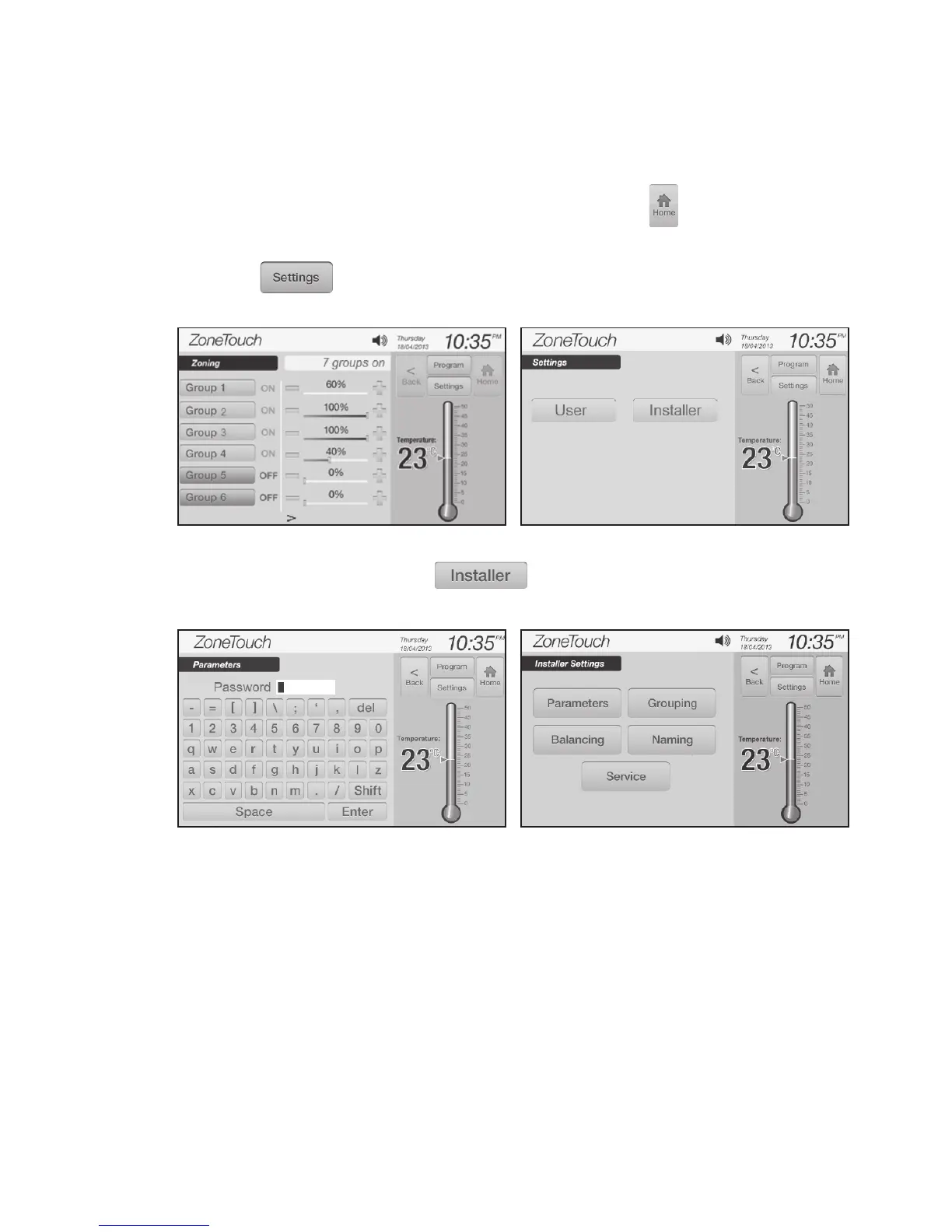
Followthestepsbelowtosetrequiredvalues.Touchingbuttoninthe
settingprocesswillgobackto the home screen from any setting pages.
a) Touchonthehomescreen(Figure3)toenter‘Settings’screen
( F i g u r e 4).
b) On‘Settings’screen,touchbuttontoshowthekeyboardfor
e n t e r i n g thepasswordofinstallersettings(Figure5).
c) Enter thepasswordofinstallersettings(Figure6),thedefaultpasswordis
‘Polyaire’.
NOTE: The password is case sensitive. Maximum length for the password is
eight characters but it can also be blank.
Figure 3.
Figure 5.
Figure 4.
Figure 6.



 To Next Page