EasyManua.ls Logo

Polycom VVX 500 series - Voicemail; How Do I Set up My Voicemail

Polycom VVX 500 series
27 pages
Print Icon
To Next Page IconTo Next Page
To Previous Page IconTo Previous Page
Loading...
End User Training Participant Guide
Polycom VVX 500 and 600 Series Phones
13
Voicemail
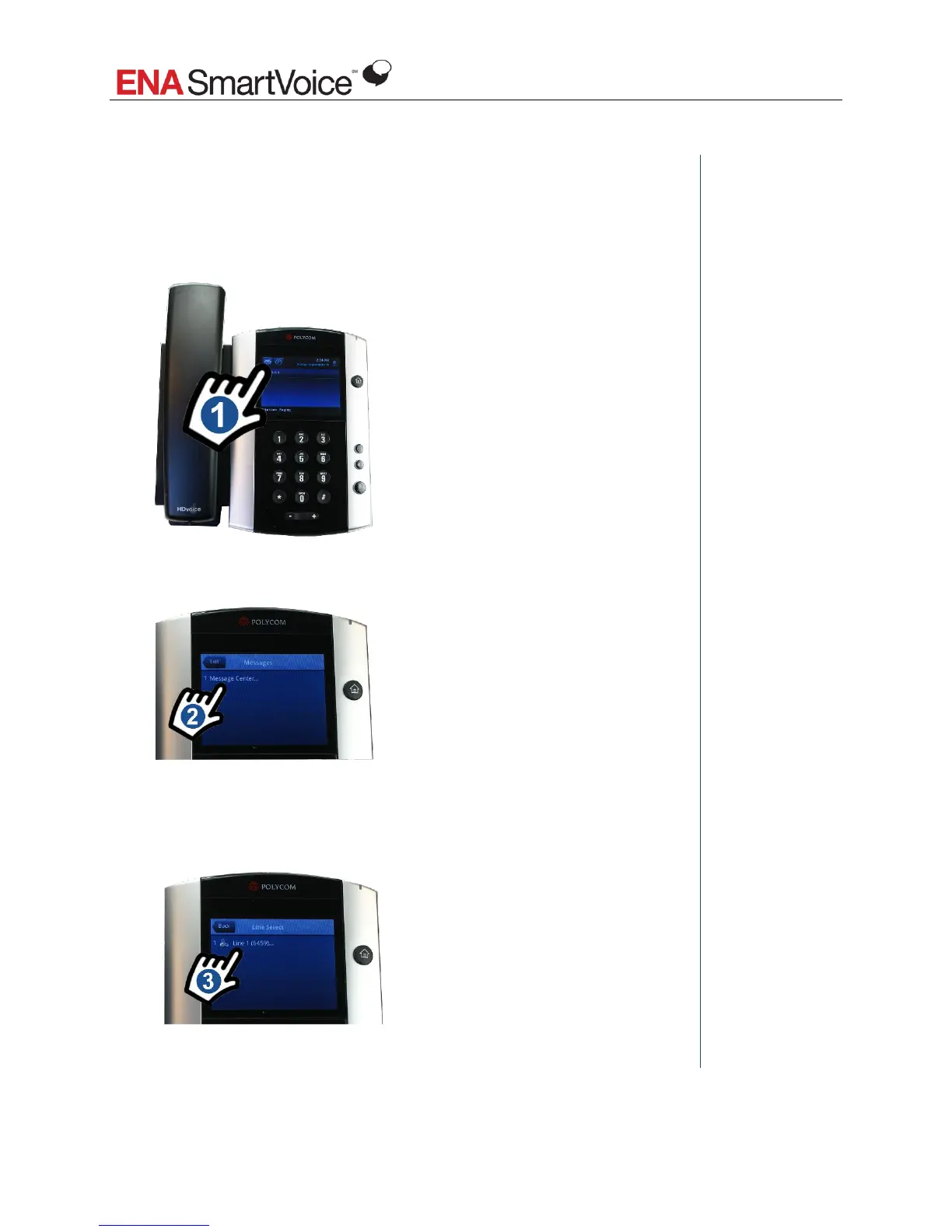
How do I set up my voicemail?
The first time you access the Message Center on your phone, the system will
walk you through your voicemail setup. To access the Message Center:
1. Tap the envelope icon at the top left of your screen.
Notes
2. Tap Message Center.
3. Tap the line for which you would like to set up voicemail. If have more
than one line with voicemail on your phone (for example, your extension
and the main number), you see them here.
4. Follow the prompts.

Table of Contents

Other manuals for Polycom VVX 500 series

Related product manuals