Polycom VVX 500 and VVX 600 Business Media Phones and Polycom VVX Camera User’s Guide
Polycom, Inc. 51
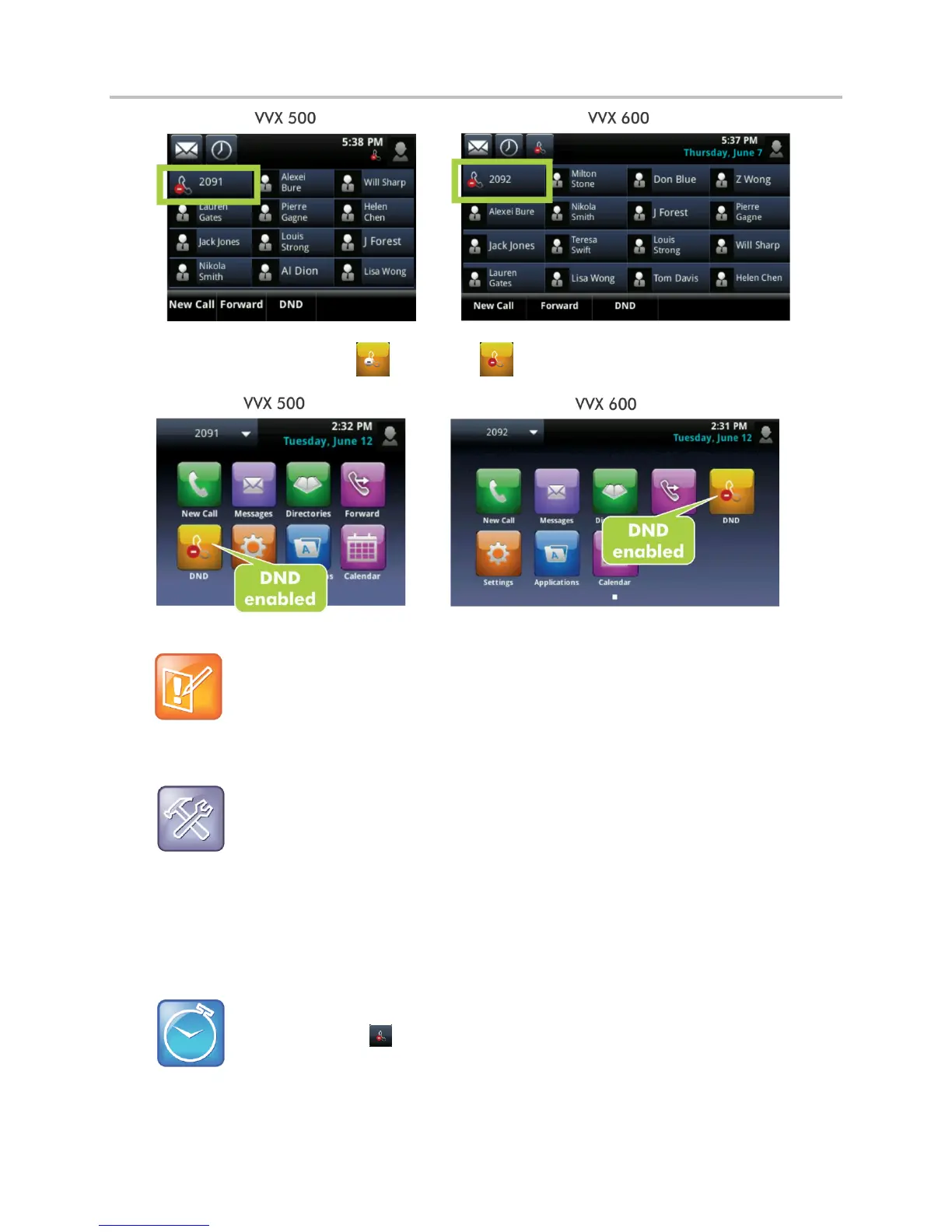
The DND icon in Home view, , changes to , as displayed next.
Note: Do Not Disturb and Shared Lines
Enabling Do Not Disturb on shared lines disables ringing only. You still see a visual notification of
the call and have the option to answer the call.
Troubleshooting: Why Doesn’t the DND Icon Display?
When you have set your presence status to Do Not Disturb, as well as enabled DND for your phone,
the message My Status: Do Not Disturb scrolls under the time display, and the DND icon does not
display in the status bar.
To toggle Do Not Disturb on and off:
From Home view, tap DND. Or, if your phone is idle, tap DND from Lines view.
Timesaver: Quick Way to Disable DND on the VVX 600
To turn DND off, tap , located in the status bar.





 To Next Page