G2000/G3000/G6000 Industrial User’s Manual Chapter 3: Operations and Settings
28
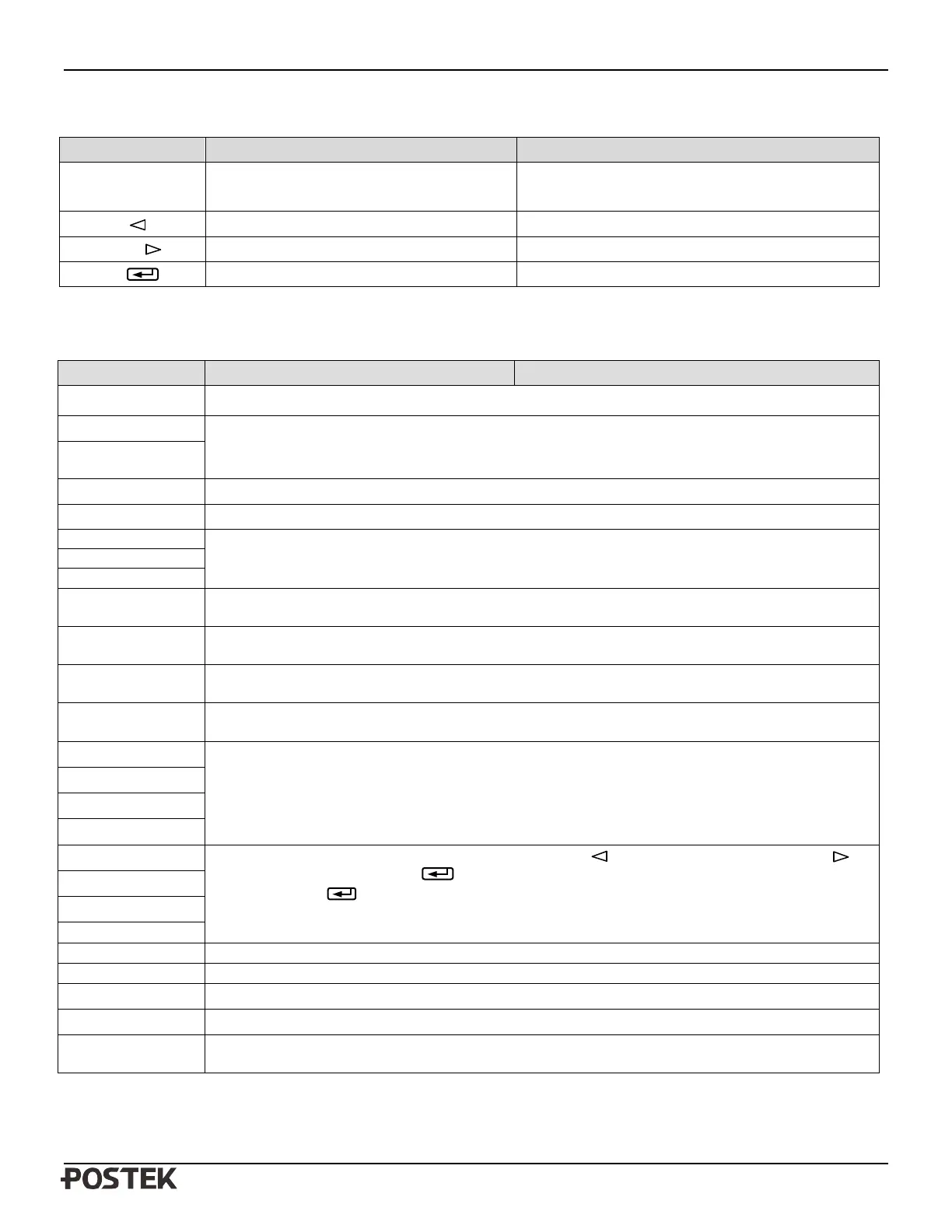
Button Functions
Button Function Description
Combination:
PAUSE + FEED
Entering the Main Menu
Press and release PAUSE, then press and hold FEED
for 4 seconds
PAUSE ( ) Item/Parameter Selection Descending Item/Parameter selection
CANCEL ( ) Item/Parameter Selection Increasing Item/Parameter selection
FEED ( ) Confirmation Confirm selection
Items to be set and operating guide
Main Menu Sub Menu Description
Exit
Exit the setup menu
Darkness
When set at ‘0’, the printer will accept the default setting or command setting, if not, the printer will
not accept the default setting or command setting.
Speed
Print Method Thermal Transfer and Direct Thermal
Options: Enable, Disable
Default: Disable
Sensor Type
Options: Reflective, Transmissive
Default: Reflective
Baud Rate
Options: 9600, 19200, 38400, 57600
Default: 38400
Parity
Options: None, Odd, Even
Default: None
Data Bit
Options: 7 Bit, 8 Bit
Default: 8 Bit
Tear Offset
The increment for G2000 is 0.125mm
The increment for G3000 is 0.085mm
The increment for G6000 is 0.0423mm
Positioning Offset
Cutting Offset
Peeling Offset
IP Address
The range of XXX is 0-255, press PAUSE/Self Test ( ) to decrease, CANCEL/Reset ( ) to
increase, FEED/Calibrate ( )
to move to next XXX. Upon completion, pressing
FEED/Calibrate ( ) will proceed to the “Save/Abort” screen.
Gateway
View Fonts View fonts that have been downloaded to the printer.
Del Fonts Delete downloaded fonts, one by one, or delete all at one time.
Command Type
Options: PPLE, PPLZ
Default: PPLE


 To Next Page