35
5 Buses and Routing
5.3 Subgroups
StudioLive™ Series III
Owner’s Manual
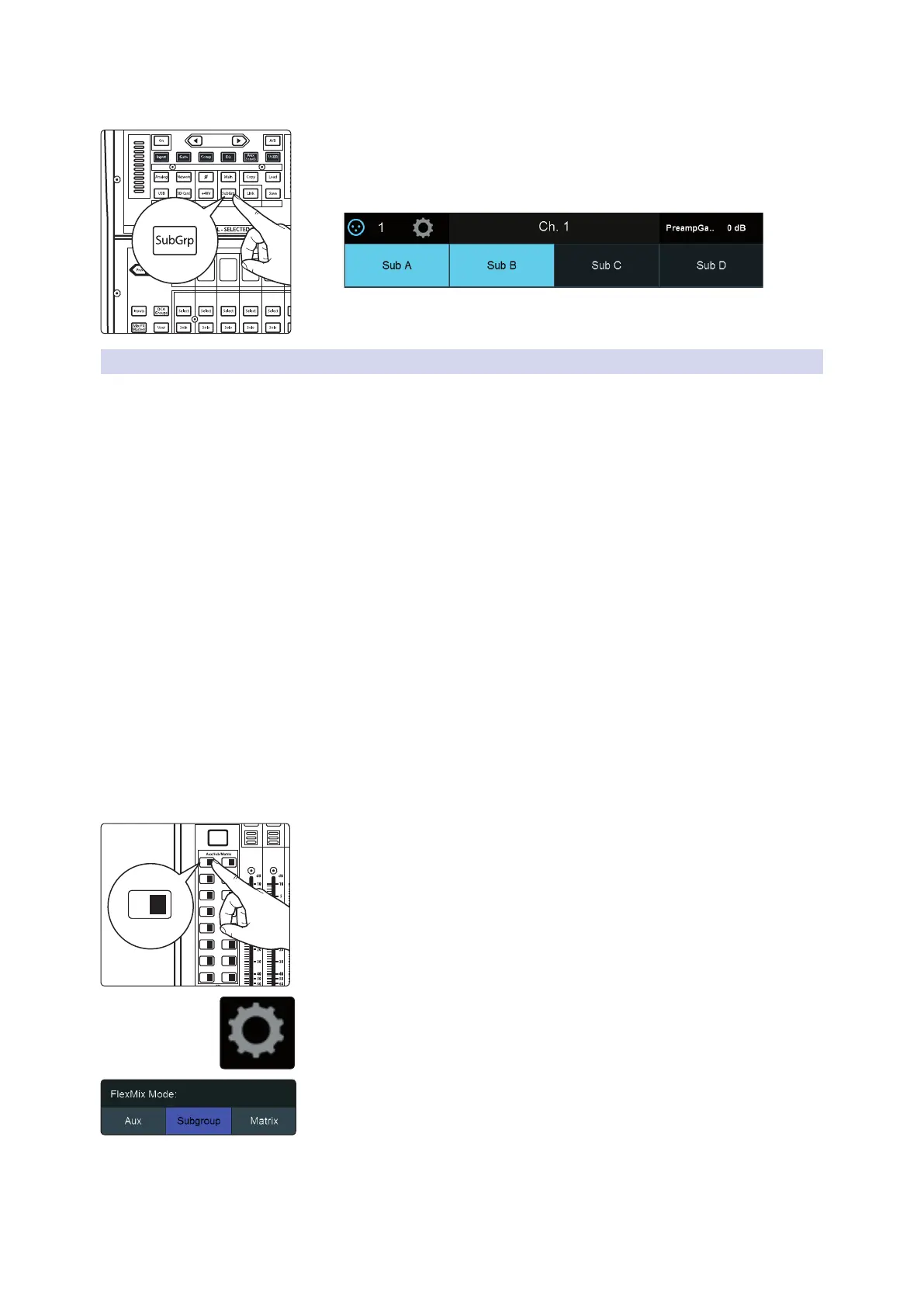
To add a channel to a fixed Subgroup:
1. Select the channel and press the Subgroup button in the Assign section of
the Fat Channel. This will bring up the Assigns menu on the Touch Display.
The four fixed Subgroups are at the top of the screen.
2. Touch the Subgroup to which you’d like to assign the channel.
For more information on Subgroup routing assignments, please refer to
Section 5.3.1.
5.3.3 Creating Instrument Subgroups
Grouping individual instruments that create a section in your mix has obvious
advantages: The entire group can be muted or soloed, brought up or down in a mix,
and faded in or out for a more polished intro or outro. Because subgroups can also be
processed by the Fat Channel, some common groups are drums, backing vocals, horn
sections, and string sections. Drums are a classic application for subgroup mixing.
While we’ll use a drum group in this particular example, these principles can be
applied when grouping any type of instrument section.
In this example, our drums will be connected to the StudioLive as follows:
• Channel 1: Kick
• Channel 2: Snare Top
• Channel 3: Snare Bottom
• Channel 4: Floor Tom
• Channel 5: Tom 1
• Channel 6: Tom 2
• Channel 7: Overhead Left
• Channel 8: Overhead Right
• Channel 9: Hi-Hat
We will create a stereo subgroup by first making both FlexMix 1 and 2 Subgroups and
linking them to create a stereo bus.
1. Press the Mix 1 Select button. This will also automatically enable the Select
button for the Mix 1 output master.
2. In the Touch Display, press the Settings gear.
3. Press the Subgroup button under FlexMix Mode.
Page
(Insert)
Input Mic/Line Assign
Channel
Stereo
Preset
Comp
Processor EQ / Dyn
OL
-2
-12
-24
-36
-48
-65
Level
User
Main
Mix
Solo
Mute
Solo
Mute
11 27
13 29
15 31
12 28
14 30
16 32
A E
C G
B F
D H
1 17 18
19 20
21 22
3
5
2
4
6
23 247 8
25 269 10
1 17











 To Next Page