58
6 The Fat Channel
6.8 Fat Channel Screens
StudioLive™ Series III
Owner’s Manual
6.8.2 Channel Settings Screen
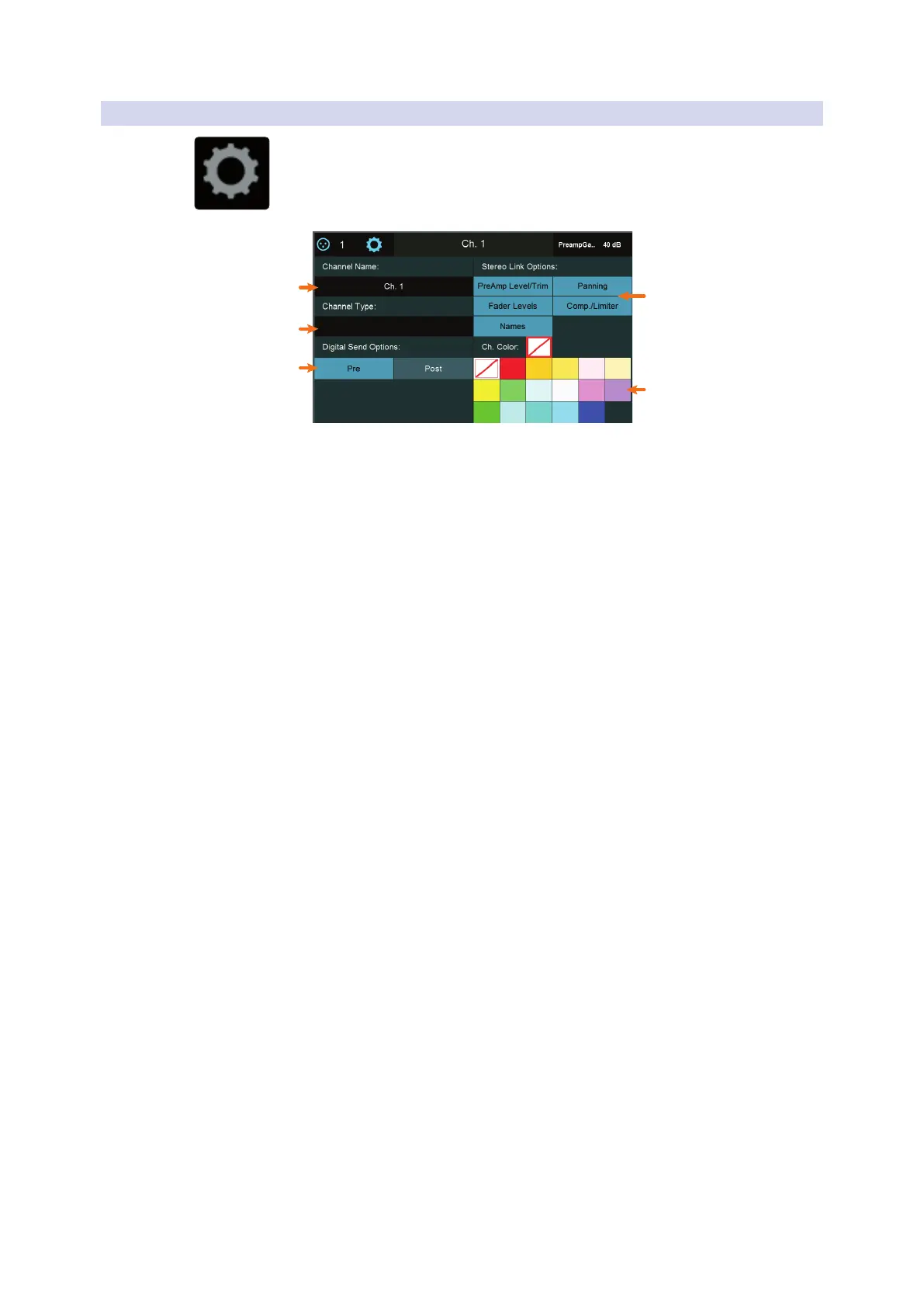
When the overview screen for a channel or bus is open, can access the Channel
Settings screen by tapping on the Settings button (Call-out #3).
5
4
1
2
3
1. Channel Name. Touch the name field to enter a new name with the onscreen
keyboard.
2. Channel Type. Touch the type field to choose between the standard identifying
channel types (such as Guitars or Drums).
3. Digital Send Options. Touch Pre (signal is sent before Fat Channel processing)
or Post (signal is sent after Fat Channel Processing) to choose the signal routing
when sending this channel or bus to a USB or network-connected audio device.
4. Channel Color. Sets the color of a channel’s Select button. If no color is selected,
the Select button will be blue.
5. Stereo Link Options. These options let you specify the linking behavior when
you link pairs of channels or buses, with the following options:
- Preamp Level/Trim. Enable this option to link preamp level and trim
settings when channels are linked. Disable to allow these settings to be
individually set for each linked channel.
- Panning. Enable this option for “stereo” panning mode, which lets you
use the pan controls on linked channels or buses to control overall stereo
“width.” Moving a pan control on a linked channel moves the corresponding
pan control the same amount in the opposite direction. Disable this option
to allow independent panning of linked channels or buses.
- Fader Levels. Enable this option to link volume faders for linked pairs of
channels or buses. Disable it to allow independent manipulation of fader
levels for linked channels.
- Comp./Limiter. Enable this option to link the compression and limiting
detection behavior for linked channels or buses. With this option on, signals
occurring either linked channel cause identical gain reduction behavior in
both. Disable this option to let the compressor/limiter act independently on
each linked channel.
- Names. Enable this option to keep linked channel/bus names identical.
With this option on, a change to either name in a linked pair is reflected in
the other linked channel.
Power User Tip: If one of the digital inputs (Network, USB, or SD) is selected as the channel
source, you will be presented with the option to designate the Digital Send source as
either Analog or Digital. This is a great way to use plugin processing as an insert. This is
also necessary if you’d like to record an AVB or USB input to the SD recorder. For more
information, please see the Using Your StudioLive as an Audio Interface with Universal
Control Reference Guide.











 To Next Page