63
6 The Fat Channel
6.8 Fat Channel Screens
StudioLive™ Series III
Owner’s Manual
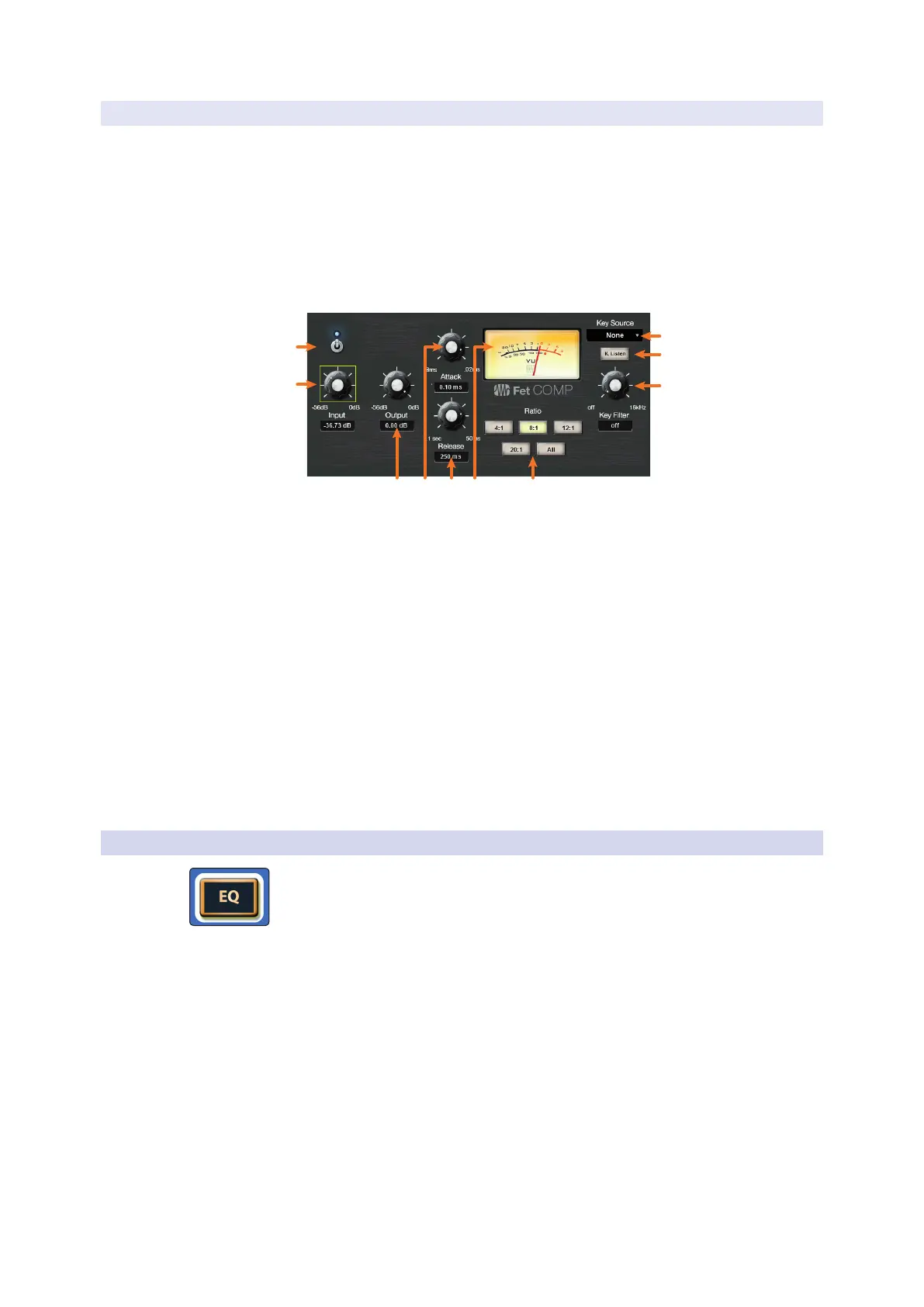
6.8.4.3 Class-A FET Compressor Overview Screen
When the Fat Channel is in Class A FET Compressor mode, the Touch Display shows
an overview screen that displays the relevant parameters. Touching any onscreen
knob allows you to use the Master Control encoder to set the selected parameter.
Touching a drop-down selector (such as Key Source) lets you select from a list of
relevant choices. Use the Master Control encoder to scroll through choices. Touching
onscreen buttons toggles the related parameter on or off.
Power User Tip: For StudioLive models with dynamic Fat Channel displays, many of these
parameters can also be controlled from the encoders and buttons in the Fat Channel. See
Section 6.5.3 for details.
2
1
9
10
8
1. Processor On/Off. Enables or disables the Compressor.
2. Input. Sets the input gain to the compressor.
3. Output. Sets the make-up gain for the compressor.
4. Attack. Sets the attack time for the compressor.
5. Release. Sets the release time for the compressor.
6. VU Meter. Displays the post-Compressor signal level.
7. Ratio. Sets the ratio for the compressor.
8. Key Filter. Sets the Key Filter frequency.
9. Key Listen. Touch to enable the Key Listen function.
10. Key Source (Input Channels only). Sets the Key Source for the Compressor.
Note: Because the StudioLive 64S employs the quad-core FLEX DSP engine, any of the first
32 channels can be used a Key Source for channels 1-32 while any of the second 32
channels can be used as a Key Source for channels 33-64.
6.8.5 EQ Overview Screens
Pressing the EQ button in the Fat Channel gives you access to equalization settings
for the currently selected channel or mix. An EQ (or equalizer) is a tone control that
lets you make changes in the tonal balance of a signal. You can boost or cut the level
of ranges of frequencies, to make corrective or creative changes to the signal.
The Fat Channel gives you the following distinct EQ models to choose from, each
with its own set of controls and its own behavior.
• Standard EQ. A clean and full-featured EQ that offers transparent tone shaping.
• Passive Program EQ. A model of a tube-based EQ with simple, quick and a classic
tonal character.
• Vintage 1970s EQ. A model of a classic solid-state EQ, with simple, musical
frequency settings and a lot of character.











 To Next Page