191
PRIMERGY TX200 S3 User’s Guide
Installing Internal Options
7
7.5.2 Installable Expansion Cards and Notes
Installable Expansion Cards
Order of Expansion Card Installation
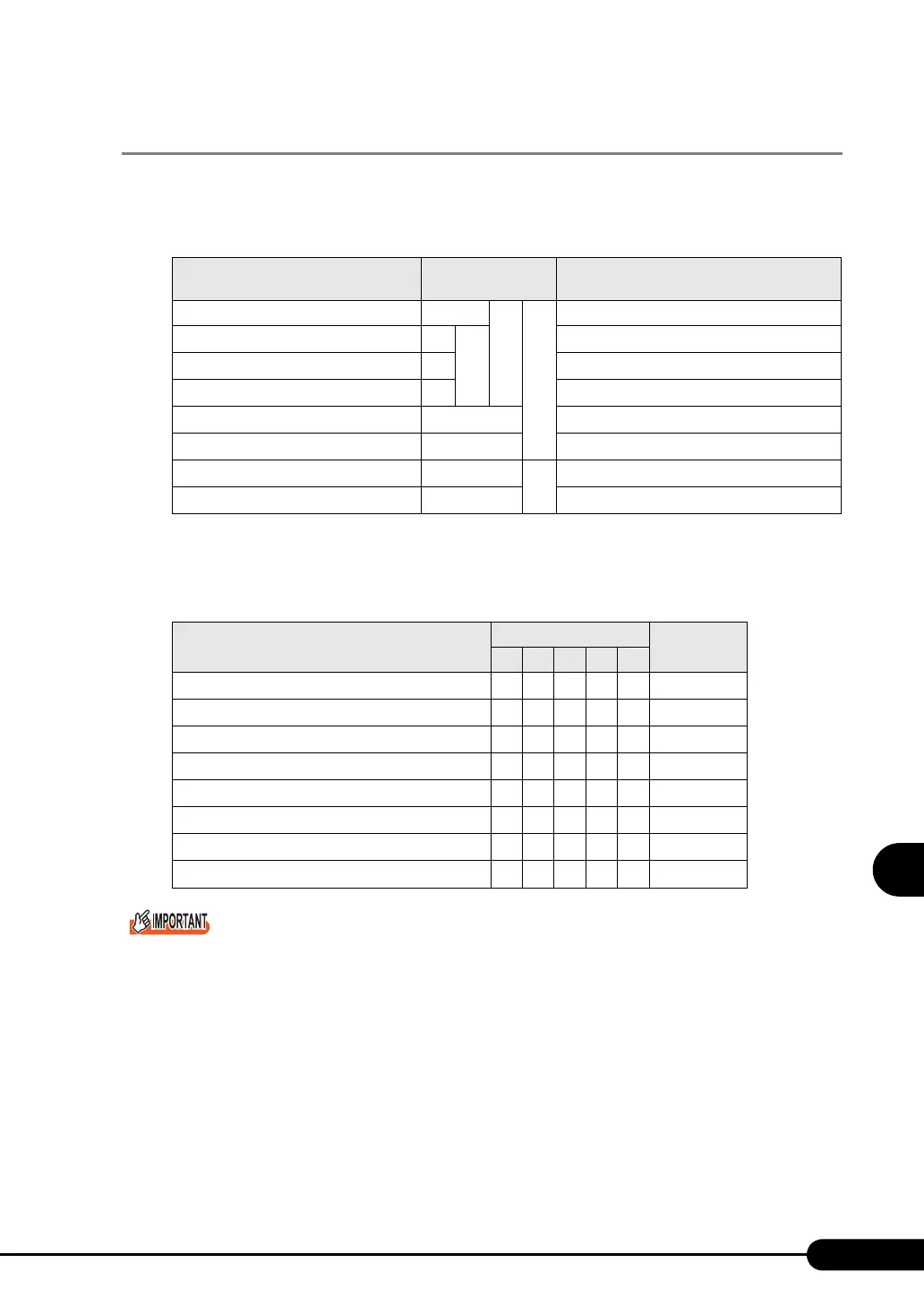
Install expansion cards into the slots in accordance with the priority indicated in the following table.
` Follow the "Installation order" shown in the table when installing the cards and drivers. If you turn on
the power after installing multiple expansion cards simultaneously or in a wrong order, they will not
function properly.
Notes on Installing Expansion Cards
• Install installable expansion cards only.
• Before installing expansion cards, see the manual supplied with the card to check the notes. Also,
check the following for the SAS array controller card.
table: List of Installable Expansion Cards
Installable card (Model name)
Maximum number
of cards
Remarks
SAS array controller card (PG-140FL) 1
2
3
For internal hard disk
LAN card (PG-1892)
2
2
1000BASE-T
LAN card (PG-1882)
2
1000BASE-SX
LAN card (PG-1862)
2
1000BASE-T, Dual port
SCSI array controller card (PG-142E3)
2
For external SCSI option (Ultra 320 x 2 ch)
SCSI card (PG-1281)
2
For internal/external SCSI option (Ultra 160)
Fibre channel controller (PG-FC202) 2
2
PCI Express
LAN card (PG-2861)
2 PCI Express、Dual port
table: Expansion Card Installation Order and Slots
Installable expansion card (Model name)
PCI slot
Installation
order
1 2 3 4 5
SAS array controller card (PG-140FL) 1 ---- 1
LAN card (PG-1892)
1 --- 22
LAN card (PG-1882)
1 --- 23
LAN card (PG-1862)
1 --- 24
SCSI array controller card (PG-142E3)
21-- 35
SCSI card (PG-1281)
21-- 36
Fibre channel controller (PG-FC202) -- 12- 1
LAN card (PG-2861) -- 12- 2



 To Next Page