Orion Machine Manual
Revision 3.0 CTS Flex Stretchwrapper
25 July 2016 System Operation
Page 3-5
Run Screens
Run Screen
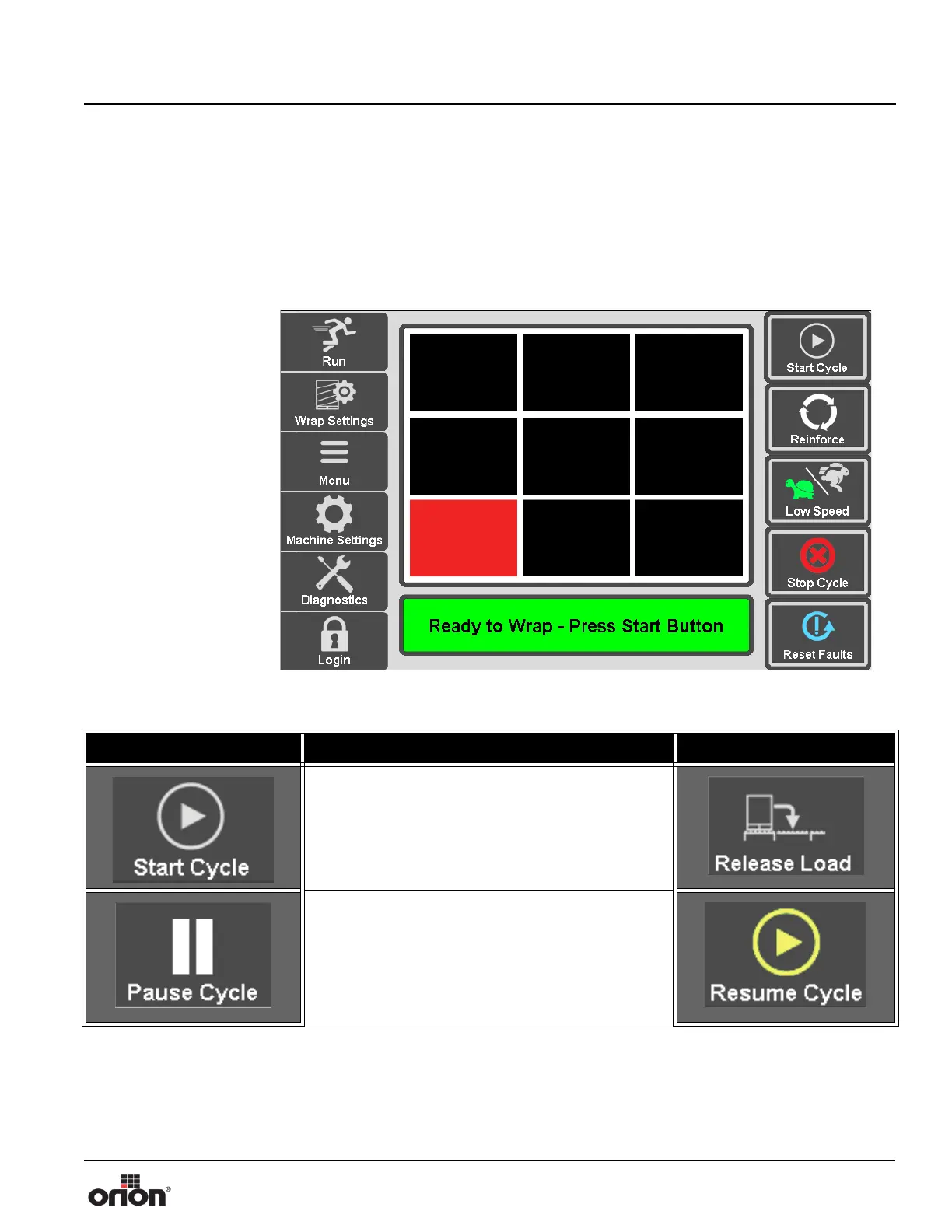
This is the Run screen used for primary functions of the machine. The red block in the
Orion block logo will travel the perimeter of the logo showing the position of the turntable
in relation to the home proximity sensor.
Figure 3 - 4
The Run Screen
Table 3-2. The Run Screen Button Descriptions
STATE 1 DESCRIPTION STATE 2
Press and hold Start Cycle to start the machine.
This must be held until the Start Delay timer is
complete to start the machine. Press Release Load
to index the load to the downstream conveyor.
Press Pause Cycle to pause the wrap cycle. When
paused, the Carriage and Main Drive will stop, and
will wait for the Resume Cycle button to be pressed
before resuming the wrap cycle. Press resume cycle
to resume the wrap cycle, if the cycle is currently
paused.



 To Next Page