Orion Machine Manual
Revision 3.0 CTS Flex Stretchwrapper
25 July 2016 System Operation
Page 3-15
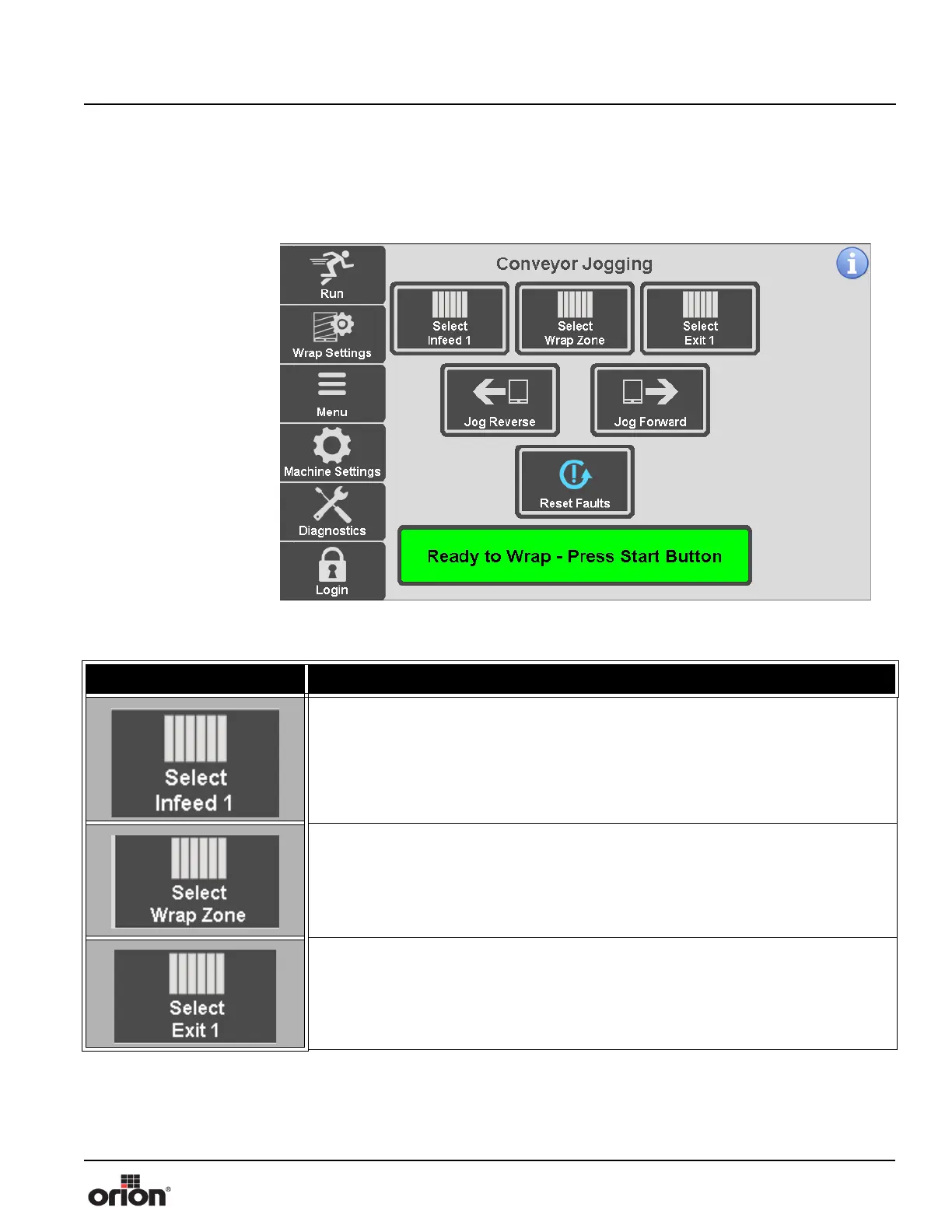
Conveyor Jogging Screen
This is the Conveyor Jogging Screen. Your screen may vary depending on the configura-
tion of your CTS.
Figure 3 - 10
The Conveyor
Jogging Screen
Table 3-9. The Conveyor Jogging Screen Button Descriptions
STATE 1 DESCRIPTION
Press this button to enable the indicated infeed conveyor jog. Press and hold the Jog
Forward or Jog Reverse button to jog the enabled conveyors.
Press this button to enable the wrap zone conveyor jog. Press and hold the Jog For-
ward or Jog Reverse button to jog the enabled conveyors.
Press this button to enable the indicated exit conveyor jog. Press and hold the Jog
Forward or Jog Reverse button to jog the enabled conveyors.



 To Next Page