Machine Manual Orion
CTS Flex Stretchwrapper Revision 3.0
System Operation 25 July 2016
Page 3-36
Diagnostics Screens
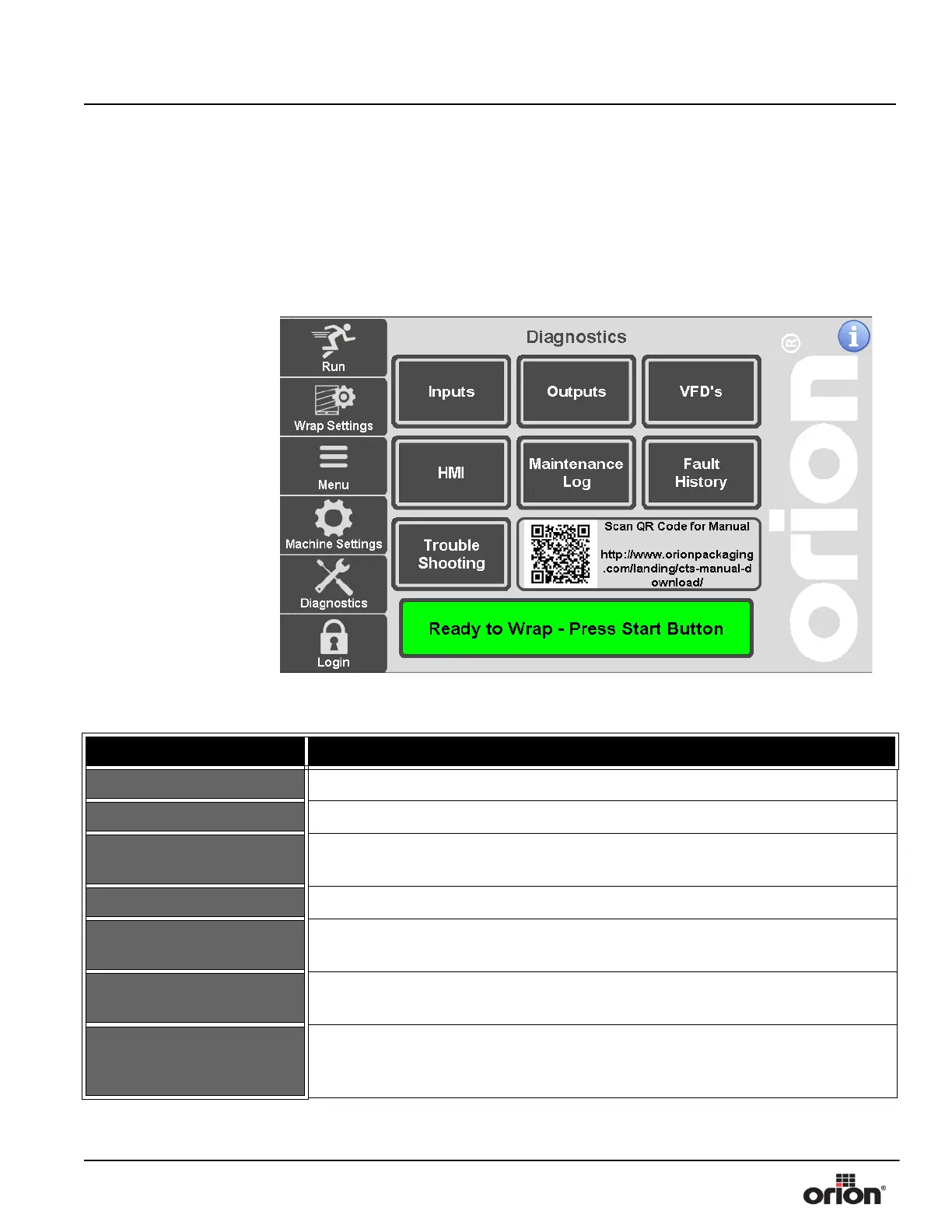
Diagnostics Screen
This is the Diagnostics screen. This screen allows navigation to each of the Diagnostic
Screens.
Figure 3 - 26
The Diagnostics
Screen
Table 3-25. The Diagnostics Screen Button Descriptions
STATE 1 DESCRIPTION
INPUTS Press this button to go to the Inputs Screen. See “Inputs Screens” on page 3 - 37.
OUTPUTS Press this button to go to the Outputs Screen. See “Outputs Screens” on page 3 - 38.
VFD’S
Press this button to go to the VFD’s Screen. See “VFD Parameters Screen” on
page 3 - 29.
HMI Press this button to go to the HMI Screen. See “HMI Setup” on page 3 - 41.
MAINTENANCE LOG
Press this button to go to the Maintenance Log Screen. See “Maintenance Log
Screen” on page 3 - 42.
FAULT HISTORY
Press this button to go to the Fault History Screen. See “Fault History Screen” on
page 3 - 43.
TROUBLESHOOTING
Press this button to display the interactive troubleshooting guide. You can press
links on the first page to view the help topic needed. Maintenance information is
also included at the end of the guide.



 To Next Page