Machine Manual Orion
CTS Flex Stretchwrapper Revision 3.0
System Operation 25 July 2016
Page 3-32
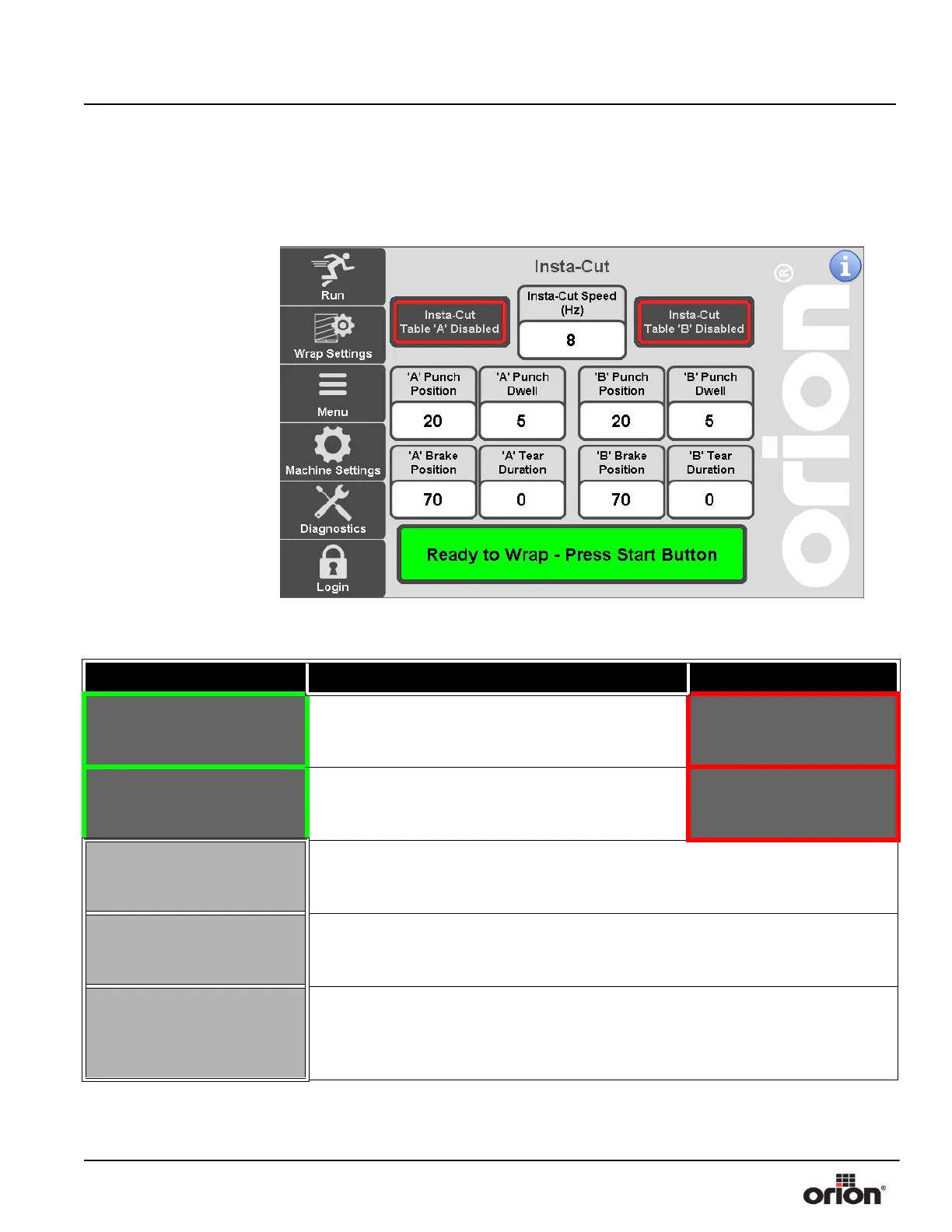
Dual Insta-Cut Screen
This is the Dual Turntable Insta-Cut Screen. This screen is only used for Dual Turntable
machines which also have Insta-Cut.
Figure 3 - 24
The Dual Insta-Cut
Screen
Table 3-23. The Insta-Cut Screen Button Descriptions
STATE 1 DESCRIPTION STATE 2
INSTA- CUT TABLE A
ENABLED
Press this button to toggle between Insta-Cut On or
Insta-Cut Off for table A. This allows the operator to
disable the Insta-Cut function.
INSTA-CUT
TABLE A DISABLED
INSTA- CUT TABLE B
ENABLED
Press this button to toggle between Insta-Cut On or
Insta-Cut Off for table B. This allows the operator to
disable the Insta-Cut function.
INSTA-CUT
TABLE B DISABLED
A INSTA-CUT PUNCH
POSITION
Press this button to modify the table A Insta-Cut Punch Position. This is the tooth
count position at which the Insta-Cut puncher activates to punch a hole in the film.
Min - 20 Max - 96 or 112, depending on sprocket selection.
A INSTA-CUT PUNCH
DWELL
Press this button to modify the table A Insta-Cut Punch Dwell. This is the amount of
teeth that the Insta-Cut puncher will stay activated to create a hole in the film. Min -
2 Max - 15
A INSTA-CUT BRAKE
POSITION
Press this button to modify the table A Insta-Cut Brake Position. This is the tooth
count position at which the Multistretch will stop paying out film, which causes the
film to tear. Min - (Insta-Cut Punch Position + Insta-Cut Punch Dwell) Max - 96 or
112, depending on sprocket selection.



 To Next Page