Machine Manual Orion
CTS Flex Stretchwrapper Revision 3.0
System Operation 25 July 2016
Page 3-20
Machine Settings Screens
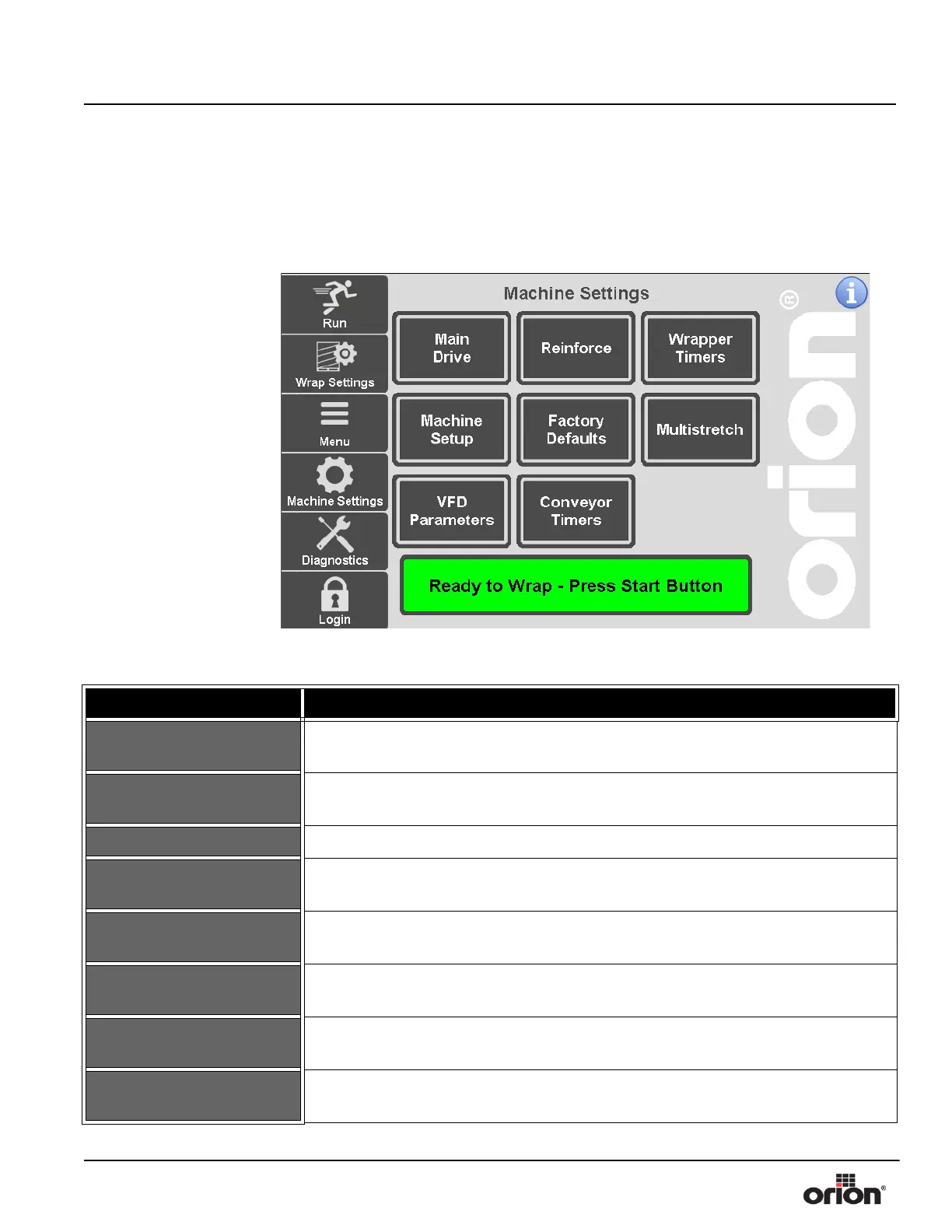
Machine Settings Screen
This is the Machine Settings Screen. This screen allows access to each of the machine set-
ting adjustments.
Figure 3 - 14
The Machine Settings
Screen
Table 3-13. The Machine Settings Screen Button Descriptions
STATE 1 DESCRIPTION
MAIN DRIVE
Press this button to go to the Main Drive Screen. See “Main Drive Screen” on
page 3 - 21.
REINFORCE
Press this button to go to the Reinforce Screen. See “Reinforce Wrap Setup” on
page 3 - 22.
TIMERS Press this button to go to the Timers Screen. See “Timers Screen” on page 3 - 23.
MACHINE SETUP
Press this button to go to the Machine Setup Screen. See “Machine Setup Screen” on
page 3 - 25.
FACTORY DEFAULTS
Press this button to go to the Factory Defaults Screen. See “Factory Defaults
Screen” on page 3 - 27.
MULTISTRETCH
Press this button to go to the Multistretch Screen. See “Multistretch Settings Screen”
on page 3 - 28.
VFD PARAMETERS
Press this button to go to the VFD Parameters Screen. See “VFD Diagnostics
Screen” on page 3 - 39.
CONVEYOR TIMERS
Press this button to go to the Conveyor Timers Screen. See “Conveyor Timers
Screen” on page 3 - 31.



 To Next Page