Orion Machine Manual
Revision 3.0 CTS Flex Stretchwrapper
25 July 2016 System Operation
Page 3-39
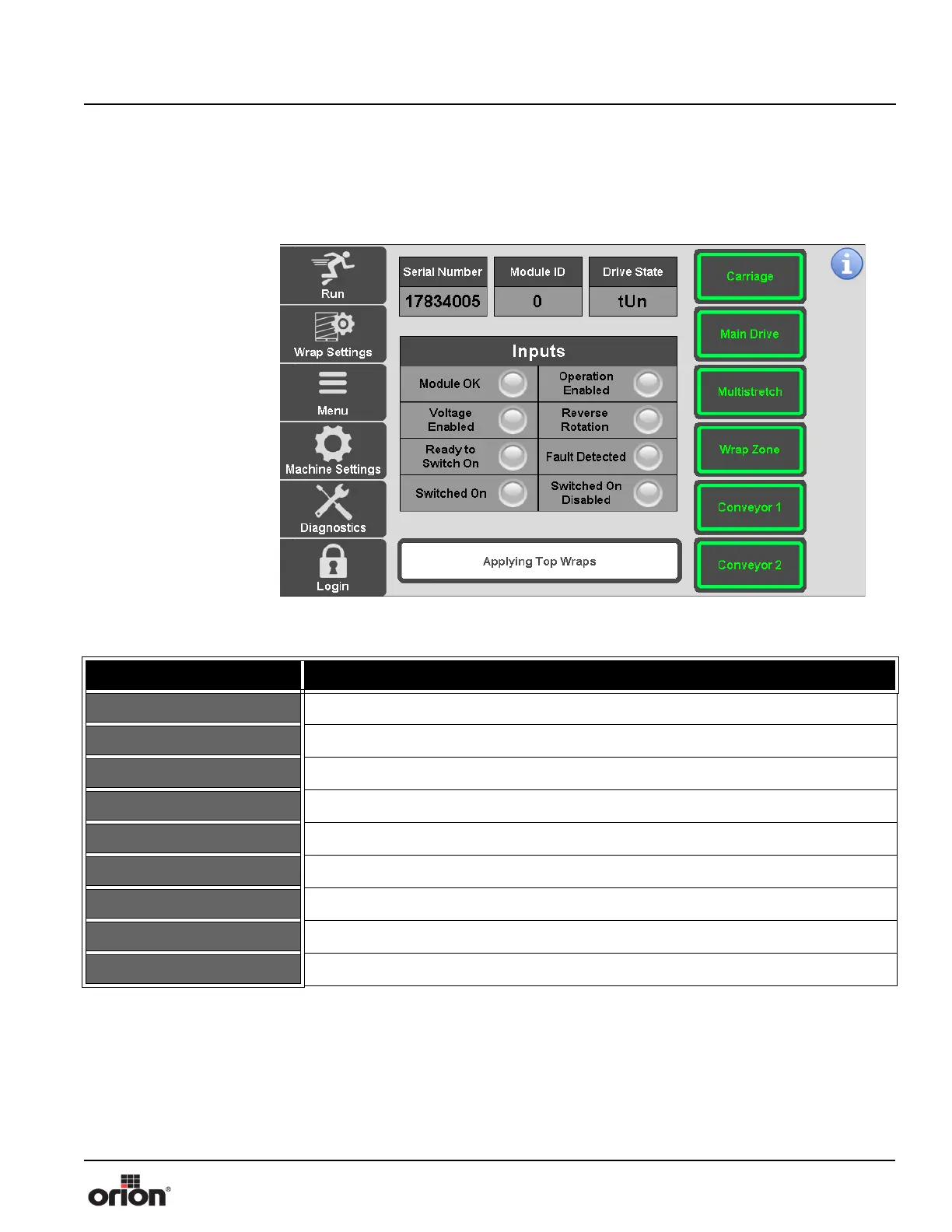
VFD Diagnostics Screen
This is the VFD Diagnostics screen.This screen allows you to view the diagnostics infor-
mation about each VFD.
Figure 3 - 29
The VFD Diagnostics
Screen
Table 3-28. The VFD Diagnostics Screen Button Descriptions
STATE 1 DESCRIPTION
SERIAL NUMBER This displays the serial number of the selected VFD.
MODULE ID This displays the Module ID of the selected VFD.
DRIVE STATE This displays the current Drive State of the selected VFD.
CARRIAGE Press this button to select the Carriage input view.
TURNTABLE Press this button to select the Turntable input view.
MULTISTRETCH Press this button to select the Multistretch input view.
WRAP ZONE Press this button to select the Wrap Zone input view.
CONVEYOR 1 Press this button to select the Conveyor 1 input view.
CONVEYOR 2 Press this button to select the Conveyor 2 input view.



 To Next Page