Orion Machine Manual
Revision 3.0 CTS Flex Stretchwrapper
25 July 2016 System Operation
Page 3-21
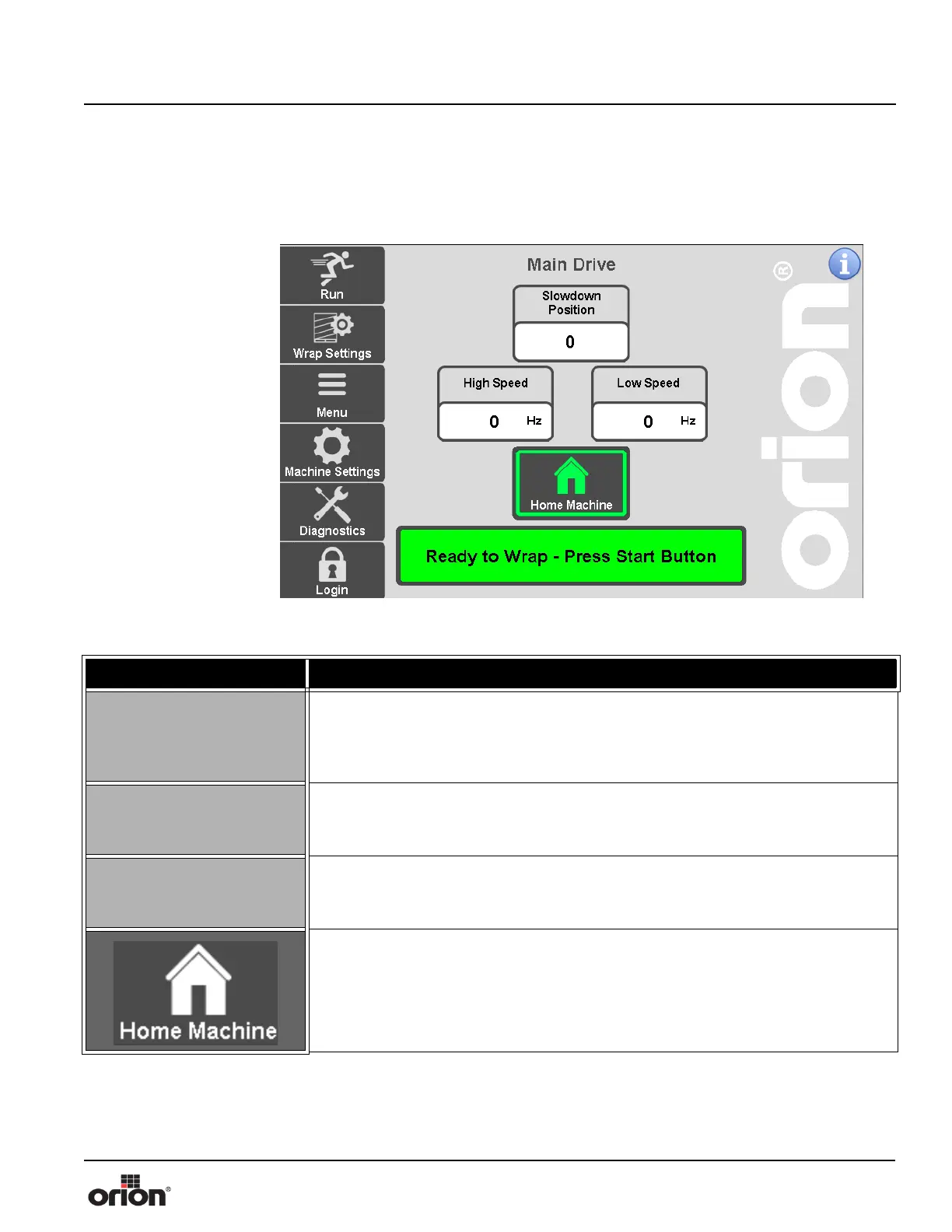
Main Drive Screen
This is the Main Drive screen. This screen allows adjustment of the Main Drive (turnta-
ble.)
Figure 3 - 15
The Main Drive
Screen
Table 3-14. The Main Drive Screen Button Descriptions
STATE 1 DESCRIPTION
SLOWDOWN POSITION
The slow down position is when the turntable or tower starts to decel before stop-
ping at home. An earlier slow down position might be needed for heavier loads and
a later slowdown position for lighter loads. The value is the tooth count in which the
machine will start to decelerate.
HIGH SPEED
Press this button to modify the High Speed value, in terms of hertz. This value
determines the speed at which the Main Drive will travel during the wrap cycle
when High Speed is selected. Min - 8 Hz Max - 27 Hz
LOW SPEED
Press this button to modify the Low Speed value, in terms of hertz. This value deter-
mines the speed at which the Main Drive will travel during the wrap cycle when
Low Speed is selected. Min - 27 Hz Max - 55 Hz
Press this button to send the machine to its Home Position. When pressed, the Car-
riage will travel to its bottom limit, and the Main Drive will travel to its predefined
End of Cycle Position.



 To Next Page