Orion Machine Manual
Revision 3.0 CTS Flex Stretchwrapper
25 July 2016 System Operation
Page 3-25
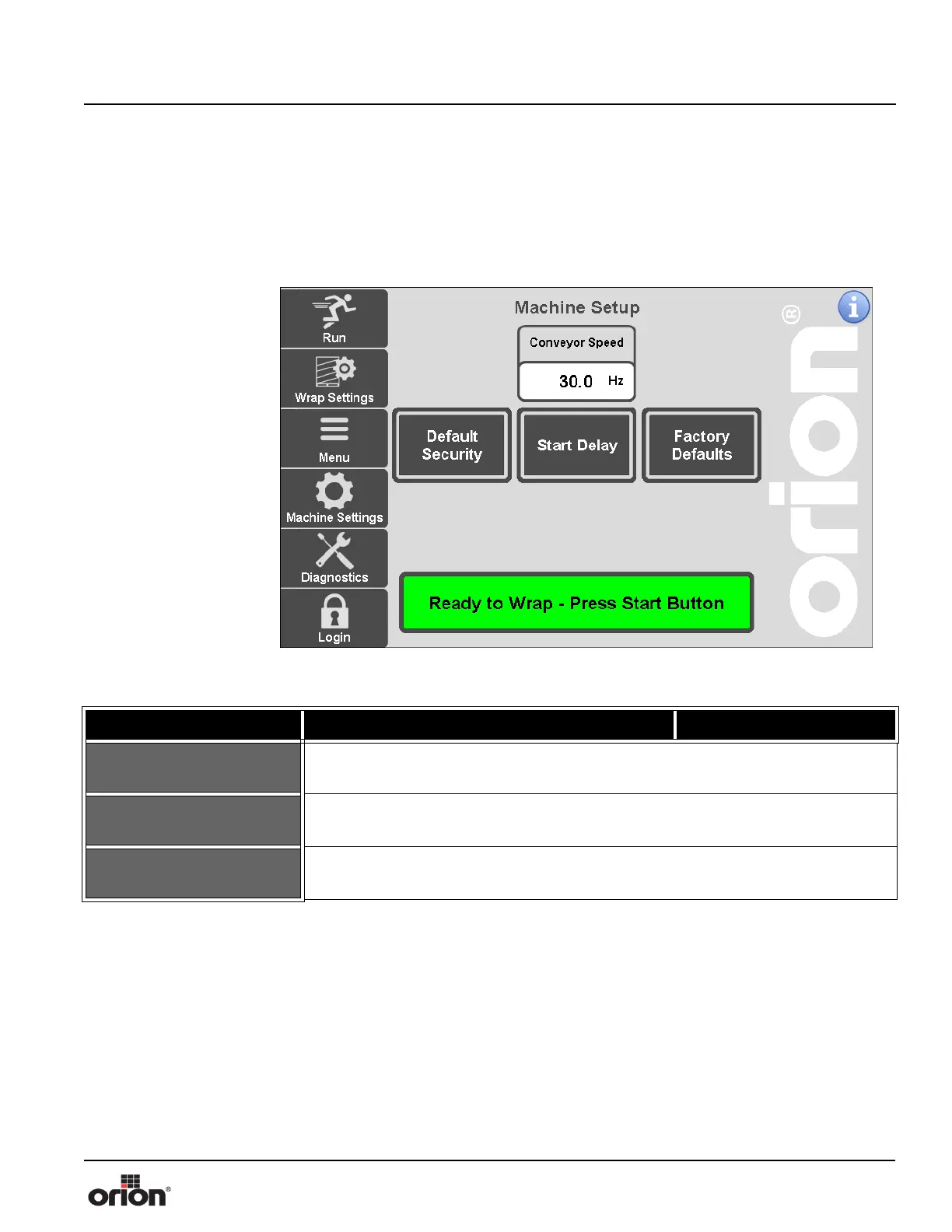
Machine Setup Screen
This is the Machine Setup Screen. This screen is used when setting up the initial machine
configuration. The technicians who assembled you machine already set the type of
machine you have on this screen. You will not need to make any changes on this screen in
day-to-day use.
Figure 3 - 18
The Machine Setup
Screen
Table 3-17. The Machine Setup Screen Button Descriptions
STATE 1 DESCRIPTION STATE 2
DEFAULT SECURITY
Press this button to go to the Security Settings Screen. See “Security Settings
Screen” on page 3 - 9.
START DELAY
Press this button to go to the Start Delay Screen. See “Start Delay Screen” on page 3
- 26.
FACTORY DEFAULTS
Press this button to go to the Factory Defaults Screen. See “Factory Defaults
Screen” on page 3 - 27.



 To Next Page