20
M-43-25 LUF-Series Lufran Manual
Revision - Date 03-01-04-18 Standard outlet, Standard Interface
Engineering Information (Continued):
Operator Interface Panel (OIP) (Continued):
Alarm Summary:
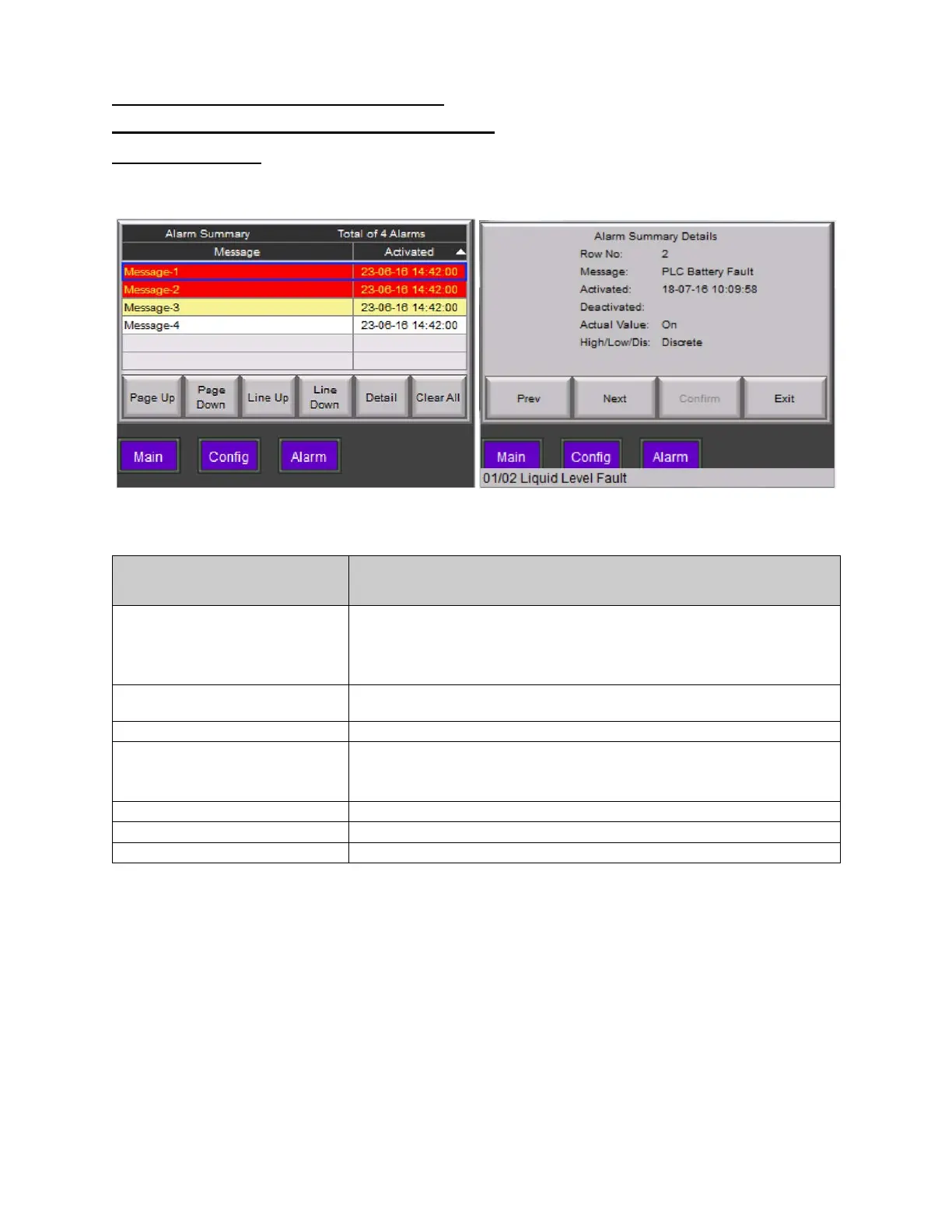
The ALARM SUMMARY will appear when the ALM. LOG button on the MAIN MENU is pressed. The
alarm summary lists each alarm event detected and the time at which it occurred.
Figure 11: Fault Log and Detail Display
Alarm Summary
Description
PAGE DOWN,
LINE UP,
These buttons allow the operator to scroll up and down through the
list of alarm summary lines.
DETAIL
This button will display additional details for the line selected, as
shown in the above figure.
This button will erase all lines in the alarm summary.
NEXT
These buttons allow the operator to scroll up and down through the
detail displays of the alarms and exit the detail display.
This button will display the MAIN MENU screen.
This button will display the CONFIGURATION MENU screen.
This button will display the ALARMS MENU screen.


 To Next Page