16
M-43-25 LUF-Series Lufran Manual
Revision - Date 03-01-04-18 Standard outlet, Standard Interface
Engineering Information (Continued):
Operator Interface Panel (OIP) (Continued):
Main Menu:
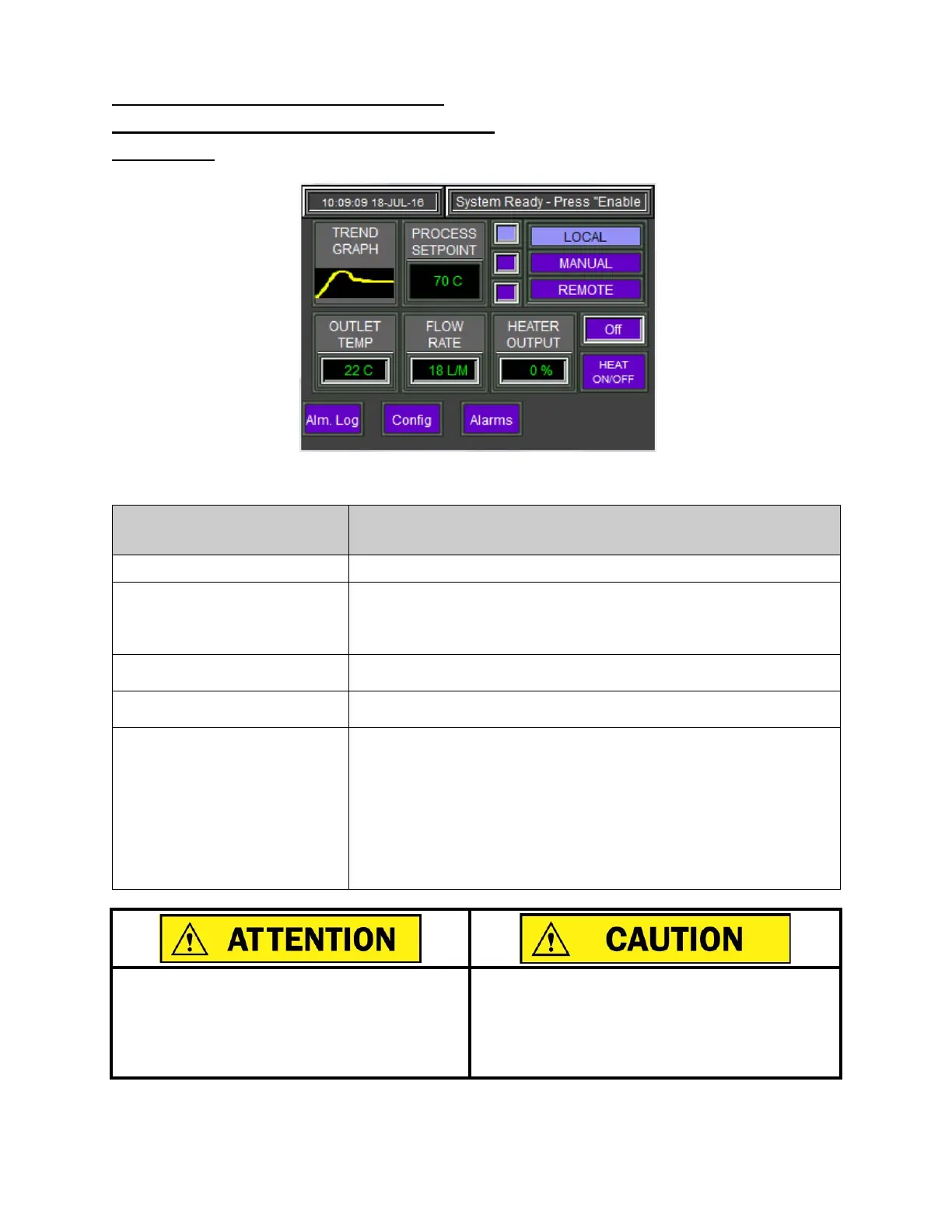
Figure 8: Main Menu
Main Menu Information
Description
TREND GRAPH
This button will go directly to the TREND GRAPH screen.
PROCESS SETPOINT
Displays the process setpoint. The value appears when the unit is in
LOCAL control mode.
Press this button to bring up a keypad to change the process
MANUAL SETPOINT
This value is the manual output of the heater. This value will only
appear when the unit is in MANUAL control mode.
REMOTE SETPOINT
This value is the process setpoint. The value appears when the unit
is in REMOTE control mode.
LOCAL,
MANUAL,
REMOTE
These buttons will switch control of the various settings between
local mode, remote mode, or manual adjustments of the DAC control
values. The selected control mode will be highlighted.
LOCAL: The heater is controlled from the touch-
front of the unit.
MANUAL
: The heater output is set manually. The DAC control
system is not active.
REMOTE
: The setting of this unit are controlled by a remote
device.
Une fois en mode de contrôle manuel, le contrôle
automatisé est plus active et peut entraîner un
comportement erratique ou de surchauffe
conditions. Pour cette raison, la commande
manuelle ne doit être utilisé par du personnel
qualifié comme un outil de maintenance.
Once in manual control m
control is no longer active and may result in erratic
behavior or over-temperature conditions. For this
reason, manual control should only be used by
qualified personnel as a maintenance tool.


 To Next Page