18
M-43-25 LUF-Series Lufran Manual
Revision - Date 03-01-04-18 Standard outlet, Standard Interface
Engineering Information (Continued):
Operator Interface Panel (OIP) (Continued):
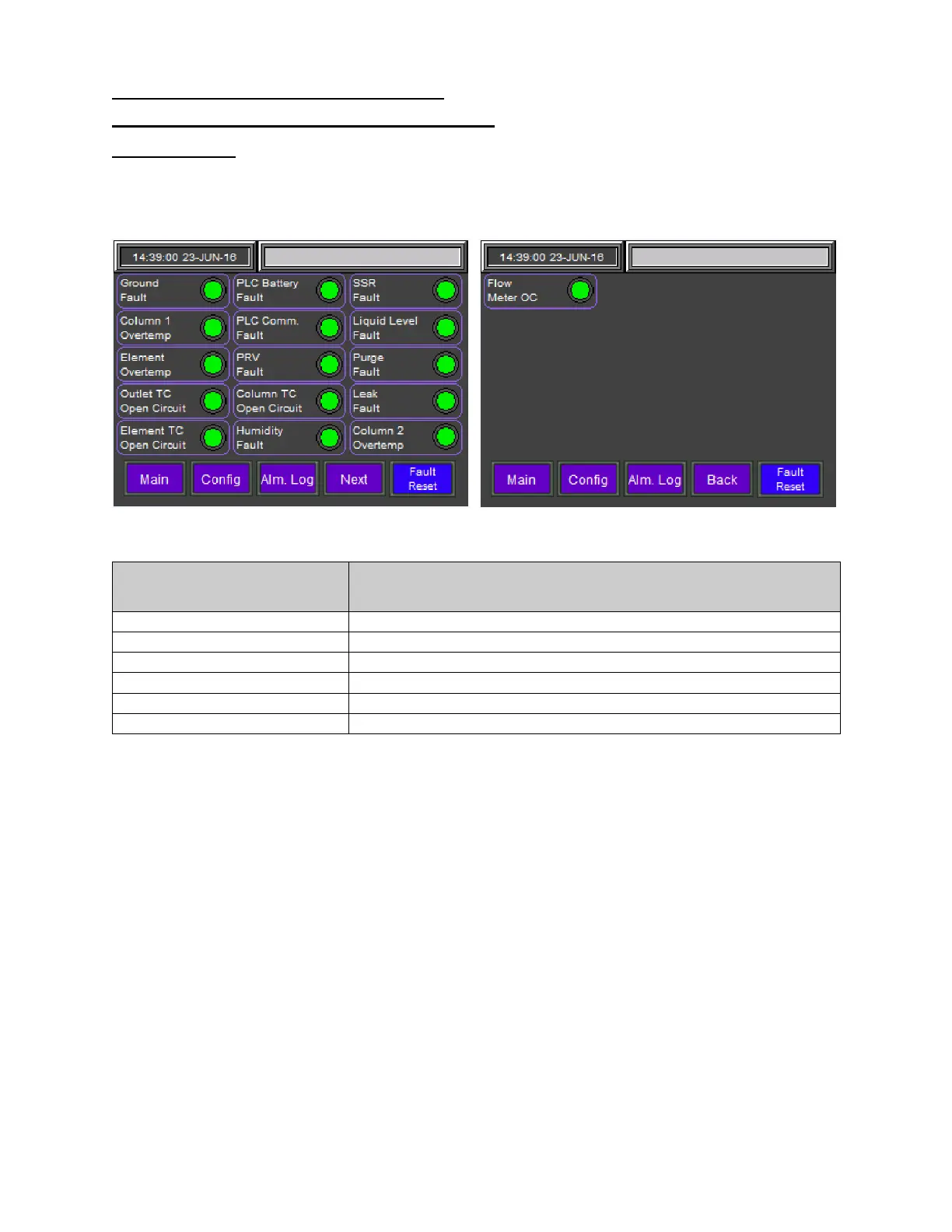
Alarms Menu:
The ALARMS MENU displays the status of the various alarm settings for the LUF heater. All of the alarm
fields in this menu are read-only. Any alarm that has been activated will be indicated by a blinking red
light. Refer to the Alarms section of this manual for a detailed description of each alarm setting.
Figure 9: Alarms Menu (2 Screens)
Fault Log Information
Description
This button will display the MAIN MENU screen.
This button will display the CONFIGURATION MENU screen.
This button will display the ALARMS SUMMARY screen.
This button will display screen 2 of the ALARMS MENU
This button will display screen 1 of the ALARMS MENU
This button will reset all alarm settings.


 To Next Page