TACACS+ Authentication
Configuring TACACS+ on the Switch
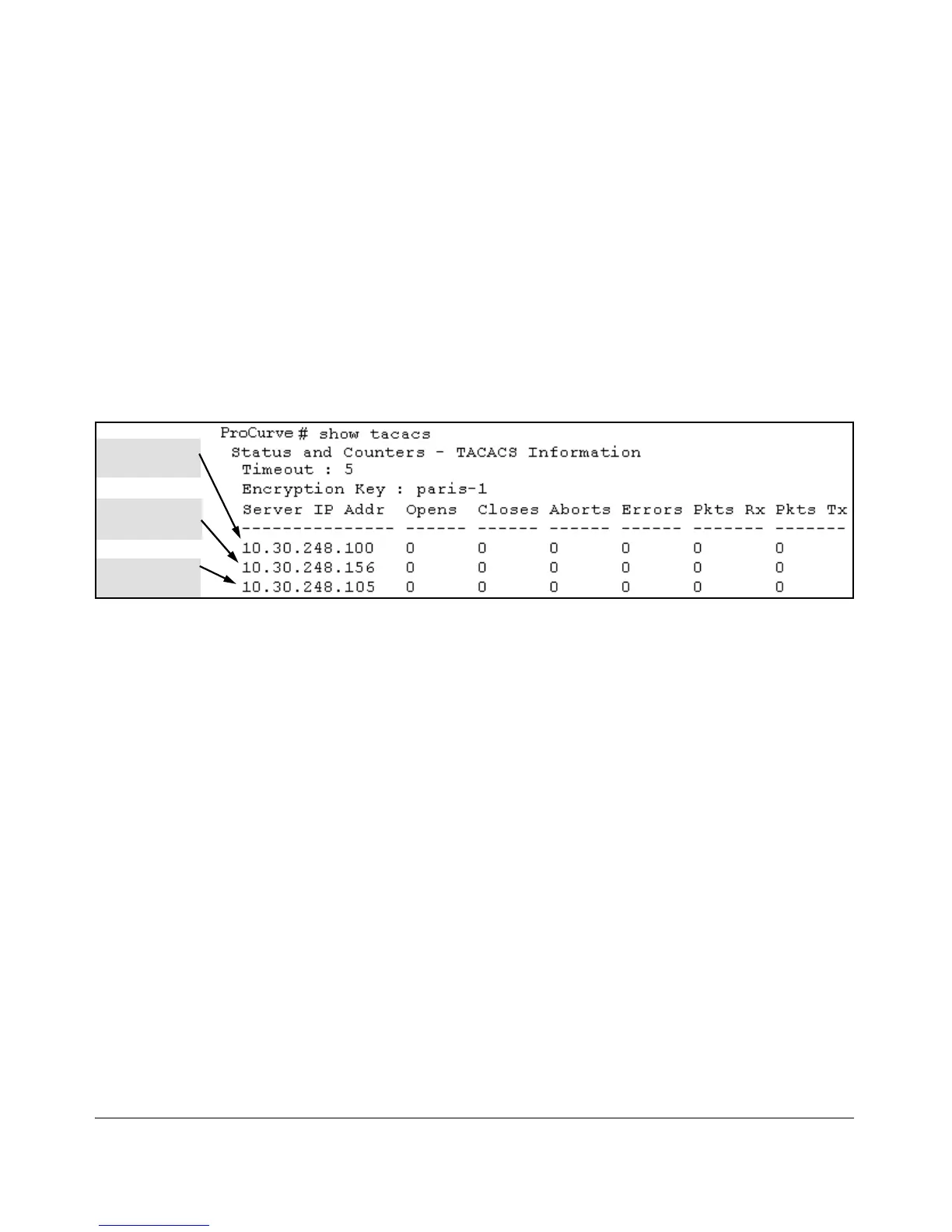
Viewing the Switch’s Current TACACS+
Server Contact Configuration
This command lists the timeout period, encryption key, and the IP addresses
of the first-choice and backup TACACS+ servers the switch can contact.
Syntax: show tacacs
For example, if the switch was configured for a first-choice and two backup
TACACS+ server addresses, the default timeout period, and paris-1 for a
(global) encryption key, show tacacs would produce a listing similar to the
following:
First-Choice
TACACS+ Server
Second-Choice
TACACS+ Server
Third-Choice
TACACS+ Server
Figure 4-3. Example of the Switch’s TACACS+ Configuration Listing
Configuring the Switch’s Authentication Methods
The aaa authentication command configures access control for the following
access methods:
■ Console
■ Telnet
■ SSH
■ Web
■ Port-access (802.1X)
However, TACACS+ authentication is only used with the console, Telnet, or
SSH access methods. The command specifies whether to use a TACACS+
server or the switch’s local authentication, or (for some secondary scenarios)
no authentication (meaning that if the primary method fails, authentication is
denied). The command also reconfigures the number of access attempts to
allow in a session if the first attempt uses an incorrect username/password
pair.
4-10



 To Next Page