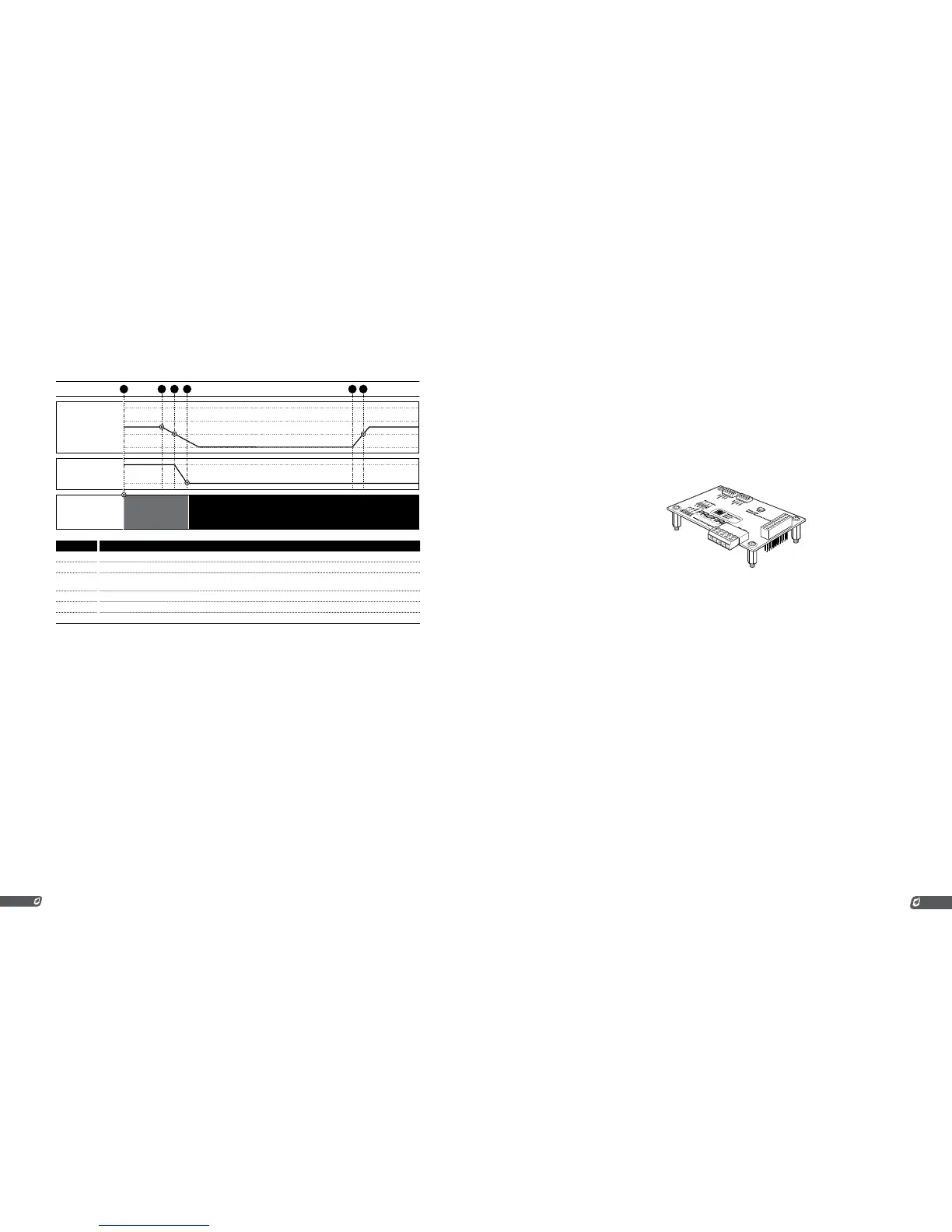
SYSTEM
STATE
3 6521 4
EVENT
PRESSURE LOW SP
PRESSURE HIGH SP
# CHART 5 EVENTS
1 System already running with pressure between High and Low setpoints.
2 Hand valve on fuel train closed. Pressure begins to drop.
3 Pressure falls below the low set point. Delay timer starts counting down. (max valve depends on the Level/
Pressure Delay setting)
4 Delay timer expires and system shuts down.
5 Hand valve is opened and pressure increases quickly.
6 Pressure rises above low setpoint but system does not restart and remains shut down.
4-20MA TEMPERATURE OUTPUT
If the 4-20mA Output is not being used to control a proportional valve, it can be configured to output
the process temperature encoded as a 4-20mA signal. This is useful if a PLC on site needs to know the
process temperature. In this case, wire the PF2100’s 4-20mA Output to a PLC’s 4-20mA Input. Note that
the PF2100 provides the loop power. The PLC resistance is expected to be in the range of 120 Ohms and
250 Ohms.
The 4-20mA output signal will be scaled such that 4mA represents OC and 20mA represents HT ESD
Setpoint.
5.2 | Modbus Expansion Card
An optional Modbus Expansion Card can be installed in the PF2100 which provides the following
additional features:
REMOTE MONITORING
This card allows for remote monitoring of the PF2100 status including process temperature, auxiliary
temperature, and 4-20mA Input Card status (if installed).
REMOTE START / STOP
This card can also be used to remotely start and stop the system and to adjust some setpoint values.
REMOTE SETPOINT ADJUSTMENT
This card can be used to remotely adjust some setpoints such as High Fire, Low Fire, and Pilot Off
setpoints. Note that these settings are not stored in memory. If the system is powered off and then on
again, these settings will revert back to the last values entered directly using the keypad.
Refer to the “Modbus Expansion Card Manual” for further details on installation and operation of this
card.
Some PF2100 models come with this card pre-installed.
MODBUS EXPANSION CARD SETTINGS
This setting applies to the Modbus Expansion Card which must be installed in the PF2100’s expansion
slot.
Modbus Enable/Address (menu 6)
The Modbus Card is disabled by setting the address to zero and enabled by setting the
address to any non-zero value. The address is shown on the display as a decimal number
which can be set to any value in the range of 1 to 254. This corresponds to hexadecimal
values 0x01 to 0xFE.



 To Next Page