5352
STARTING IN MANUAL MODE
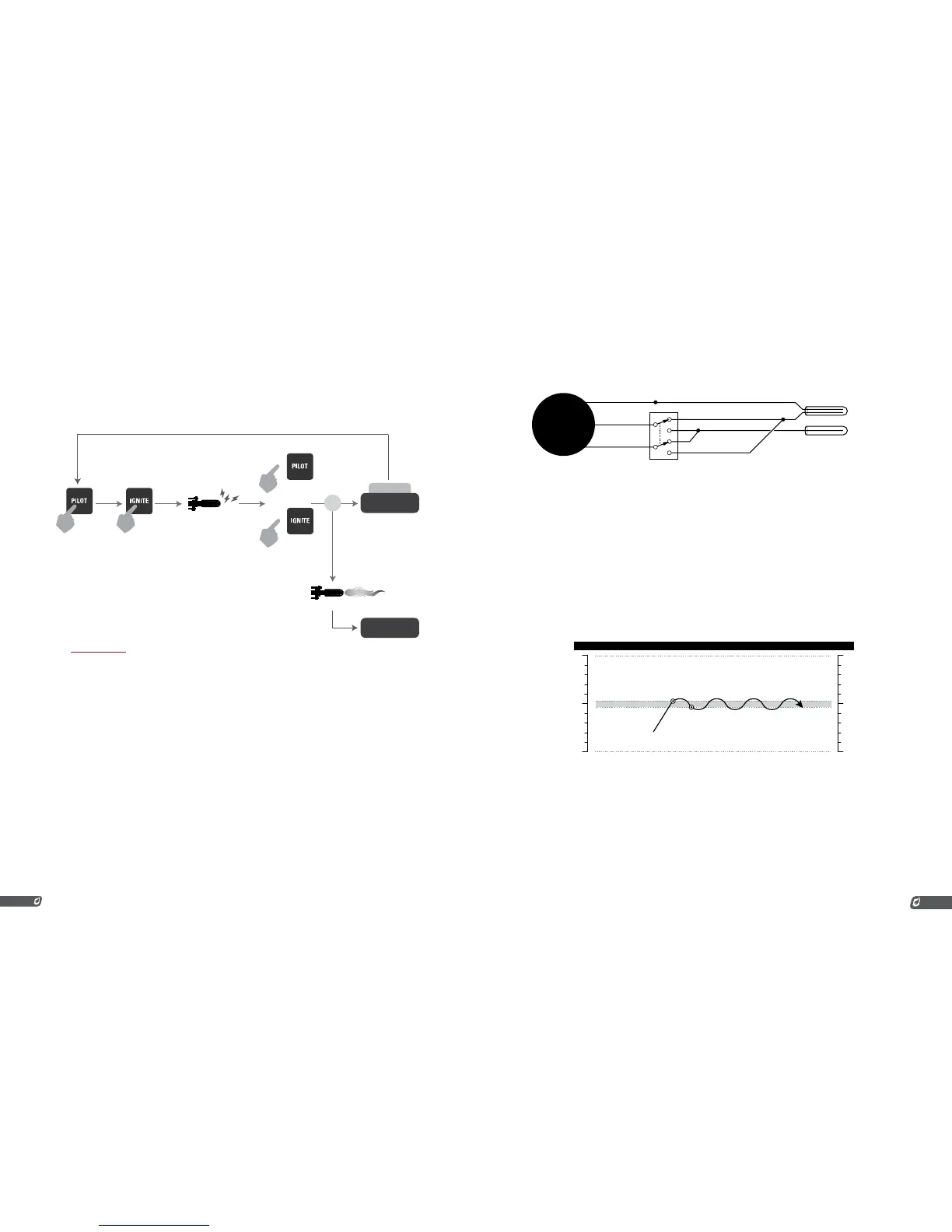
When the system is started in Manual Mode (using the Pilot, Ignite, and Main Keys), it must be manually
moved through the ignition sequence. In Manual Mode, the PF2100 will NOT automatically attempt to
relight the pilot if it ever goes out unexpectedly. It will only attempt to relight the pilot if it was turned off
by the system as a result of normal process control (ie, Waiting on Temp, Waiting for Level, etc).
PRESS AND HOLD
RELEASE
FLAME DETECTED
SHUTDOWN
ERROR
FLAME
DETECT
PROCESS
CONTROL STARTS
+
The Process Control sequence will be explained in more detail later.
4.2 | Process Control
The PF2100 maintains a process at a user specified temperature. The system monitors the temperature
and adjusts to increase or decrease the temperature as needed. This is an automated sequence of events
based on user settings. This process of monitoring and controlling is called Process Control. The system
uses a gas fired heater with an electronic ignition circuit and several electronic fuel valves (also called
solenoids). It also has a flame detection circuit and up to three temperature measuring thermocouples.
The PF2100 has three inputs: High Temp, Proc Temp, and Aux Temp. By default, these signals correspond
to the High Temp Thermocouple, the Process Thermocouple, and the Aux Thermocouple respectively.
The Process Control setting allows the Process and Aux thermocouples to be swapped. This is useful in
circumstances that will be explained later.
HIGH TEMP HIGH TEMP THERMOCOUPLE
THERMOWELL #1
THERMOWELL #2
PROCESS THERMOCOUPLE
AUX THERMOCOUPLE
PROC TEMP
AUX TEMP
“PROCESS CONTROL” SETTING
Internal Software Signals External Physical Connections
It is expected that the High Temp Thermocouple and the Process Thermocouple will always be mounted
in a common thermowell. This is usually accomplished by using a duel element thermocouple. The
software uses these two thermocouples as a check for each other as a failsafe. If the readings from
these two thermocouples do not agree within a specified amount of error, the system will shut down.
The High Temp signal is used to protect the burner and other process equipment from being damaged
due to excessive heat. It cannot be disabled through any combination of process control settings.
The Proc Temp signal is the primary control signal for Process Control. This signal is compared to the
Deadband, Low Temp Alarm Setpoint, Process Setpoint, Low Fire Setpoint, and the Pilot Off Setpoints in
order to control the temperature of the process.
The Aux Temp signal can be used as a secondary control signal. The way that this signal is used will vary
depending on the Aux Temp Mode setting. If enabled, an Aux Setpoint gets compared to this signal.
STANDARD PROCESS CONTROL
Using very basic settings, the PF2100 behaves as follows.
DEAD BAND
TEMP EXCEEDS
SETPOINT
PROCESS
TEMPERATURE
TEMP DROPS
BELOW SETPOINT
TIME˚C ˚F
MAIN ON
MAIN OFF
1. The Main Valve opens and the Process Temperature increases.
2. The Process Temperature exceeds Process Setpoint, the Main
Valve closes, and the Process Temperature begins to drop.
3. The Process Temperature drops below the Process Setpoint
minus Deadband, the Main Valve opens, and the Process
Temperature begins to increase again.
LOW FIRE: ON AT PROC SETPOINT
This example has the Process (High Fire) and Low Fire Setpoints enabled. It has been set to turn on at
the Process Setpoint. This example uses two valves, a Low Fire valve and a High Fire valve. Both valves
start open in this example.



 To Next Page