PROLiNK® PRC2401U Wireless AC2600 MU-MIMO Dual-Band Gigabit Router
30
Clients Icon
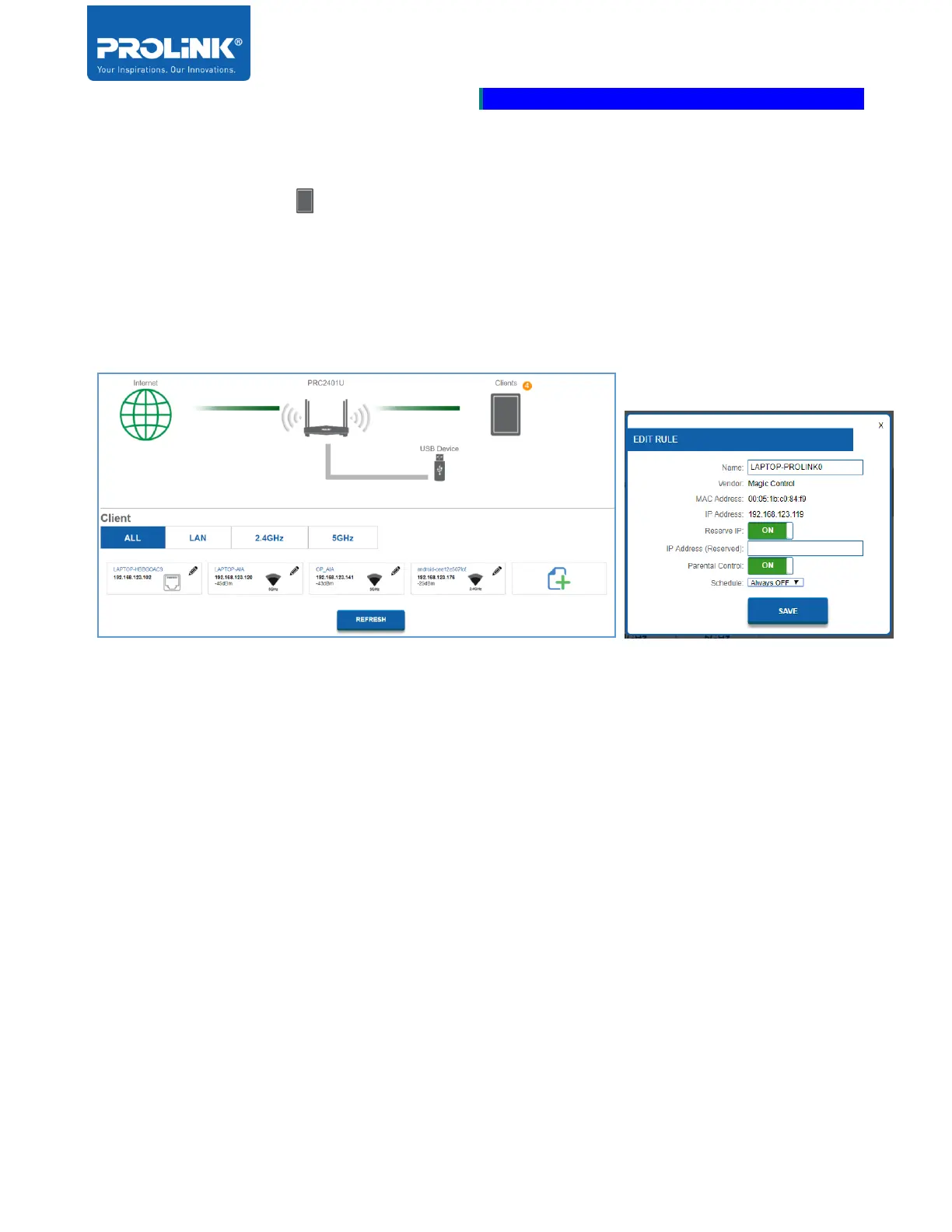
Click on the Clients icon to display the list of connected client on the router. The list of client is
categories into 4 sections according to Network Interface type. 1
st
tab to display ALL Network
Interface connected client. 2
nd
tab is LAN Network Interface connected client only. 3
rd
tab is 2.4GHz
Network Interface connected client only. 4
th
tab is 5GHz Network Interface connected client only.
To edit a client’s settings, click the pencil icon for the client you would like to edit.
a) EDIT RULE
• Name: To Edit custom name for the client.
• Vendor: It displays the vendor name of the device.
• IP Address: Enter a specific IP address for the client.
• Reserve IP: if you would like to reserve this IP address for this client. Enable the
option and every time the client joins the network, it will receive same IP
Address
• Parental Control: To block internet access to your router, enable the option.
Then select a schedule you want the rule to be active from the drop-down
menu.
• Click Save when you are done.



 To Next Page