PROLiNK® PRN3009 Wireless-N 300 Routers
53
4.3 Network
On the Advance Network setting, allows the user to change the LAN Settings and WAN Setting. Please
note, this setting is for more technically advanced users, who have sufficient knowledge about LAN
and WAN setting. These settings should not be changed unless you know what effect the changes will
have on router compatibilities.
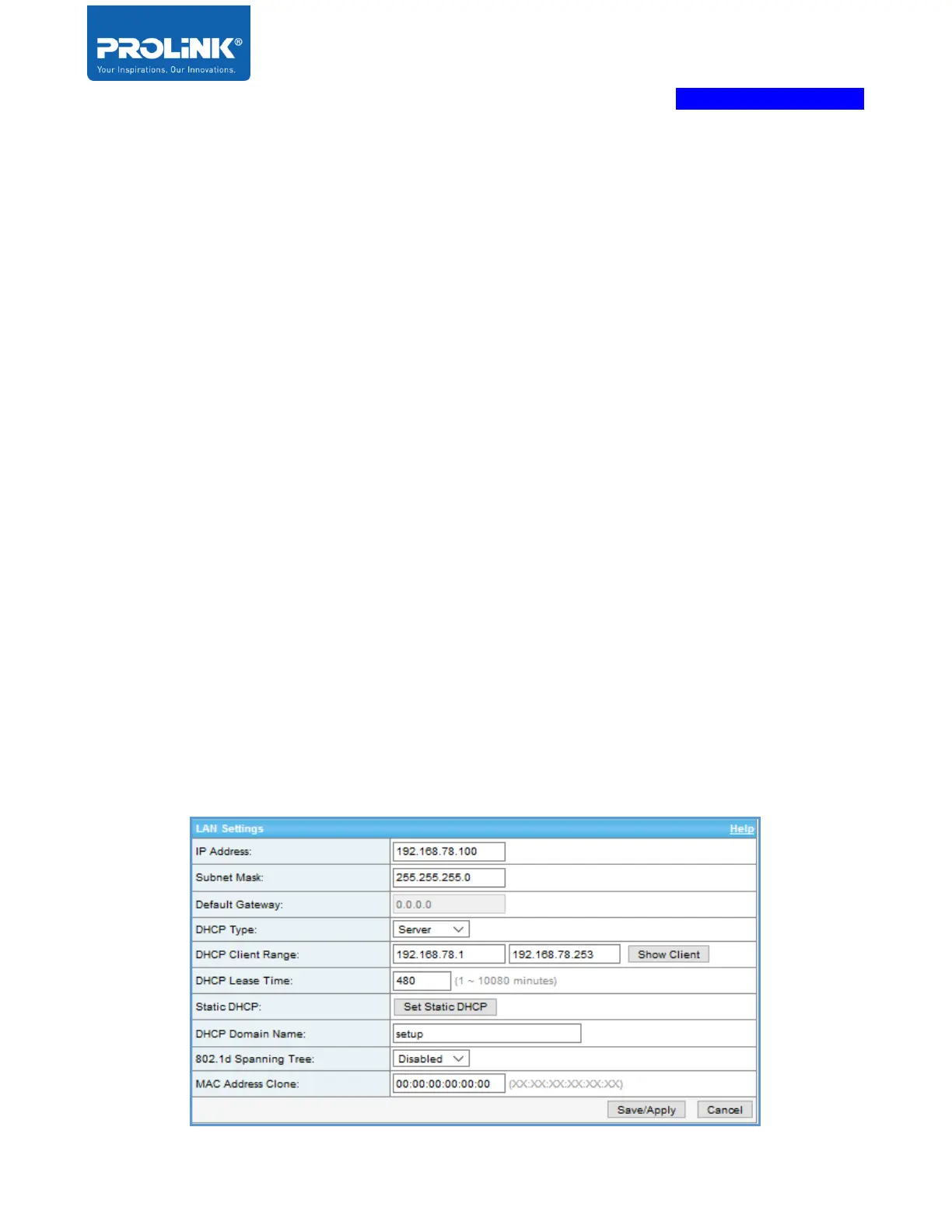
LAN Setting
IP Address - The IP address of the device.
Subnet Mask - Enter the Subnet Mask of the router. By default, the subnet is set to 255.255.255.0.
Default Gateway - Valid only in Bridge mode, IP Address is used in other operation modes.
DHCP Type - Client will obtain an IP address from DHCP server elsewhere, while on Server will
offer IP addresses for the network.
DHCP Client Range – Range of IP address provided by the PRN3009 to the client
DHCP Lease Time - Enter the length of time for the IP address lease in minutes.
Static DHCP - Enable or Disable Static DHCP functionality
DHCP Domain - The domain of the IP address offered by the DHCP server.
802.1d Spanning Tree - A protocol used to detect and separate network loops, forecasting and
avoiding the potential broadcasting storm
MAC Address Clone - Use a specified MAC address to instead the default one.



 To Next Page