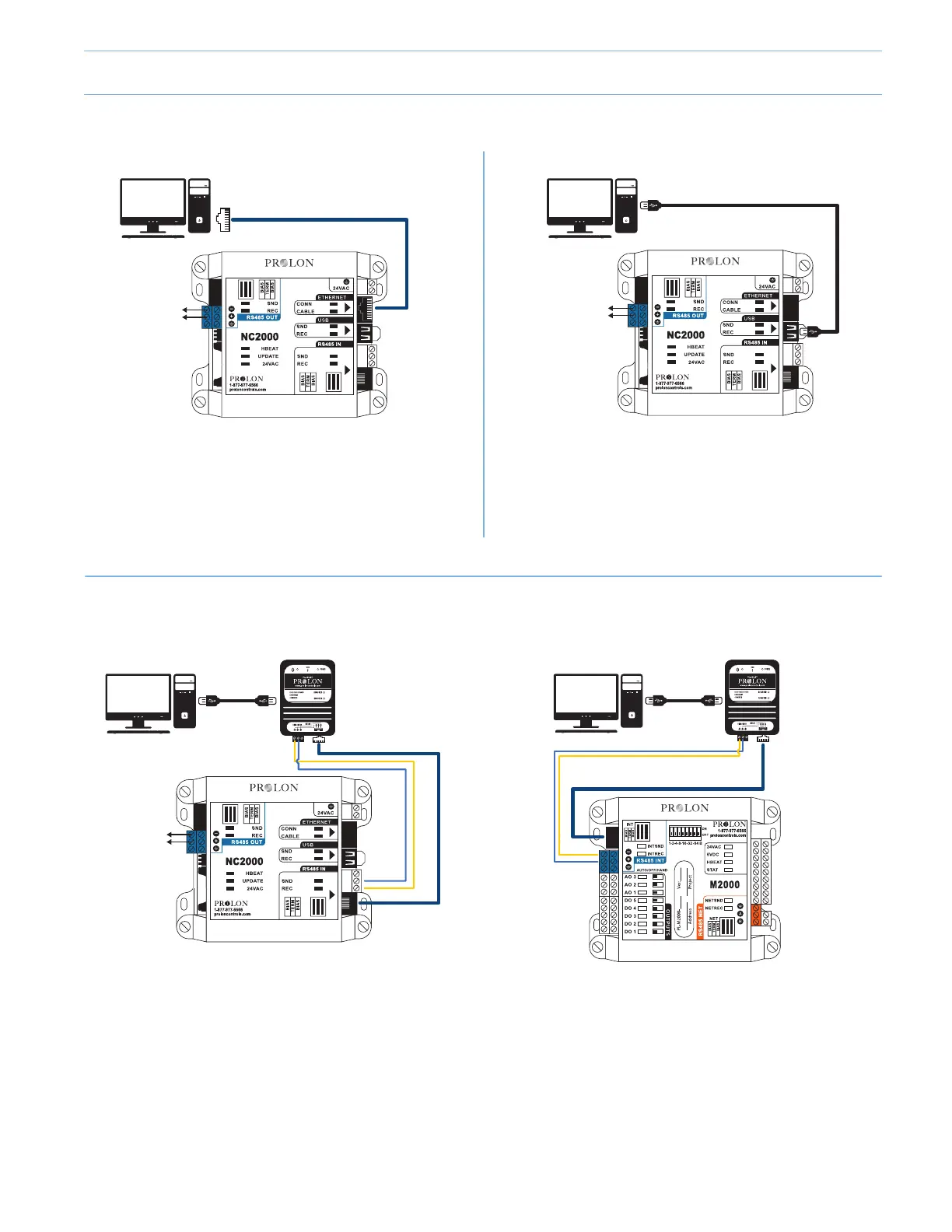
* The PL-485-BT converter can be used to connect a PC/Mobile device to ANY Prolon controller. This example only shows
connections to PL-M2000-XXX and PL-NC2000.
How to Connect a Computer to Prolon Controllers
PORT
RS485
IN PORT
- OR -
USB
Port
12345678
- OR -
PL-NC2000 (Network Controller)
PL-NC2000 (Network Controller) PL-M2000-XXX (Unit Controller)
PL-NC2000 (Network Controller)
Use this method to connect to a PL-NC2000 over an IP
Connection. NOTE: The computer and the PL-NC2000 must
be on the same subnet to communicate. Use a CAT5e cable.
Use this method to connect to a PL-NC2000 using the PL-
485-BT converter. NOTE: USB Cable (Type A to Type B) and
CAT5e cable are provided with PL-485-BT converter.
Use this method to connect to a PL-M2000-XXX using the
PL-485-BT converter. NOTE: USB Cable (Type A to Type B)
and CAT5e cable are provided with PL-485-BT converter.
Use this method to connect to a PL-NC2000 with a USB
cable. NOTE: Use a Type-A to Type-A USB Cable.
(Available only for Windows based computers)
IP Connection
PL-485-BT Connection*
USB Connection
7-1



 To Next Page