Single-Zone Unit Controllers with Digital Wall Sensor
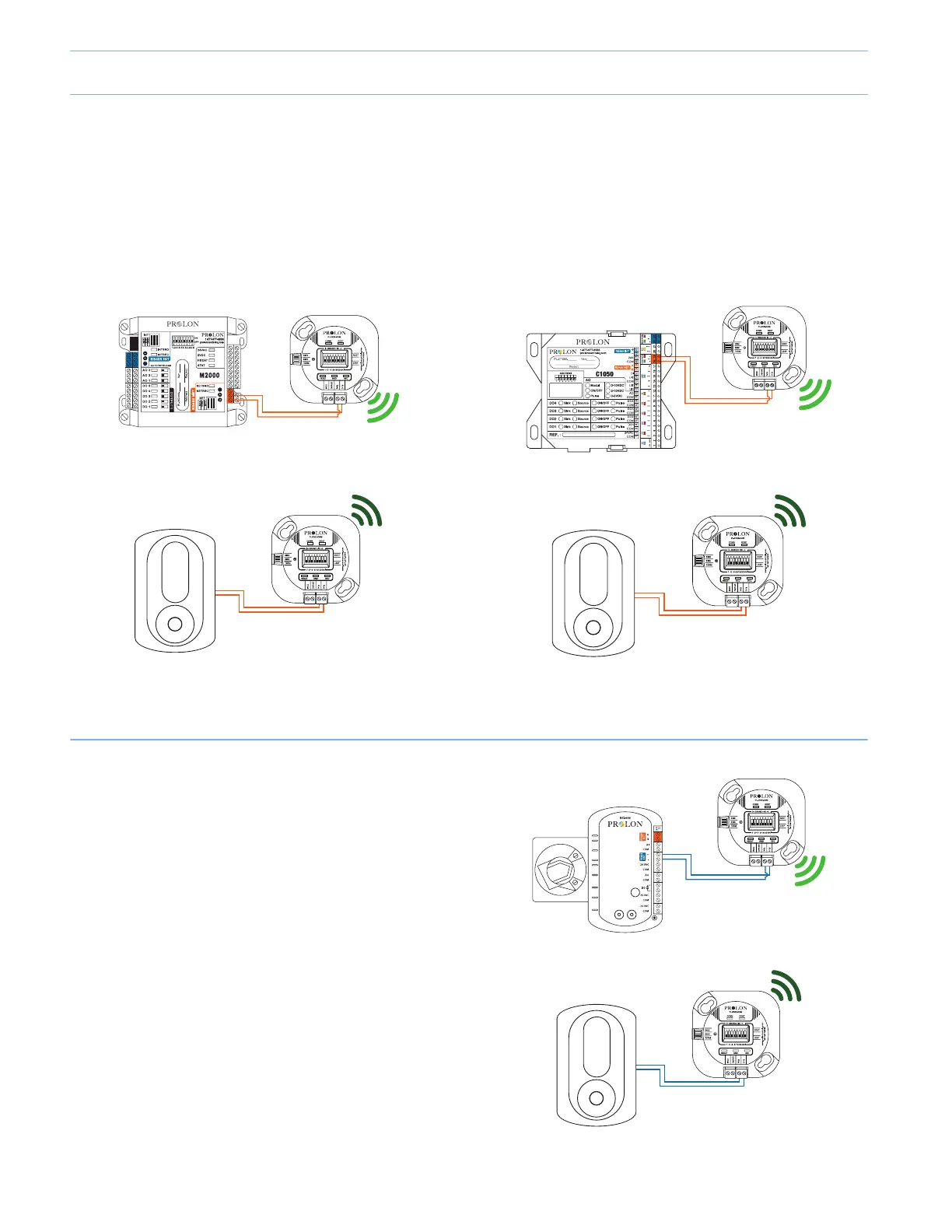
The RTUS, HPS or FCU controllers can be connected to their respective communicating digital wall sensor, using the PL-TREE-
COM device. **Important** A PL-RS wall sensor CANNOT be connected using a PL-TREE-COM (M2000 only).
1. The PL-TREE-COM connected to the communicating wall sensor must be set as the "ROOT".
2. The PL-TREE-COM connected to the Single-Zone Unit Controller must be set as the "LEAF".
3. Both TREE-COM modules must have their dipswitches set for the same channel number
Figure 7
PL-TREE-COM
Channel: 1
LEAF
PL-T1000
PL-TREE-COM
Channel: 1
ROOT
PL-M2000-###
Modbus: 20
Figure 8
PL-T1000
PL-TREE-COM
Channel: 2
ROOT
PL-C1050-###
Modbus: 30
PL-TREE-COM
Channel: 2
LEAF
VAV Zone controllers with Digital Wall Sensor
The PL-VC2000 or C1050 VAV controllers can be connected
to a communicating digital wall sensor (T1000, T500,T200)
using a PL-TREE-COM. (Figure 9)
1. The PL-TREE-COM connected to the communicating
wall sensor NEEDS to be set as the "ROOT". (INT port)
2. The PL-TREE-COM connected to the VAV controller
must be set as the "LEAF". (INT port)
3. Both TREE-COM modules must have their dipswitches
set for the same channel number.
Figure 9
PL-T1000
PL-TREE-COM
Channel: 1
ROOT
PL-VC2000
Modbus: 1
PL-TREE-COM
Channel: 1
LEAF
PL-TREE-COM Installation Scenarios
6-4



 To Next Page