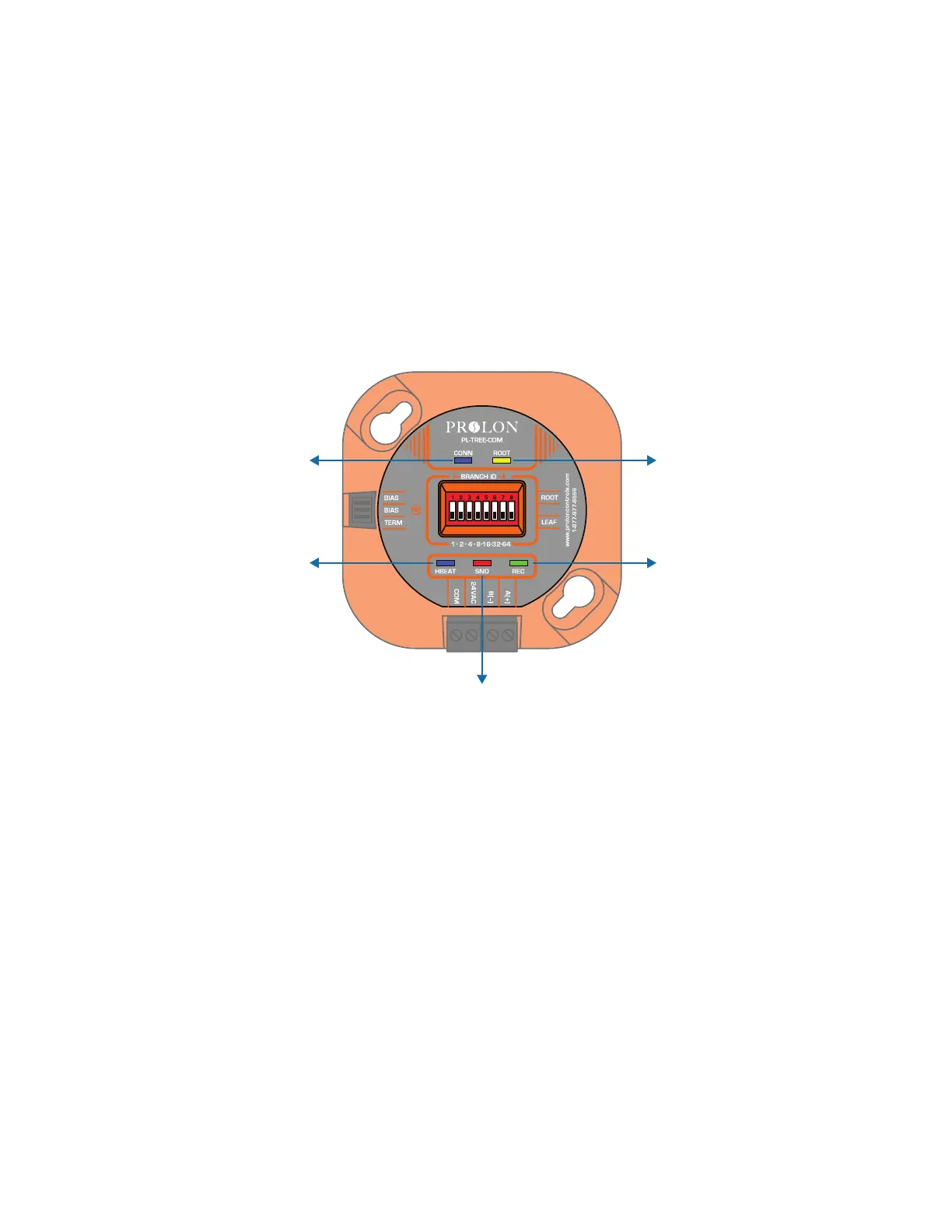
8. LEDS
ThePL-TREE-COMcomesequipedwithveLEDstoindicatedevicestatus.(Figure6)
8a) HBEAT (BLUE): This LED simply indicates that the device is powered and operating. It should blink once every second,
regardless of RS485 or Wireless communication.
8b) CONN (BLUE)*: This LED indicates if other devices have been found on the same subnet as this device. If so, then the
devices are ready to share their RS485 information.
8c) ROOT (YELLOW): This LED indicates if this device has been set as a “ROOT” using dipswitch #8. When the LED is ON,
thisdeviceissetastheROOTforitssubnet.IftheLEDiso,itisinsteada“LEAF”.
8d) SND (RED): ThisLEDindicatesifdataisbeingtransmittedontheRS485bus.Blinkingoccursinquickshortbursts.
8e) REC (GREEN): ThisLEDindicatesifdataisbeingreceivedfromtheRS485bus.Blinkingoccursinquickshortbursts.
*Once a successful connection is established between a “ROOT” and one or more multiple “LEAF” devices, their
individual CONN blue lights will turn on. The connection process may take up to 7 minutes to complete.
Figure 6
HBEAT
(BLUE)
CONN
(BLUE)
ROOT
(YELLOW)
SND (RED)
REC
(GREEN)
9. Setting bias and terminating resistors
ThePL-TREE-COMcomeswithjumperstoenableRS485biasandterminatingresistors.Biasandterminatingresistors
are used to stabilize an RS485 network. Terminating resistors should be placed at each extremity of an RS485 bus. Both
bias resistors should be activated at a single node on the RS485 bus, but the location of the node is not important
ThejumpertoactivatetheresistorsareidentiedonthePL-TREE-COMviathefrontlabel.Theresistorsareactivatedwhen
thejumpercoversbothheaderpinsforagivenresistor.
10. Firmware compatibility
ThePL-TREE-COMisdesignedtoworkwithsamegenerationproducts(v.7.5.0orlater),butcanberetrottedintoexisting
systems, provided that the controllers using TREE-COM modules are compatible. This is especially important with Modbus
“Master”devices,thatmustcomplywiththeTREE-COM’sspeciccommunicationcaracteristics.
10a) WhenaPL-NC2000ispresent,itmusthavermwareversion7.5.0orlatertosupportTREE-COMcommunication.
10b) AnyDigitalwallsensor(T200/T500/T1000)connectedtoaTREE-COMmusthavermwareversion7.5.0orlaterto
support TREE-COM communication.
10c) Other Modbus Master controllers (RTU, HP, etc.) using older rmware may still work properly with TREE-COM
modules. It is strongly recommended however to update them for best communication performance
10d) Followercontrollersarenotaectedbyrmwareversion,allarecompatiblewiththeTREE-COM.
6-3



 To Next Page