Absolute override authorization
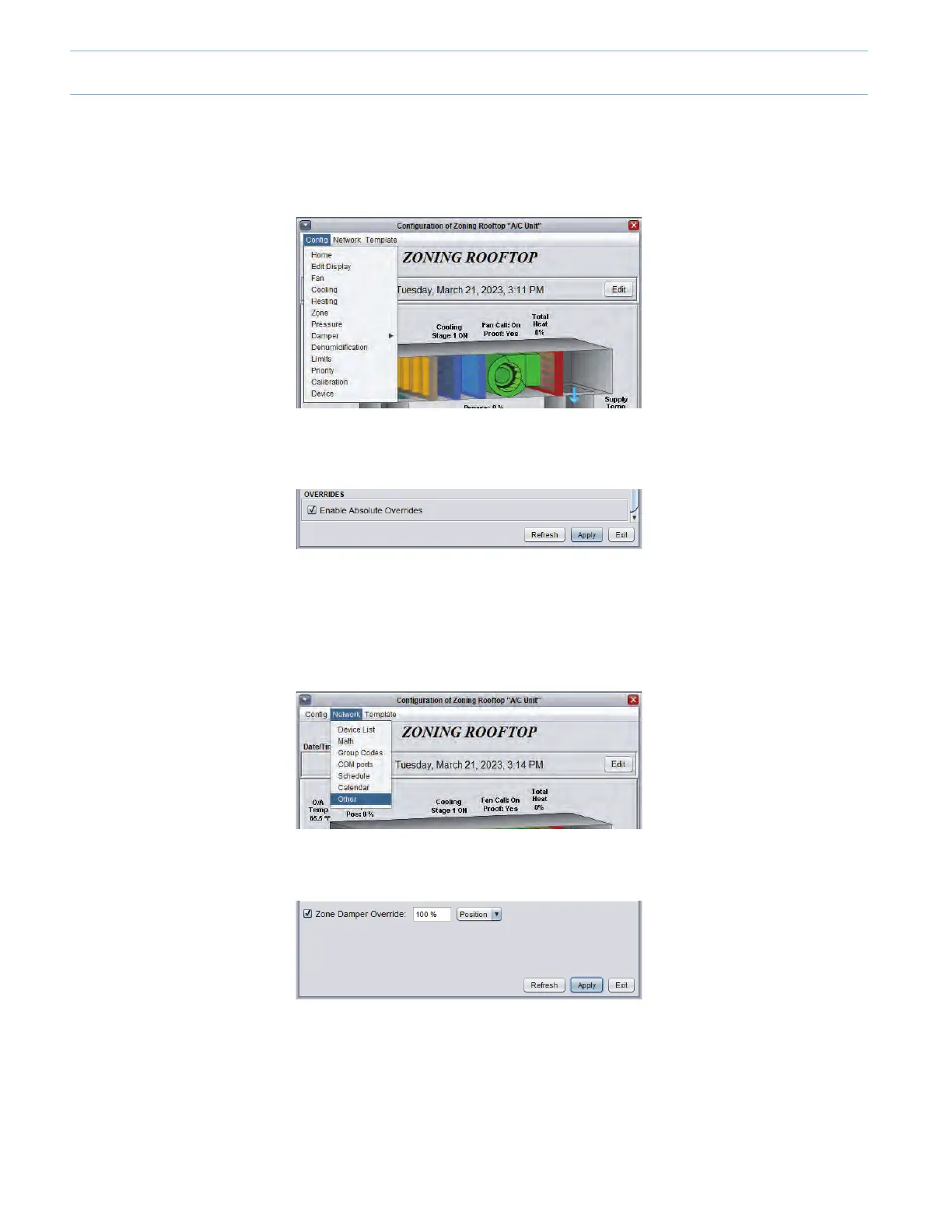
• Back to the RTU unit controller, double-click the icon and select the “Cong” menu on the top left corner. Then select “Edit
display” from the menu.
• At the bottom of this page check the “Enable Absolute Overrides” and click “OK”toconrmyouracceptance.
• Then click “Apply”.
Testing the System
Adjusting the bypass damper
• Click on the “Home” button in the upper right to return to the unit controller’s home page, click on “Network” then “Other”
at the bottom of the list.
• Check the “Zone Damper Override”, enter 100% and click “Apply”.
• Waitforallthezonedamperstodisplay100%openonthescreen.Ifthishasnotbeencheckedbefore,physicallyconrm
that the dampers are open. If necessary, inverse the zone(s) damper’s opening direction (see instructions below).
• Return to the home page and make sure the bypass damper is fully closed (0%). Validate physically.
• Readthestaticpressurevalueonthehomescreenandthenadjustthesetpointbyincreasingitby20%ofthereading.To
do so, click on “Cong” then “Pressure”toaccessthepressuremanagementmenuforthebypassdamper.Adjusttheset
pointaccordingtoyourcalculationsandadjustthedierentialto20%ofthesetpointvalue.
8-4



 To Next Page