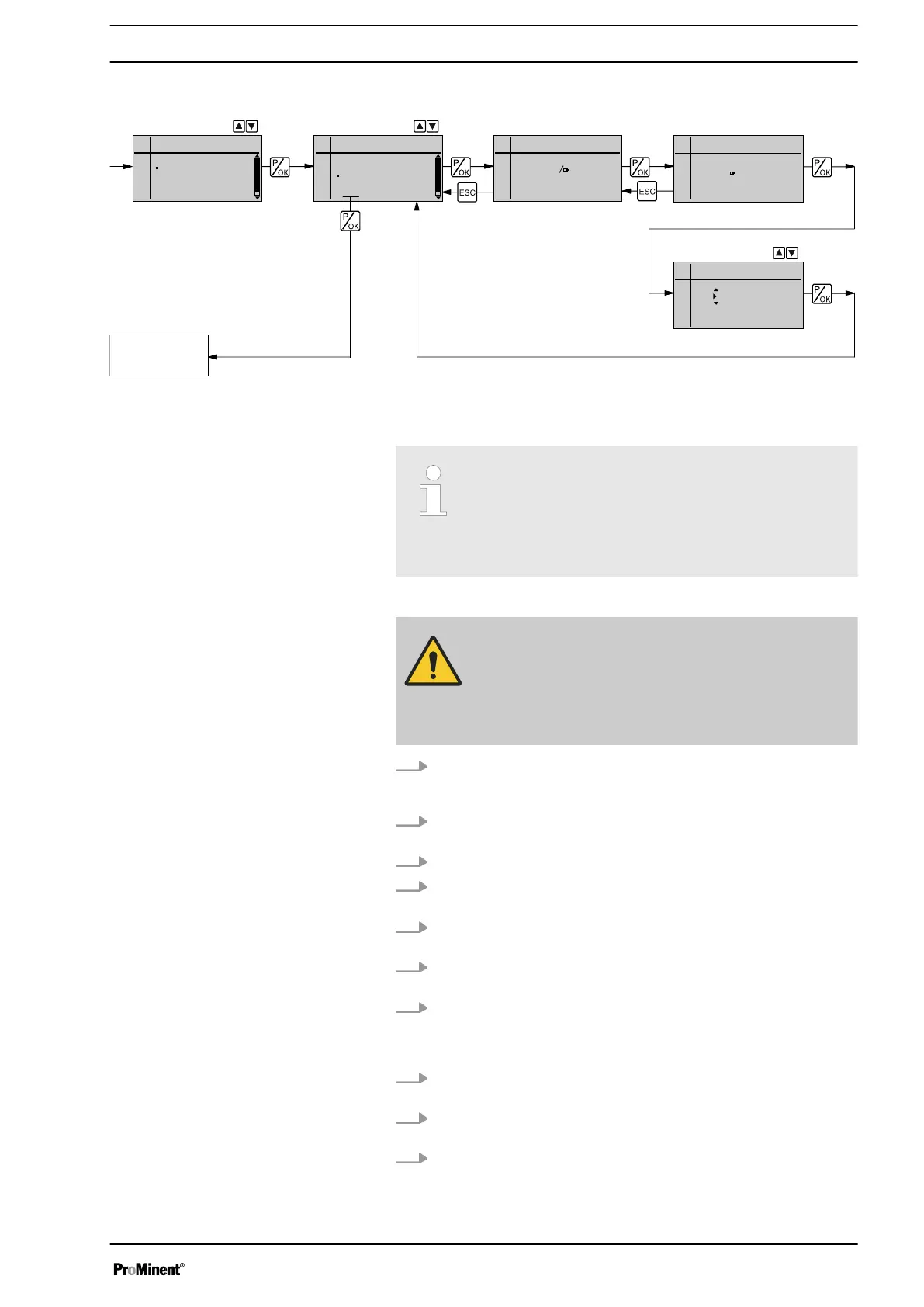
8.6.2 Settings for the “Calibration” function (CALIBRATION menu)
Continuous
display
Calibrate
Calibr. running
Main menu
Mode
Settings
Service
Information
Language
Settings
Batch
Auxiliary freq.
Calibrate
Dosing
End
Calibrate
Start with OK
32.90 mL
Stop with OK
0107
Calibr. quant.
0 0 0 3. 0 8 L
The pump can also be operated in the calibrated state. In this case, the
corresponding continuous displays then indicate the metering volume or
the capacity directly.
Accuracy of the calibration
Calibration will not be accurate if these conditions are
not adhered to:
–
Operate with at least 30% stroke length.
–
The pump should operate at maximum frequency.
WARNING!
If the feed chemical is dangerous, take appropriate
safety precautions when performing the following cali‐
bration instructions.
Observe the safety data sheet for the feed chemical!
1. Lead the suction hose into a measuring cylinder containing the feed
chemical – make sure that the discharge hose is installed in a per‐
manent manner (operating pressure, ...!).
2. Prime using the feed chemical (simultaneously press the two
[arrow keys]
), should the suction hose be empty.
3. Record the level in the measuring cylinder.
4.
To set the volume unit, follow the menu path
„Settings
è
System
è
Units“
.
5. Using the
[arrow keys]
, select the correct units and confirm by
pressing the
[P/OK]
key.
6. Select the
„CALIBRATE“
menu and then use the
[P/OK]
key to
change to the first menu option.
7. To start the calibration, press the
[P/OK]
key. The next menu option,
„Calib. running“
appears, the pump starts to pump and indicates the
stroke rate (the pump works at the stroke rate, which is set under
„MANUAL“
).
8. After a reasonable number of strokes (e.g. 200), stop the pump by
pressing the
[P/OK]
key.
9. Determine the required metering volume (difference between initial
volume - remaining volume).
10. Enter this volume in the menu option which appears and then press
the key
[P/OK]
- the pump changes to the main menu.
Calibration
Setting
53






 To Next Page