93-346-80 Issue 4 © Copyright Protec Fire Detection PLC 2011
2.1.2 Control Panel Setup
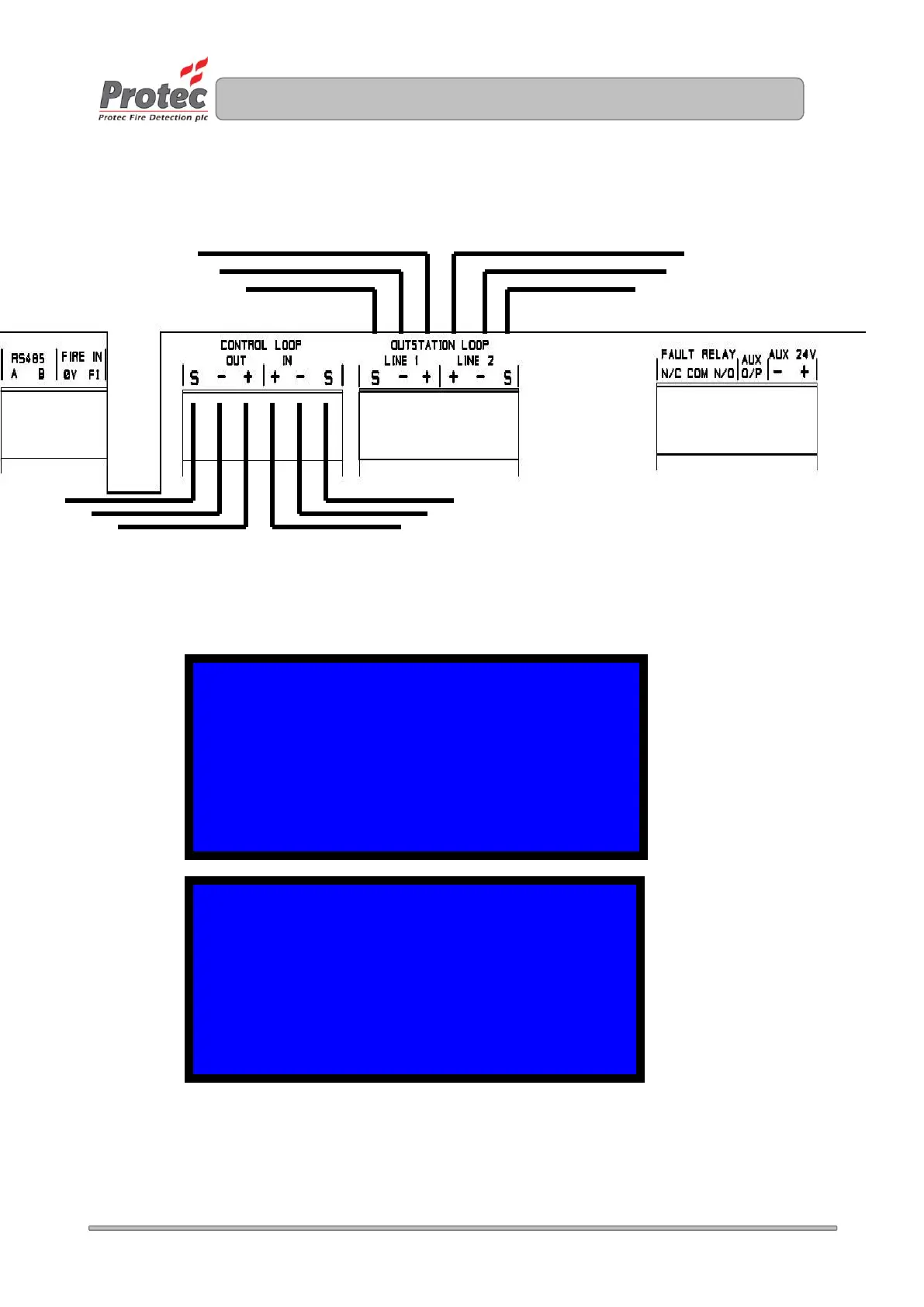
Connect the outstation loop in the panel.
Connect the control loop, if required
Connect the power to the power supply unit and power up.
Enter high security (654753)
From the Main menu Select Option 5
Select Option 1 - Log the outstation loop and ensure all outstations are present at the correct address
and the LCD displays either L3 (for a new device) or R3 (for a re-logged device). L1/2 or R1/2 means
the outstation can only be seen from one side of the loop.
PANEL 01 MAIN MENU V0.97
0 EXIT MENU 5 ADVANCED OPTIONS
1 SET TIME 6 HARDWARE INPUTS
2 SET DATE 7 VIEW MEMORY
3 OPTION DISABLED 8 REBUILD
4 TEST OPTIONS
ADVANCED OPTIONS
0 RETURN TO PREVIOUS MENU
1 LOG DEVICES
2 LOG PDPS
3 LOG PANELS
4 UPLOAD LOG
5 LOOP BALANCING
Control Loop – Only Used on
Networked Systems. Otherwise no
cables connected


 To Next Page