PureWave PEMI User Manual | 06-23 V1.0 Page 12 from 28
PureWave PEMI User Manual
3.1.4 Setting the time and date
The PureWave PEMI displays a military clock on the left corner of LCD Screen (battery backed RTC). To set the
time, the device’s user interface offers you convenient menu guidance.
Turn off the device to begin setting Time and Date.
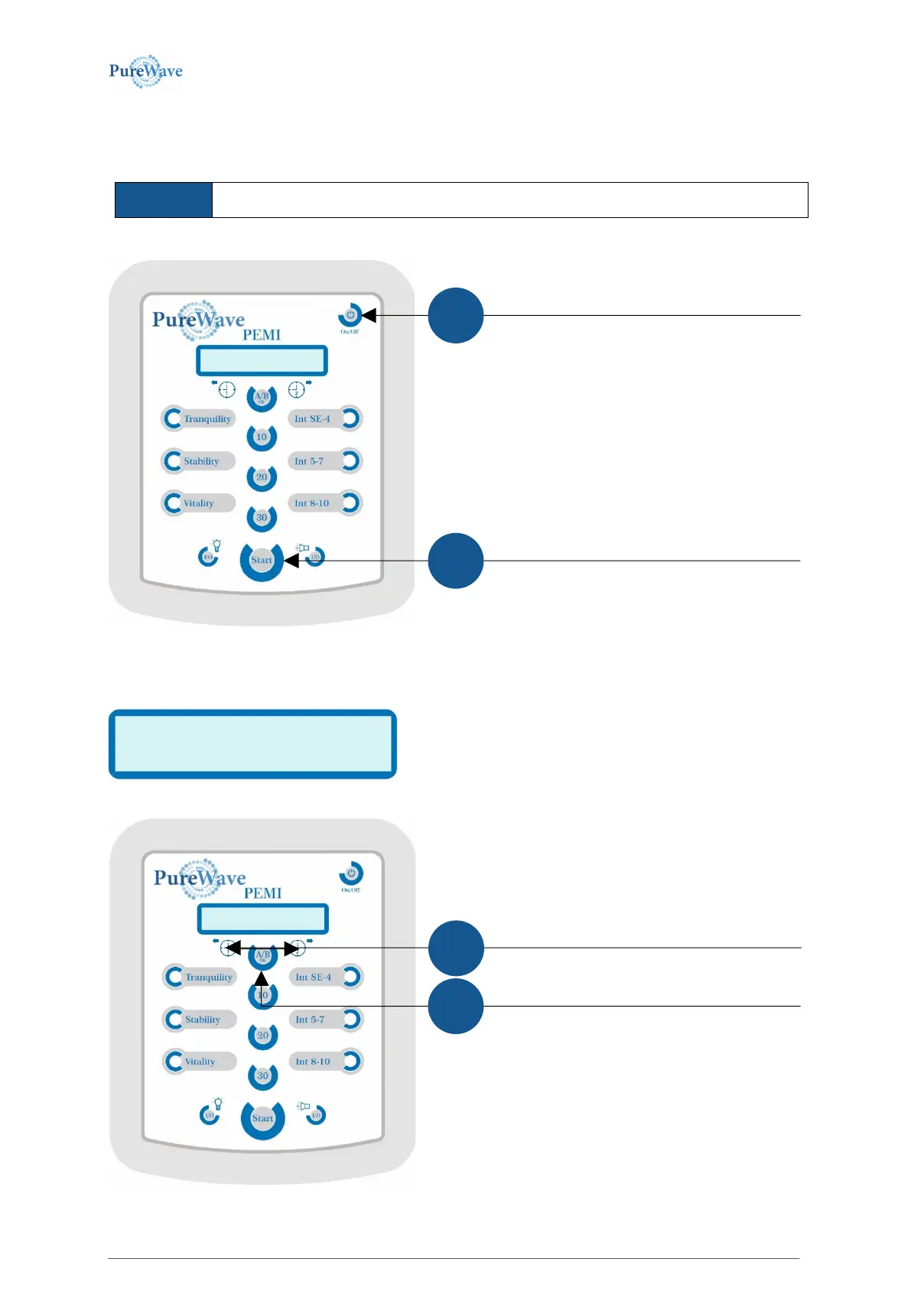
You may reach the corresponding; “SET TIME/DATE” by Shutting off the Unit via the ON/OFF-button shown.
1. And the
You are now in the menu to set the time and see the display (exemplary time)
The blinking cursor is positioned on the time’s first digit, “1“, as
shown above. You may now change the time by increasing the
digit by clicking the right arrow-button, or to lessen the digit,
click the left arrow-button.
While holding down the 30-minute button, press and
release the on/off button, but continue to hold the 30
button for a count of two seconds.
Increasing the time by pressing the right
arrow-button, or lessen the time via the left
The A/B-OK-button confirms the current
value and goes to the next position.


 To Next Page