Expansion
Unit Model
Description Required Accessories Maximum
Expansion Units
Supported
EJ1600 v2 • Uses a SAS 12 Gbps interface
• Supports SAS HDD/SSD
• SAS-12G2E storage
expansion card
• Mini-SAS SFF-8644
cable
• RAIL-E03 rail kit
7
Connecting SAS Expansion Units
The ES2486dc supports a maximum of seven SAS expansion units. To connect SAS expansion units, a
storage expansion card must be installed in the NAS.
1. Install a storage expansion card on the PCIe slot.
For details, see Installing Expansion Cards.
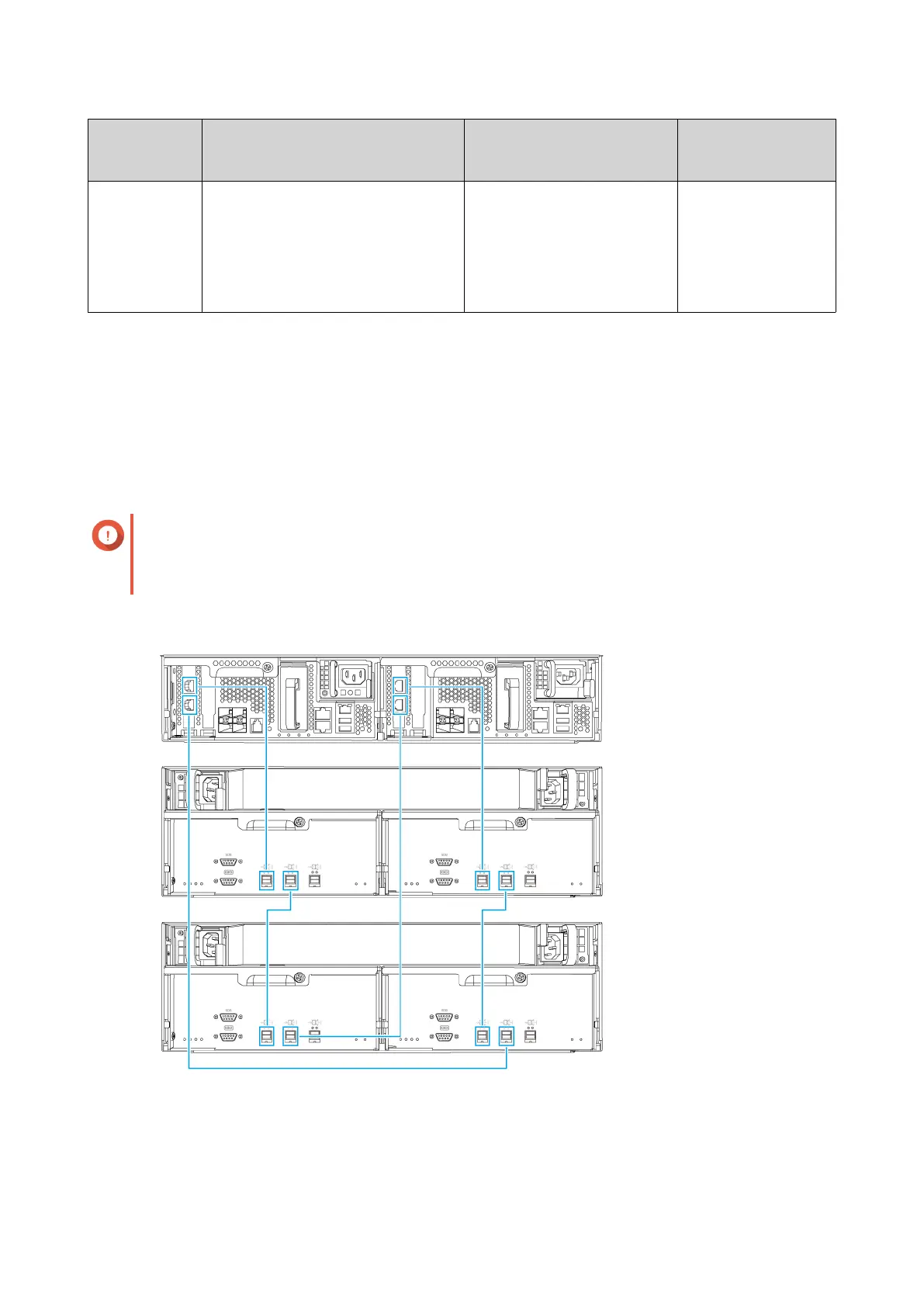
2. Connect the expansion units to the NAS using one of the following topologies.
Important
QNAP recommends always using dual-path configuration to prevent storage downtime due to
expansion unit failure or cable disconnection. Single-path configuration should be used only in a
situation where it is not possible to use dual-path configuration.
Dual-path configuration
ES2486dc User Guide
Installation and Configuration 38


 To Next Page