EasyManua.ls Logo

QOLSYS Panel 2+ - IMAGE SENSOR CONNECTIVITY TEST

QOLSYS Panel 2+
173 pages
Print Icon
To Next Page IconTo Next Page
To Previous Page IconTo Previous Page
Loading...
SYSTEM TESTS
Image Sensor Config
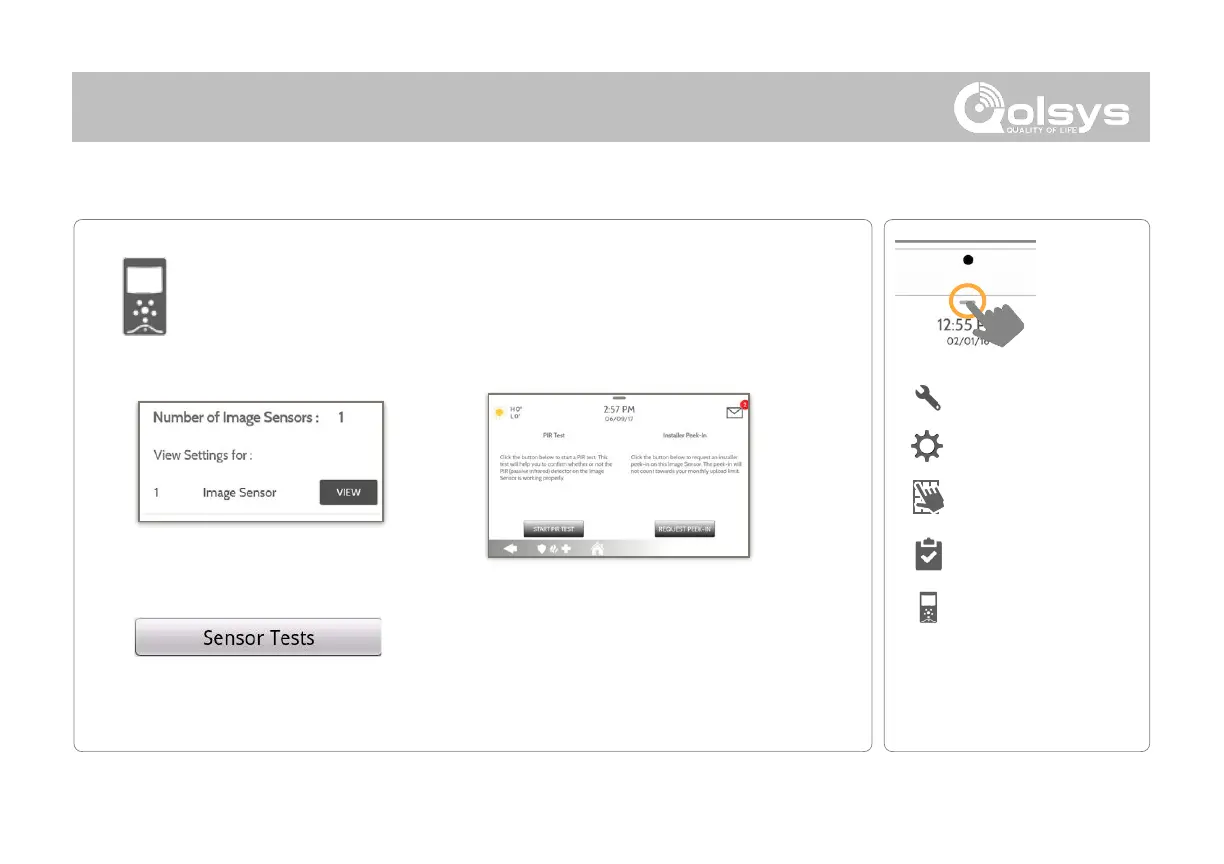
Test an image sensors connectivity with the panel to ensure they are
communicating properly and are able to take photos.
Select the desired Image Sensor by
touching “View” next to it’s name
Touch “Sensor Tests
Choose an Image Sensor to Test:
Select the test you want to run:
PIR Test checks the motion sensor
Installer Peek In tests the camera (Results
appear through the Alarm.com app)
QOLSYS CONFIDENTIAL AND PROPRIETARY
PAGE OF 119 173
IMAGE SENSOR CONFIG (For North American Market Only - Not functional for CE/EN Grade 2)
FIND IT
IMAGE SENSOR CONFIG
SYSTEM TESTS
Swipe down
for access
SETTINGS
ADVANCED SETTINGS
ENTER CODE (1111, 2222)

Related product manuals