980 User Guide Rev. B29
Page 117 August 5, 2011
6.4 Setting the RX HDCP mode
The 980 enables you to enable and disable HDCP on the Rx sink emulation port. This enables you to test how your
source device under test responds to a sink that does not support HDCP. You can also configure certain HDCP
configuration registers such as the BSTATUS and BCAPS. Use the following procedures to set the HDCP mode
and registers.
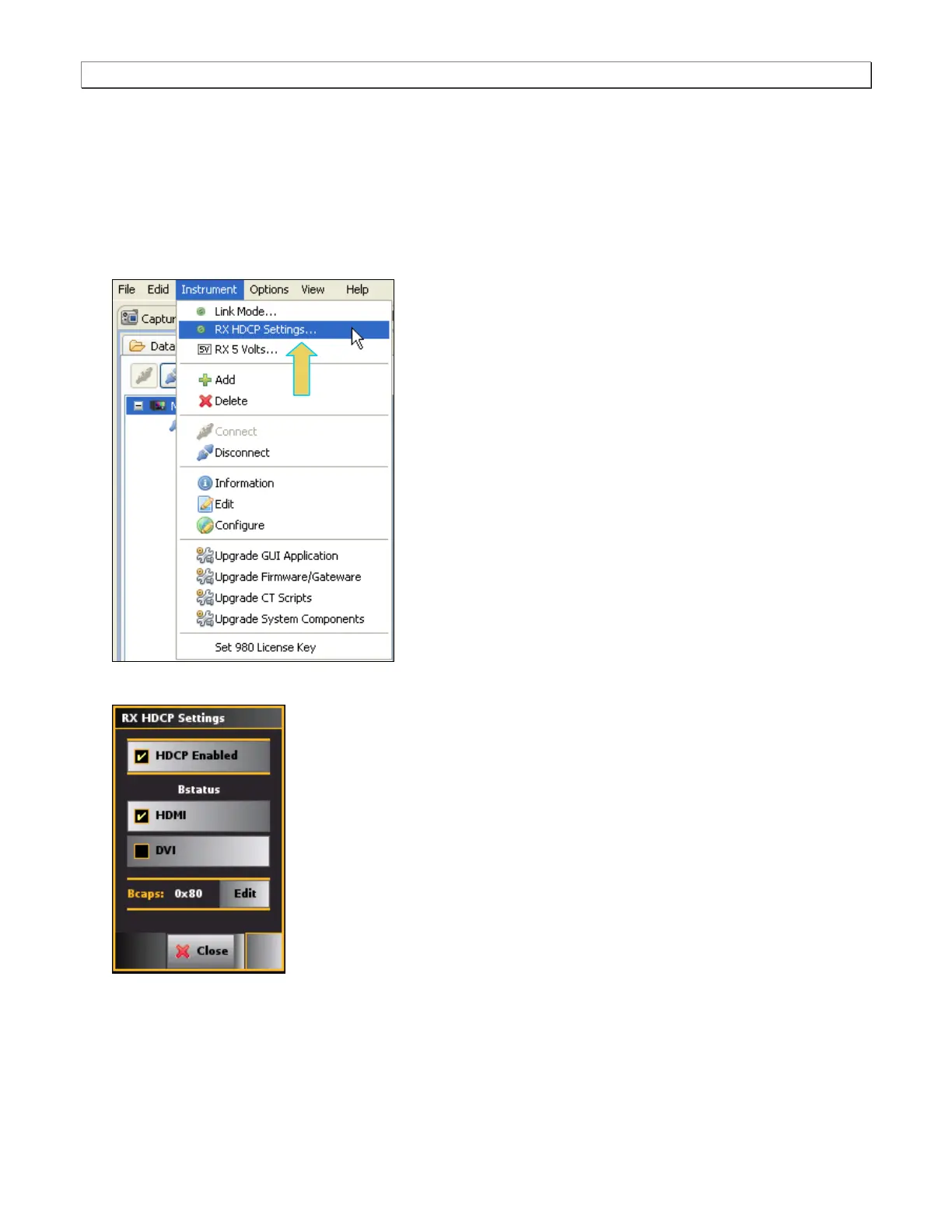
1. Select the Rx HDCP Settings… item from the Instrument pull-down menu on the built-in front panel as shown
below.
The RX HDCP Settings dialog box appears as shown below.
2. Select the RX HDCP Settings using the check boxes.
HDCP Enabled – In the Enabled mode, the 980 sink emulator will respond to HDCP authentication from a
source device under test. When disabled the 980 sink emulator will not respond to an HDCP
authentication request.



 To Next Page